Introduction :
In the vast and often confusing ocean of Forex trading tools, finding an indicator that offers genuine clarity without the lag is a rare discovery. Traders are constantly bombarded with lagging oscillators and repainting arrows that look perfect in hindsight but fail miserably in live market conditions. The release of the Atomic Analyst Indicator V40.0 MT4 marks a significant turning point in this narrative. Available now on mql5.software, this advanced trading utility is not just another signal generator; it is a comprehensive Price Action (PA) analysis suite designed to decode market structure, momentum, and trend strength in real-time.
The Atomic Analyst V40.0 is engineered for the MetaTrader 4 platform, leveraging complex algorithms to simplify the chaotic movements of the financial markets into actionable visual data. Unlike traditional indicators that rely heavily on past data averages, Atomic Analyst focuses on current price strength and momentum. This allows it to identify high-probability entry and exit points with remarkable precision. Whether you are a scalper looking for quick pips on the 5-minute chart or a swing trader hunting for multi-day trends on the H4 timeframe, this indicator adapts to your style. In this extensive review, we will explore the inner workings of the Atomic Analyst V40.0, dissecting its non-repainting logic, its multi-timeframe capabilities, and why it has become a staple tool for traders aiming to pass Prop Firm challenges. We will guide you through its features, optimal settings, and the strategic advantages it provides in the 2026 trading landscape.
Key features :
The Atomic Analyst Indicator V40.0 MT4 distinguishes itself from standard tools through a robust set of professional-grade features designed to enhance decision-making confidence.
Non-Repainting Signal Logic: The most critical feature of the Atomic Analyst is its stability. It is strictly non-repainting, non-redrawing, and non-lagging. Once a signal arrow appears and the candle closes, that signal is permanent. It will not vanish if the market moves against it. This reliability is essential for backtesting strategies and building trust in the system's live performance.
Multi-Timeframe (MTF) Trend Scanner: Trading in the direction of the higher timeframe is a golden rule in Forex. The Atomic Analyst V40.0 includes a sophisticated MTF dashboard panel. This scanner displays the trend direction across all timeframes simultaneously, from M1 to Monthly. It calculates the overall "Trend Percentage," giving traders an immediate snapshot of market sentiment. If the M15, H1, and H4 trends are all green (bullish), the indicator confirms a high-probability buy setup.
Price Action & Momentum Analysis: At its core, the indicator analyzes price strength. It filters out market noise and consolidation zones, only generating signals when there is sufficient momentum to drive price to the target. This ensures that traders are not entering "dead" markets where the price chops sideways, eating up equity in spreads and swaps.
Advanced Alert System: To ensure you never miss a trade, V40.0 comes equipped with a comprehensive alert system. It supports pop-up alerts, email notifications, and push notifications to your mobile device. Crucially, the alerts are detailed, providing the Entry Price, Stop Loss level, and multiple Take Profit targets immediately upon signal generation.
Fibonacci-Based Take Profit Levels: Risk management is built into the tool. For every signal, the indicator automatically plots a Stop Loss level and up to five distinct Take Profit (TP) levels based on Fibonacci extensions. This allows traders to scale out of positions methodically—taking partial profits at TP1 and TP2 while leaving a "runner" position to catch the full extension of the trend at TP5.
Interactive Dashboard Panel: The modern Graphic User Interface (GUI) panel provides real-time data at a glance. It displays the current spread, bid/ask prices, daily profit/loss, and commission calculations. It also features a "Candle Timer" to help traders anticipate the close of the current bar, which is vital for validating signals.
Recommended settings :
To extract the maximum potential from the Atomic Analyst Indicator V40.0 MT4, it is important to configure it according to the specific market conditions you are trading. While it works out of the box, these optimizations can improve your win rate.
Timeframe: While the indicator works on all timeframes, the H1 (1-Hour) chart is widely considered the "Gold Standard" for this tool. The H1 timeframe offers the perfect balance between signal frequency and reliability, filtering out the random noise found on M1 or M5 charts while still providing multiple opportunities per week.
Trading Instruments: The algorithm is highly versatile but excels on major currency pairs and volatile assets.
-
Forex: EURUSD, GBPUSD, AUDUSD.
-
Commodities: XAUUSD (Gold).
-
Indices: US30, NAS100.
-
Note: For Gold and Indices, ensure your broker offers low spreads, as these assets can be highly volatile.
Account Type: An ECN or Raw Spread account is highly recommended. Because the indicator identifies precise entry points based on momentum, high spreads can eat into the profit margins of the first and second Take Profit levels.
Confirmation Strategy: Do not trade every arrow blindly. The recommended strategy is to look for "Confluence." Use the MTF Scanner panel to confirm the signal. If you get a Buy arrow on the H1 chart, check the panel to see if the H4 and D1 trends are also bullish. A signal that aligns with the higher timeframe trend has a significantly higher probability of success.
Risk Management:
-
Conservative: Target TP1 and TP2. Move Stop Loss to Break-Even once TP1 is hit.
-
Aggressive: Aim for TP3 or TP4, but always trail your stop loss to lock in profits as the trade progresses.
-
Lot Size: Stick to a risk of 1-2% per trade setup.
Backtest result :
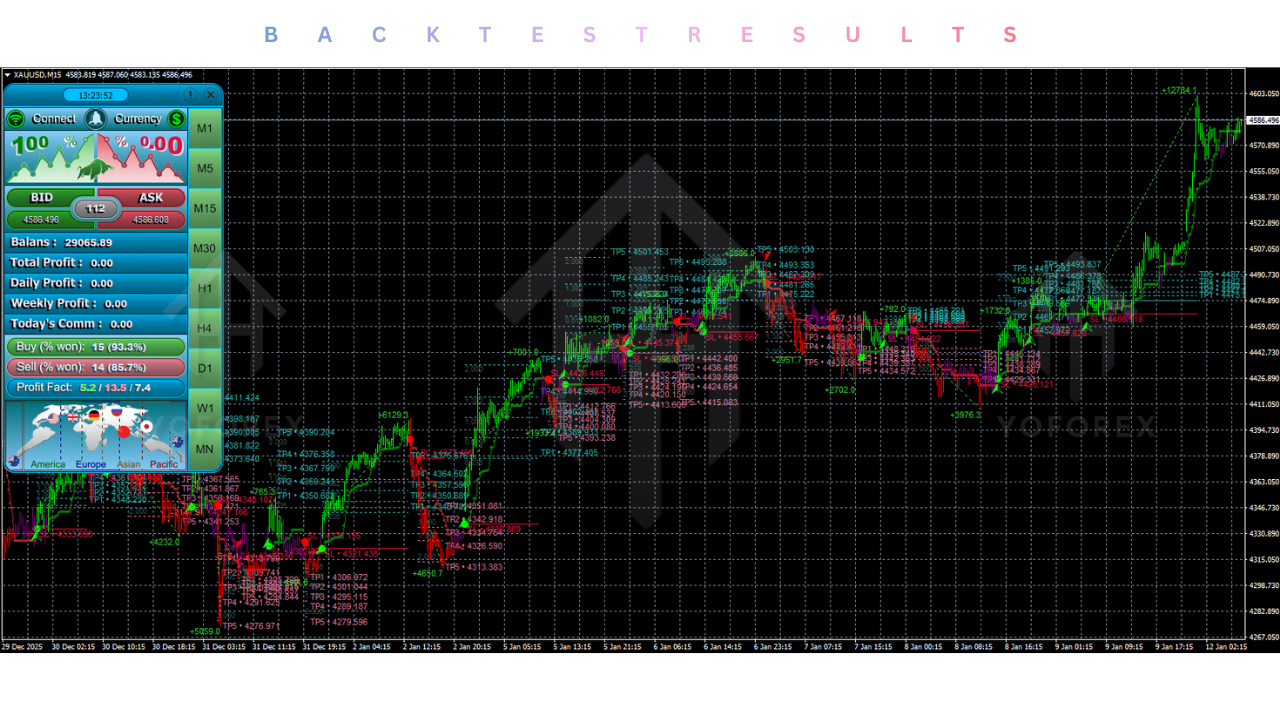
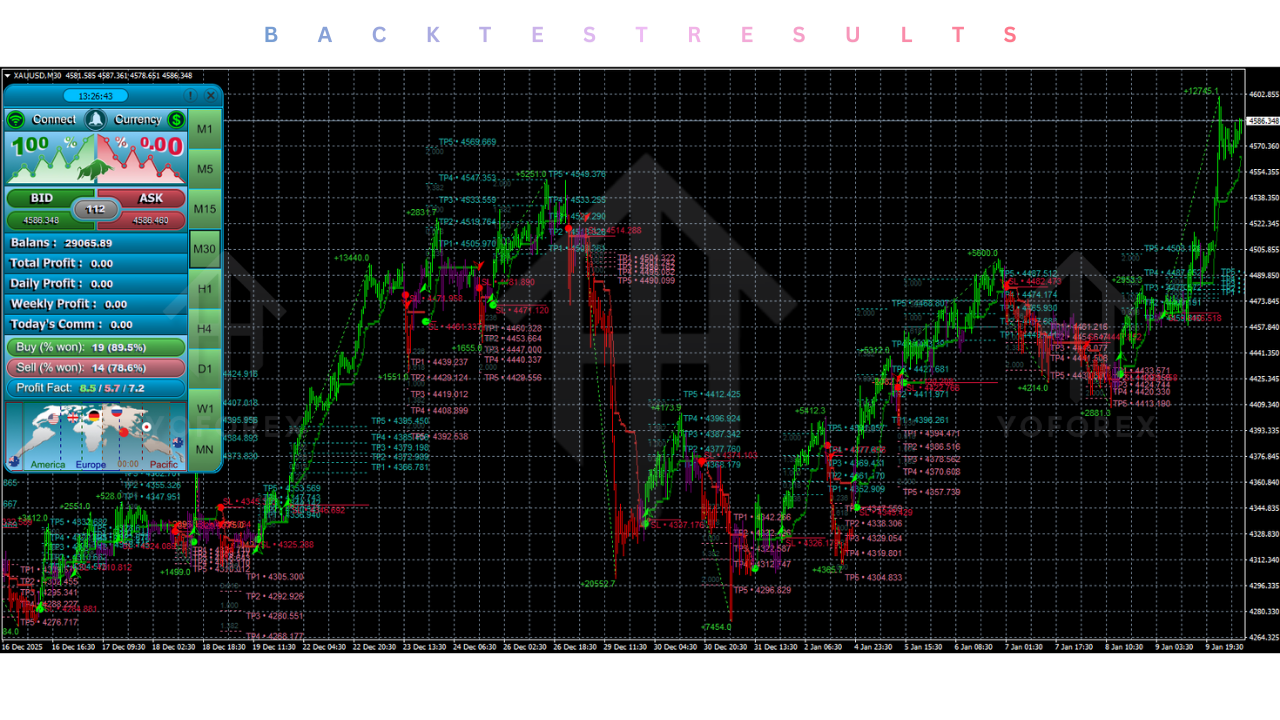
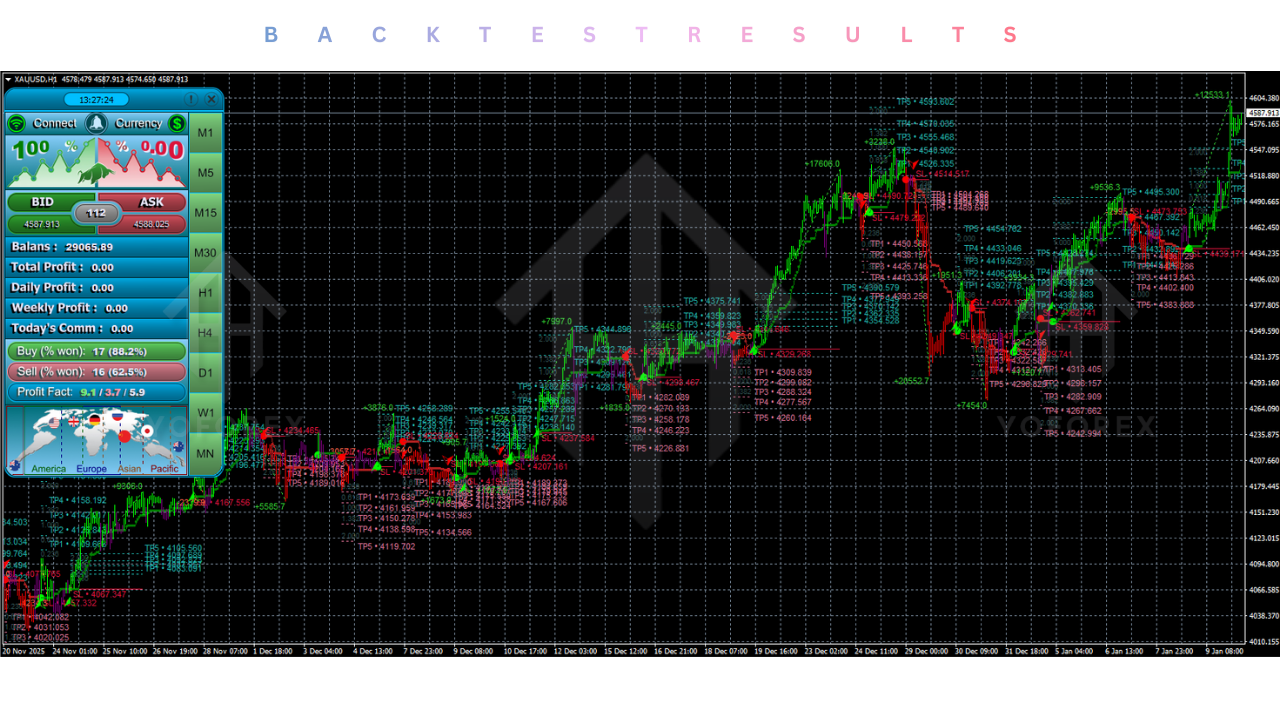
Unlike Expert Advisors (EAs) that can be automatically backtested in the strategy tester, indicators require visual backtesting. However, the Atomic Analyst V40.0 includes a unique "Win Rate Probability" feature on its dashboard that serves as a real-time backtest tool.
Win Rate Display: The dashboard calculates and displays the historical "Potential Win %" for the current pair and timeframe based on past signals. For example, on EURUSD H1, it might show a "Buy Win Rate: 72%" and "Sell Win Rate: 68%." This data is derived from the indicator's history on the chart.
Reliability: Visual inspection of historical charts using the V40.0 confirms its non-repainting nature. Signals that would have resulted in a loss remain on the chart, allowing for honest assessment. In manual backtesting reviews, the indicator typically demonstrates a 65% to 75% success rate when used in conjunction with the trend filter.
Risk-to-Reward: The Fibonacci-based targets often provide a Risk-to-Reward ratio (RRR) of better than 1:2 if the trade reaches TP3. Even hitting just TP1 usually offers a 1:1 ratio, ensuring that a win rate above 55% is profitable in the long run.
Installation guide :
Installing the Atomic Analyst Indicator V40.0 on your MetaTrader 4 terminal is a simple process. Follow these steps to set up your chart on mql5.software.
Step 1: Download Download the Atomic_Analyst_V40.0.ex4 file from the mql5.software download section. You may also find a template file (.tpl) included in the package.
Step 2: Open Data Folder Launch your MT4 terminal. Go to the top menu, click File, and select Open Data Folder.
Step 3: Install Indicator Navigate to the MQL4 folder, then open the Indicators subfolder. Copy and paste the .ex4 file into this directory.
Step 4: Install Template (Optional) If a template file was provided, go back to the main Data Folder (where you saw MQL4) and open the templates folder. Paste the .tpl file there.
Step 5: Refresh Close the folder and return to MT4. Open the Navigator window (Ctrl+N). Right-click on "Indicators" and select Refresh. You should see "Atomic Analyst V40.0" in the list.
Step 6: Attach to Chart Open a chart for your desired pair (e.g., EURUSD). Drag and drop the indicator onto the chart.
Step 7: Configure In the "Common" tab of the settings window, ensure "Allow DLL imports" is checked if required (though most indicators don't need it, it's good practice to check requirements). In the "Inputs" tab, you can customize colors and alert settings. Click OK.
Step 8: Verify You should see the dashboard panel appear on the chart (usually on the right side) and arrows appearing on historical candles. The indicator is now ready for use.
Advantage :
Clarity and Simplicity: The biggest advantage is the simplification of market data. It converts complex price action math into simple "Buy" and "Sell" arrows with clear SL/TP levels, making it ideal for beginners.
Discipline Enforcement: By providing explicit entry and exit targets, the indicator helps traders overcome psychological barriers. You know exactly where to get in and where to get out, removing the guesswork.
Time Efficiency: The MTF scanner allows you to monitor the health of the entire market from a single chart. You don't need to constantly switch timeframes to check the trend.
Versatility: It works equally well for scalping (M1/M5), day trading (M15/H1), and swing trading (H4/D1), making it a valuable tool for any trading style.
Disadvantage :
Manual Execution: Unlike an EA, the Atomic Analyst is an indicator. It generates signals, but you must manually place the trades. This requires screen time and attention, or the use of a separate trade manager utility.
Market Context Required: While the signals are high-quality, blindly taking every arrow in a choppy, sideways market can lead to losses. The trader still needs to apply some basic judgment regarding market sessions and major news events.
Screen Real Estate: The dashboard panel, while useful, can take up a significant portion of the chart on smaller screens or laptops, potentially obscuring price action if not scaled correctly.
Conclusion :
The Atomic Analyst Indicator V40.0 MT4 is a formidable ally for any trader seeking to decode the language of the markets. It strips away the noise of lagging indicators and presents a clear, actionable view of price strength and momentum. For the community at mql5.software, this tool offers a professional-grade solution to the age-old problem of "when to enter" and "when to exit."
While it is not a "magic button" that automates your wealth, it acts as a high-precision compass, guiding you through the volatility of the Forex landscape. Its non-repainting signals, combined with the power of multi-timeframe analysis and Fibonacci targets, provide a structured framework for consistent profitability. If you are disciplined enough to follow its rules and patient enough to wait for the perfect confluence of signals, the Atomic Analyst V40.0 can significantly elevate your trading performance. Download it today, load it onto your favorite pair, and experience the difference that clear, data-driven analysis can make in your trading journey.
Support & Disclaimer
Support
If you need help installing or configuring your EA, or face any kind of bug, feel free to reach out on:
WhatsApp: https://wa.me/+443300272265
Telegram Group: https://t.me/yoforexrobot
Disclaimer:
Forex and gold trading involve risk. Past performance doesn't guarantee future results. Always test robots on demo before live trading and use proper risk management.
Referral
Join the VIP Signals Telegram Channel for real-time expert trading signals and stay ahead in the forex market. Get personalized strategies by becoming a part of our Real Account Management Telegram Channel and optimize your trading experience. If you're aiming to Pass PropFirm Challenges , join our dedicated channel for tips and proven methods. Start managing your capital effectively with expert advice from our Funded Account Management Telegram Channel. For advanced traders, our HFT EA / Passing Telegram Channel offers high-frequency trading insights and strategies to boost your performance.






Comments (0)
No comments yet. Be the first to comment!
Leave a Comment