In the ever-evolving world of Forex trading, automated trading systems or Expert Advisors (EAs) have become increasingly popular. These trading bots can make decisions in real-time, execute trades, and manage risk without human intervention. Among the vast array of trading bots available, one that has gained attention is EvoTrade EA V1.7 MT4. This EA is marketed as a self-learning, AI-powered trading system designed to provide automated trading solutions on the MetaTrader 4 (MT4) platform.
But how effective is EvoTrade EA in real trading conditions? Is it truly as innovative as it claims to be, or is it just another overhyped tool? In this review, we’ll take a deep dive into the features, functionality, and real-world performance of EvoTrade EA V1.7 MT4 to help you make an informed decision.
What is EvoTrade EA V1.7 MT4?
EvoTrade EA V1.7 is an Expert Advisor (EA) designed to automate Forex trading on the MT4 platform. Its core selling point is its claim to use advanced AI algorithms, including machine learning and neural networks, to make trading decisions. The EA is designed to adapt to changing market conditions, optimizing trade parameters such as Stop Loss (SL), Take Profit (TP), and lot sizes based on market behavior.
Key Features of EvoTrade EA V1.7 MT4:
- Self-Learning Algorithm: EvoTrade EA uses machine learning to optimize trading strategies based on real-time data, adjusting parameters like SL, TP, and entry points.
- Deep Market Analysis: The EA claims to utilize NLP (Natural Language Processing) and Reinforcement Learning to analyze market sentiment and adjust its trades accordingly.
- Advanced Risk Management: It incorporates dynamic risk management tools to limit exposure and protect the account from significant drawdowns.
- Automatic Trade Execution: Once activated, the EA automatically opens, modifies, and closes trades based on pre-configured settings.
- Multi-Pair Support: EvoTrade EA is capable of trading multiple currency pairs, including major and minor pairs, to diversify risk.
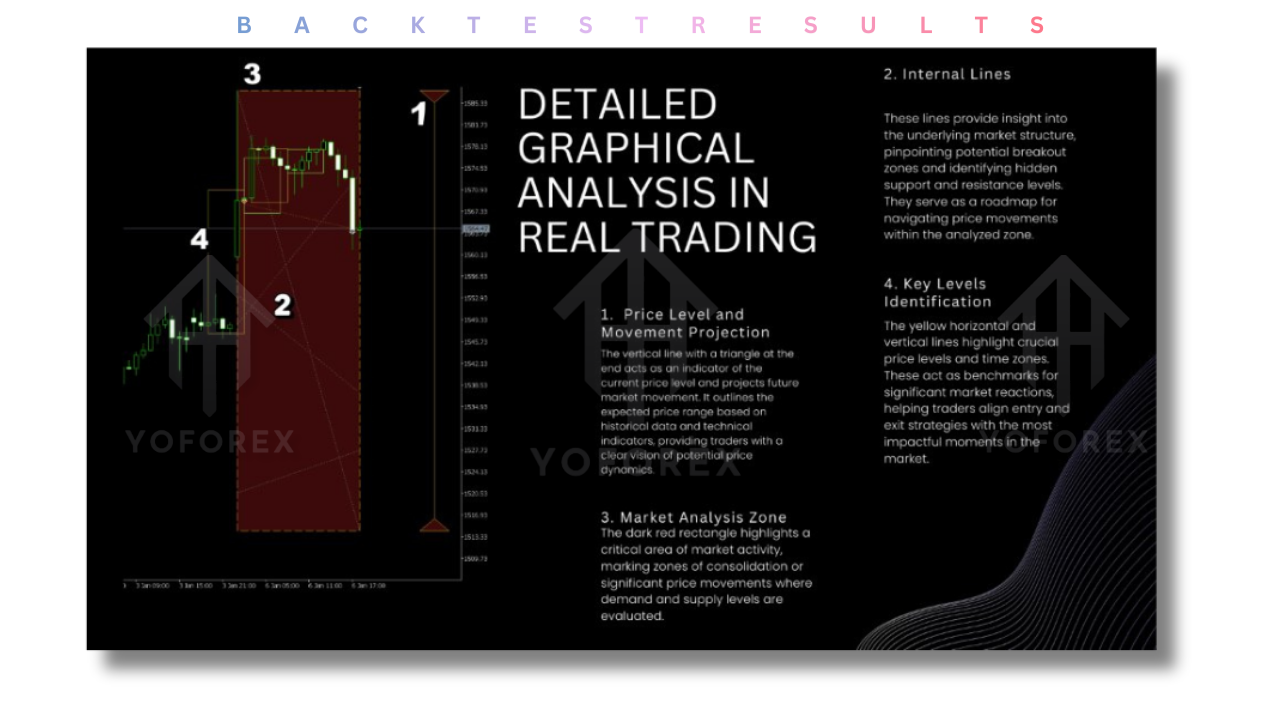
How Does EvoTrade EA V1.7 Work?
The EvoTrade EA V1.7 operates using a set of algorithms designed to analyze market data, identify trends, and execute trades with minimal human intervention. Here’s a breakdown of its working mechanism:
- Data Analysis:
The EA continuously monitors the Forex market for price movements, patterns, and news events. Using its advanced machine learning models, it processes large volumes of historical data and real-time market updates. - Trade Execution:
Based on the market analysis, EvoTrade EA executes buy or sell orders depending on the identified trend. The EA utilizes a blend of technical analysis indicators, such as Moving Averages (MA) and Relative Strength Index (RSI), to determine entry and exit points. - Risk Management:
EvoTrade EA uses a flexible risk management system that adjusts Stop Loss and Take Profit levels based on market volatility. This allows it to preserve capital during uncertain market conditions while maximizing profitability during trending markets.
Why Choose EvoTrade EA V1.7 MT4?
If you're new to automated trading or looking for a reliable trading robot to help you manage your trades, EvoTrade EA V1.7 might be worth considering. Here are some reasons why traders may opt for this EA:
1. Self-Learning Capabilities
Unlike traditional EAs that follow static rules, EvoTrade EA adapts to changing market conditions. Its self-learning mechanism means that it can improve over time, adjusting to new patterns and evolving market dynamics. This feature can give it an edge over other EAs that don’t adjust to shifts in market behavior.
2. Advanced Risk Management
EvoTrade EA comes with an in-built risk management system that dynamically adjusts its lot size, SL, and TP based on real-time analysis of market conditions. This helps minimize potential losses while maximizing profits, making it suitable for both novice and experienced traders.
3. User-Friendly Interface
For traders using MetaTrader 4 (MT4), EvoTrade EA offers a familiar interface. The EA can be easily installed, and traders can configure their settings without requiring deep programming knowledge. It’s a plug-and-play solution that allows you to start trading right away.
4. Multi-Pair Trading
EvoTrade EA is capable of trading multiple currency pairs, offering greater flexibility in diversifying your trades. It can take advantage of different market conditions across various pairs, reducing overall risk and increasing the chances of success.
5. Backtest and Optimization
EvoTrade EA allows you to backtest its strategy using historical data. This feature is essential for traders who want to evaluate the effectiveness of the EA before going live. By running simulations, you can fine-tune the EA’s settings to match your risk tolerance and trading goals.
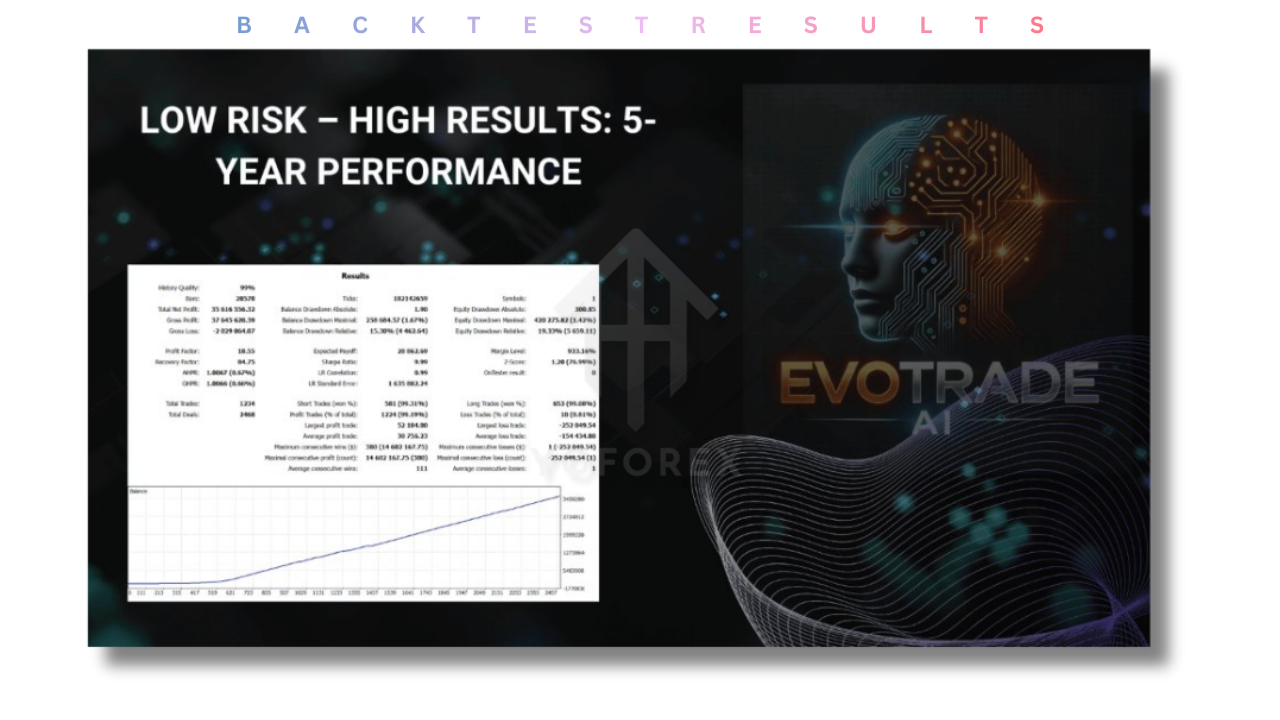
Performance of EvoTrade EA V1.7 MT4: A Closer Look
While EvoTrade EA promises a lot, the real question is how well it performs in live market conditions. Here’s what you should know:
1. Mixed Results from Users
Traders have had mixed experiences with EvoTrade EA. Some report seeing steady profits over time, especially when used with a proper risk management strategy. However, others have noted inconsistent performance, particularly during periods of high market volatility. As with any automated trading system, results vary, and past performance is not always indicative of future results.
2. Real-World Performance and Drawdowns
A critical aspect of EvoTrade EA’s performance is its ability to minimize drawdowns. While it is marketed as a self-learning system, some traders have observed significant drawdowns, especially when the market conditions shift unexpectedly. It’s important to closely monitor the EA, especially during high-impact news events or market shifts.
3. Risk of Over-Optimization
Like many EAs, EvoTrade EA runs the risk of over-optimization during backtesting. This means that the system may perform exceptionally well in backtests but fail to deliver similar results in live trading due to slippage, spreads, and latency.
Setting Up EvoTrade EA V1.7 MT4: A Step-by-Step Guide
Getting started with EvoTrade EA is straightforward. Here’s a simple setup guide:
Step 1: Download and Install EvoTrade EA
- Download the EvoTrade EA from a trusted source (such as the official MQL5 marketplace).
- Open your MetaTrader 4 platform and go to File > Open Data Folder.
- Place the downloaded
.ex4file in the Experts folder.
Step 2: Configure the EA Settings
- Once installed, open the Navigator window in MT4.
- Drag EvoTrade EA onto a chart of your choice.
- Configure the settings (SL, TP, lot size, etc.) according to your preferences.
Step 3: Start Trading
- After configuring, enable the AutoTrading feature on MT4.
- The EA will start executing trades based on the set parameters.
Advantages and Disadvantages of EvoTrade EA V1.7
Advantages:
- Self-learning algorithms improve over time.
- Advanced risk management features.
- Multi-currency pair support for diversified trading.
- Easy to install and configure with no programming knowledge required.
Disadvantages:
- Mixed performance in live trading environments.
- Over-optimization during backtesting could lead to unrealistic expectations.
- Performance can suffer during periods of high volatility or unexpected market shifts.
Conclusion: Is EvoTrade EA V1.7 MT4 Worth It?
EvoTrade EA V1.7 MT4 offers a sophisticated trading system powered by machine learning and advanced risk management features. While it shows great promise, it’s important to approach it with caution. The EA’s performance can vary, and there are risks of over-optimization and inconsistent results in live trading.
If you’re new to automated trading, EvoTrade EA could serve as an excellent tool for starting your trading journey. However, always backtest it, monitor its performance closely, and ensure that it fits with your overall trading strategy and risk management rules.
Support & Disclaimer
Support
If you need help installing or configuring your EA, or face any kind of bug, feel free to reach out on:
WhatsApp: Click here
Telegram Group: Join our community
Disclaimer: Forex and gold trading involve risk. Past performance doesn't guarantee future results. Always test robots on demo before live trading and use proper risk management.
Refferal
Join the VIP Signals Telegram Channel for real-time expert trading signals and stay ahead in the forex market. Get personalized strategies by becoming a part of our Real Account Management Telegram Channel and optimize your trading experience. If you're aiming to Pass PropFirm Challenges, join our dedicated channel for tips and proven methods. Start managing your capital effectively with expert advice from our Funded Account Management Telegram Channel. For advanced traders, our HFT EA / Passing Telegram Channel offers high-frequency trading insights and strategies to boost your performance.
Happy Trading






Comments (0)
No comments yet. Be the first to comment!
Leave a Comment