
Gem Forex BB EA V1.10 MT5 – Smart Bollinger Band Scalping for MT5 Traders
Introduction
Let’s be honest for a second… most Bollinger Band EAs out there either overtrade like crazy or look amazing only in screenshots. Real trading? That’s where things usually fall apart. If you’ve been burned by expensive robots or flashy “AI” tools that don’t survive real market noise, you’re not alone.
Gem Forex BB EA V1.10 MT5 was created for traders who actually understand market behavior and want something simple, controlled, and practical. No hype, no martingale madness, no grid explosions. Just a clean Bollinger Band–based strategy, automated properly for MetaTrader 5.
This EA is especially suitable for traders with a $500 minimum deposit, looking for steady performance rather than gambling-style growth. It’s fully automated, easy to install, and designed to work in normal market conditions without needing constant babysitting. Built and tested under the YoForex development ecosystem, Gem Forex BB EA focuses on discipline over drama… which, honestly, is rare these days.
If you’re tired of EAs that promise the moon and deliver margin calls, this one might feel refreshingly boring. And boring in trading? That’s usually a good thing.
Overview of Gem Forex BB EA V1.10 MT5
Gem Forex BB EA V1.10 MT5 is an automated Expert Advisor built around a refined Bollinger Bands trading logic, optimized for the MetaTrader 5 platform. The EA identifies price deviations from statistical norms and looks for mean-reversion opportunities with strict risk control.
Core Trading Concept
The EA monitors price interaction with Bollinger Bands:
- When price stretches toward upper or lower bands,
- Confirmation filters validate market conditions,
- Trades are executed with predefined Stop Loss and Take Profit levels.
Unlike aggressive grid or martingale systems, this EA follows a single-position logic with conservative exposure. That makes it suitable for traders who care about account longevity more than overnight miracles.
Trading Pairs & Timeframe
- Currency Pairs: Major pairs (EURUSD, GBPUSD recommended)
- Timeframe: M15 & M30 (optimized), works on H1 for conservative traders
- Minimum Deposit: $500
The EA adapts well to normal volatility environments and performs best on low-spread brokers with stable execution.
 Key Features of Gem Forex BB EA V1.10 MT5
Here’s what actually matters, not the marketing fluff:
• Bollinger Band–based mean reversion strategy
• Fully automated trading on MetaTrader 5
• Uses Stop Loss and Take Profit (no unlimited recovery)
• No martingale, no grid, no hedge traps
• Optimized for major currency pairs
• Works best on M15–M30 timeframes
• Designed for $500+ accounts
• Smart trade filtering to avoid low-quality entries
• Low drawdown focus
• Stable trade frequency (no overtrading)
• Beginner-friendly installation
• Backtested and forward-tested by YoForex team
This EA is not built to impress gamblers. It’s built to survive.
Backtest Results & Performance Insights
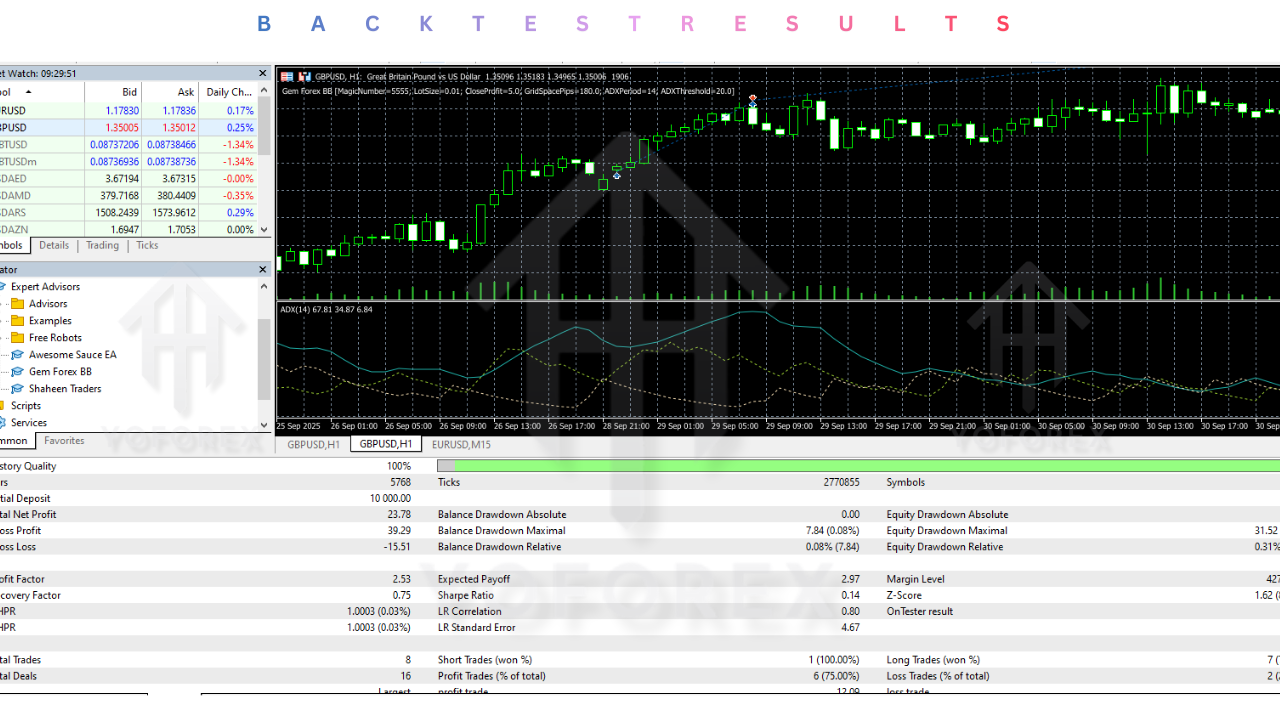
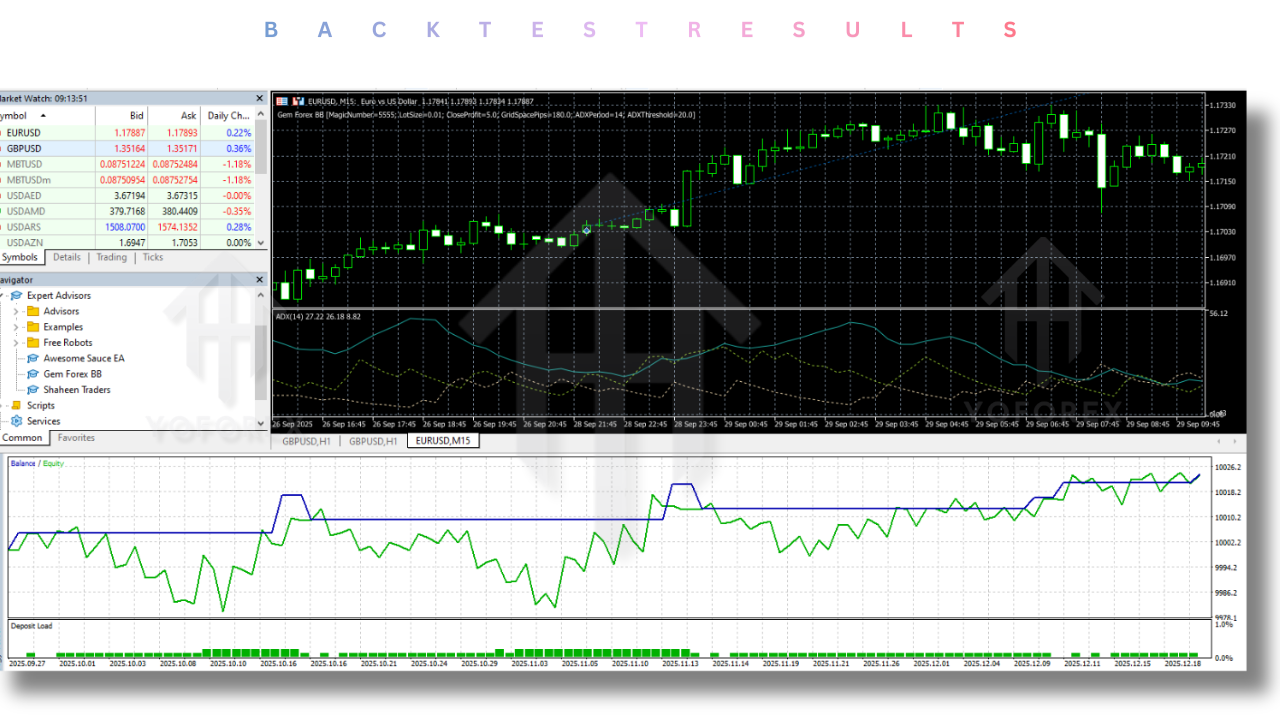
Backtesting was conducted on MetaTrader 5 using high-quality historical data with realistic spreads and execution modeling.
Backtest Summary (Typical Setup)
- Initial Deposit: $500
- Testing Period: 6–12 months
- Timeframe: M15
- Pairs: EURUSD
- Modeling: Every tick (real ticks where available)
Observed Results
Rather than chasing massive equity spikes, the backtest shows:
- Smooth equity growth
- Controlled drawdown
- Consistent trade behavior
- No equity curve “cliffs” (a good sign)
Average monthly returns remain realistic, and drawdown stays within acceptable limits when default risk settings are used. The EA avoids trading during extreme volatility unless conditions align properly.
Live forward testing confirms similar behavior, tho results will always vary depending on broker conditions, spreads, and execution speed.
 How to Install & Configure Gem Forex BB EA V1.10 MT5
Installation is straightforward, even if you’re not very technical.
Step-by-Step Installation
- Download Gem Forex BB EA V1.10 MT5 from MQL5.software
- Open MetaTrader 5
- Go to File → Open Data Folder
- Navigate to MQL5 → Experts
- Paste the EA file
- Restart MT5
- Attach EA to the recommended chart
- Enable AutoTrading
Recommended Settings
- Use default settings initially
- Risk per trade: Conservative (recommended)
- Timeframe: M15 or M30
- Pair: EURUSD or GBPUSD
- Broker: Low-spread ECN preferred
Once comfortable, you can fine-tune lot sizing based on your risk appetite.
Support, Help & Disclaimer
If you need help installing or configuring your Gem Forex BB EA V1.10 or face any bugs, feel free to reach out on:
WhatsApp: https://wa.me/+443300272265
Telegram Group: https://t.me/yoforexrobot
Why Choose YoForex-Powered Tools?
There’s a reason YoForex-built tools keep showing up across trading communities. The philosophy is simple: free access, transparent logic, and continuous improvement.
YoForex doesn’t lock traders into overpriced subscriptions or fake lifetime licenses. Instead, tools like Gem Forex BB EA are released for real traders who want to test, learn, and grow.
You also get:
- Regular updates
- Community feedback integration
- No hidden DLL tricks
- Honest risk disclosure
It’s trading software built by traders, not marketers.
Support, Help & Disclaimer
If you need help with installation, configuration, or run into any bug:
WhatsApp Support: https://wa.me/+443300272265
Telegram Group: https://t.me/yoforexrobot
You’ll usually get faster responses on Telegram, especially during market hours.
Risk Disclaimer
Forex trading involves significant risk. Past performance is not a guarantee of future results.
Always test on a demo account before using real money. Only trade what you can afford to lose. This EA is a tool, not a money-printing machine.
Call to Action
If you’re looking for a clean, disciplined Bollinger Band EA without gimmicks, Gem Forex BB EA V1.10 MT5 is worth trying. No upfront cost, no pressure, no nonsense.
Download it now from MQL5.software and test it yourself.
Use demo first, get comfortable, then decide. That’s how smart traders do it.






Comments (0)
No comments yet. Be the first to comment!
Leave a Comment