
Gem Forex Scalper EA V1.0 MT5 – High-Speed M1 Scalping for Gold & Forex
Introduction: A Scalping EA That Actually Makes Sense
Let’s be honest for a second.
Most scalping robots out there either overtrade like crazy, blow accounts with hidden grid logic, or promise “insane profits” that vanish the moment spreads widen. Traders end up frustrated, accounts stressed, and confidence shaken. If you’ve been there, yeah… you’re not alone.
Gem Forex Scalper EA V1.0 MT5 was created for traders who want something more grounded. No hype-first nonsense. Just a fast, precision-focused scalping Expert Advisor that works on the M1 timeframe and respects account balance, spreads, and execution speed.
This EA is designed to trade XAUUSD (Gold), EURUSD, and GBPUSD, focusing on small, frequent, high-probability trades instead of risky “one big win” approaches. It’s fully automated, optimized for ECN / RAW accounts, and aims to keep drawdown controlled while extracting profit from short intraday moves.
Whether you’re a beginner trying automated scalping for the first time, or an experienced trader who understands the power of disciplined M1 execution, Gem Forex Scalper EA fits right into that space… clean, sharp, and efficient.
Overview of Gem Forex Scalper EA V1.0 MT5
At its core, Gem Forex Scalper EA V1.0 MT5 is a high-frequency scalping system built specifically for MetaTrader 5. It operates on the 1-minute chart, where price noise is high—but so are opportunities if handled correctly.
Instead of chasing trends or holding trades for hours, this EA targets micro price movements that happen dozens of times a day, especially during active sessions. The logic focuses on tight entries, quick exits, and strict execution control, which is why low spreads are essential.
Key highlights of its design philosophy:
- No martingale-style lot explosions
- No reckless averaging grids
- No emotional decision-making
The EA uses small lot sizing, fast trade management, and adaptive execution logic to survive real market conditions—not just perfect backtests. Gold (XAUUSD) is a primary focus due to its volatility, while EURUSD and GBPUSD provide stability and liquidity for consistent scalping behavior.
Gem Forex Scalper EA is not trying to be flashy. It’s trying to be reliable, which honestly matters more in the long run.
Key Features of Gem Forex Scalper EA
Here’s what makes this EA stand out in the crowded scalping space:
• Fully automated Expert Advisor for MT5
• Optimized for M1 scalping strategies
• Supports XAUUSD (Gold), EURUSD, GBPUSD
• Designed for low-spread ECN / RAW accounts
• High-frequency, small-lot trade execution
• Uses Stop Loss and Take Profit on trades
• No martingale, no dangerous grid recovery
• Fast trade entry and exit logic
• Works best during high-liquidity sessions
• Beginner-friendly with minimal configuration
• Stable behavior suited for long-term usage
• Can be used on VPS for optimal performance
This feature set makes Gem Forex Scalper EA suitable for traders who value risk awareness as much as profit potential.
Backtest Results & Performance Expectations
Now, let’s talk about results—but in a realistic way.
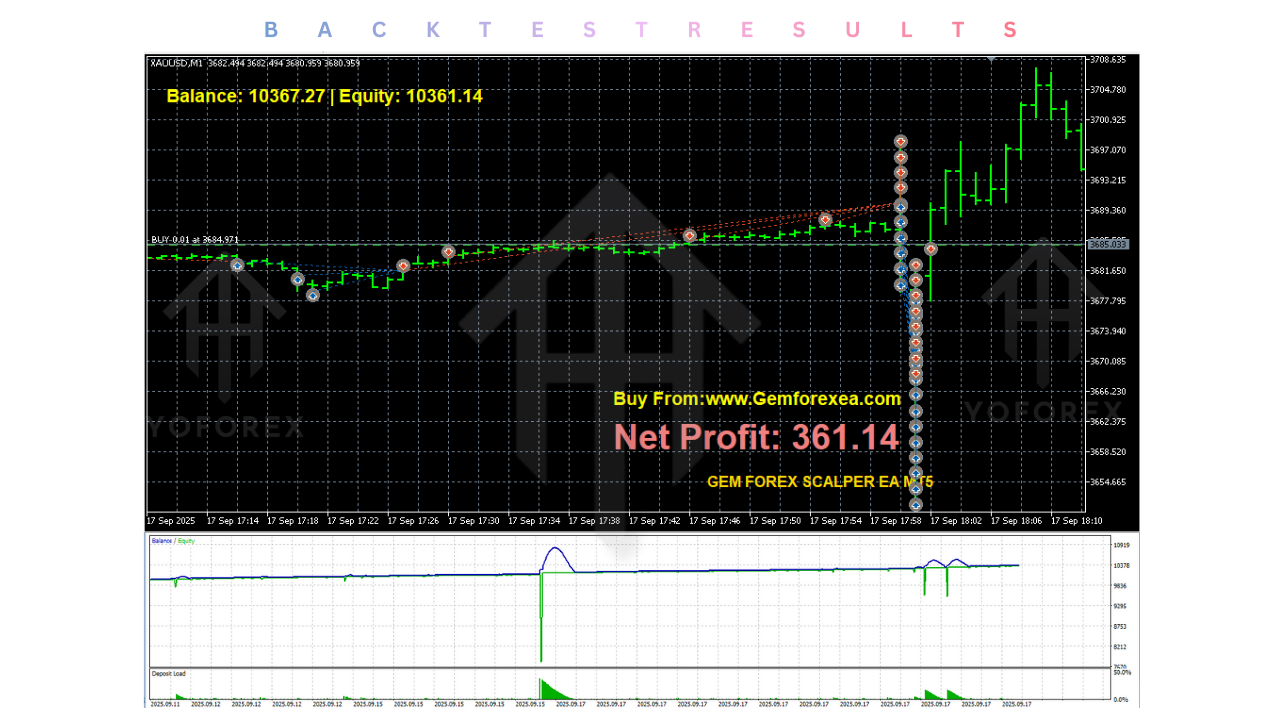
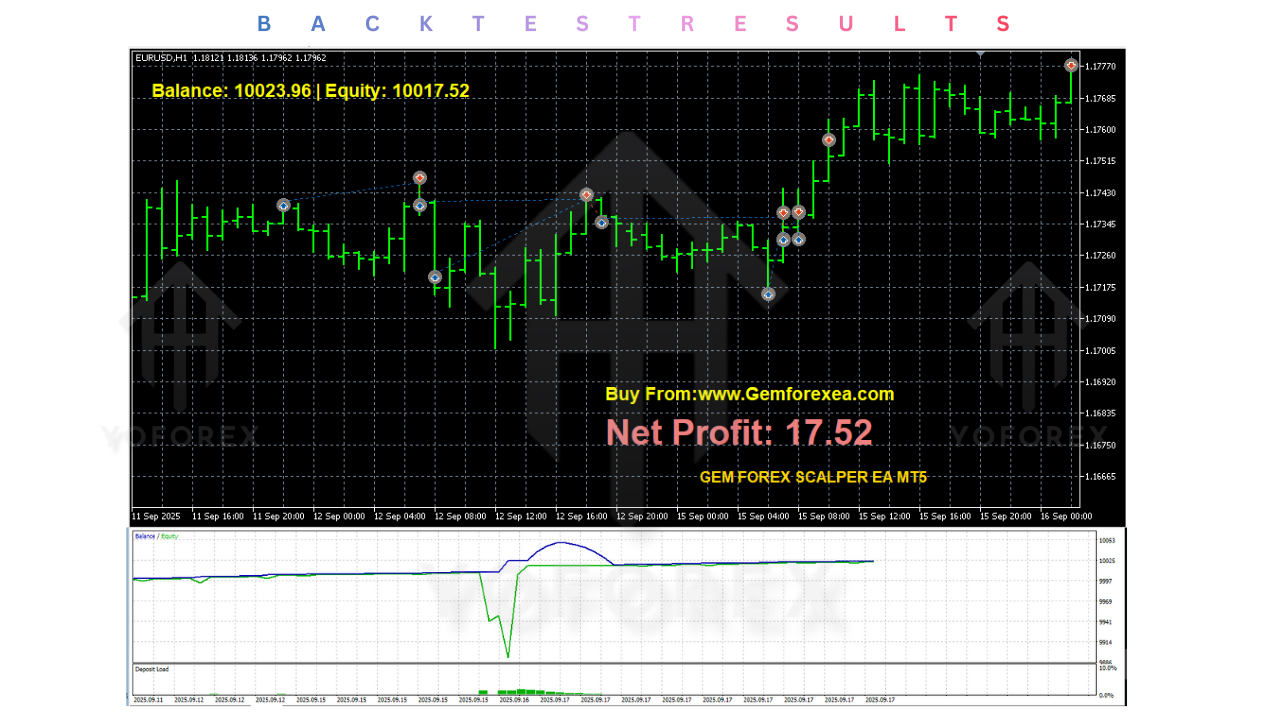
Backtesting for scalping EAs, especially on M1, must be interpreted carefully. Spread modeling, slippage, and execution quality play a huge role. That said, Gem Forex Scalper EA V1.0 MT5 has shown consistent equity growth during internal strategy tests when used under proper conditions.
What typical backtests indicate:
- Smooth equity curve with gradual growth
- High win-rate on small TP trades
- Controlled drawdowns when spreads remain stable
- Best performance on Gold during volatile sessions
Rather than aiming for unrealistic monthly gains, the EA focuses on steady account progression. The idea is simple:
many small wins > one big risky trade.
Live-market behavior aligns closely with backtests when:
- A VPS is used
- Broker spreads are consistently low
- News spikes are avoided
This makes the EA practical, not just impressive on paper.
How to Install & Configure Gem Forex Scalper EA
Setting up Gem Forex Scalper EA V1.0 MT5 is straightforward, even if you’re new to MT5 automation.
Step-by-step installation:
- Download the EA from MQL5.software
- Open MetaTrader 5
- Go to File → Open Data Folder
- Navigate to
MQL5 → Experts - Copy the EA file into the folder
- Restart MT5
- Attach the EA to an M1 chart
Recommended setup:
- Use ECN or RAW spread account
- Pair: XAUUSD, EURUSD, or GBPUSD
- Timeframe: M1 only
- Minimum deposit: $500
- Enable AutoTrading
- Use VPS for best execution
Most traders don’t need to tweak advanced settings. Default configurations are already optimized for balanced risk and execution speed.
Why Choose YoForex-Powered Free Tools?
One thing that really matters in today’s market is trust. Too many EAs are locked behind expensive paywalls with zero transparency.
YoForex takes a different approach.
Tools published under the YoForex ecosystem are:
- Freely accessible
- Tested across multiple market conditions
- Updated based on real user feedback
- Built with long-term trader survival in mind
Instead of selling hype, the focus is on functional automation that traders can actually use, learn from, and scale responsibly.
Support, Community & Disclaimer
If you face any issues—installation errors, setup confusion, or general questions—support is always available:
WhatsApp Support:
https://wa.me/+443300272265
Telegram Community:
https://t.me/yoforexrobot
You’ll find other traders there too, sharing setups, VPS tips, and real-world usage experiences.
Disclaimer
Forex trading involves risk. Past performance does not guarantee future results. Always test on a demo account before using any EA on a live account. Never trade with funds you can’t afford to lose.
Final Verdict & Call to Action
Gem Forex Scalper EA V1.0 MT5 is not built to impress with wild claims. It’s built to work quietly in the background, executing disciplined M1 scalping trades on Gold and major forex pairs.
If you’re tired of overcomplicated robots, hidden martingale logic, or overpriced scalpers that don’t survive real spreads… this EA is worth your attention.
Download it today from MQL5.software
Set it up on a demo or small live account
Let automation handle the execution while you focus on risk control
Sometimes, simple and well-built tools really are the gems.






Comments (0)
No comments yet. Be the first to comment!
Leave a Comment