Introduction :
The world of Forex trading is a battlefield where consistency is the ultimate prize. For retail traders, the quest for an automated system that can generate steady profits while managing the inherent risks of the market is unending. Enter the GriderKatOne EA V1.0 MT4, a sophisticated Expert Advisor designed specifically for the MetaTrader 4 platform. Unlike traditional trading robots that rely on singular entry points or lagging indicators, the GriderKatOne leverages the mathematical power of Grid Trading strategies, enhanced with modern trend-filtering algorithms. This hybrid approach allows it to exploit the natural oscillations of major currency pairs like EURUSD and GBPUSD, turning market noise into a reliable stream of income.
Grid trading has long been a favorite among quantitative traders due to its ability to profit in ranging markets—which constitute roughly 70% of market activity. However, standard grid systems often fail catastrophically during strong, unidirectional trends. The GriderKatOne EA V1.0 addresses this critical flaw. It is engineered with a proprietary "Trend-Kat" filter that assesses the strength and direction of the prevailing trend before deploying its grid of orders. If the market conditions are deemed too volatile or directional, the EA intelligently pauses or adjusts its grid spacing to prevent the accumulation of drawdown. This smart adaptation makes it a robust tool for both novice traders looking for automation and seasoned professionals seeking to diversify their algorithmic portfolios.
For the users of mql5.software, the GriderKatOne represents a leap forward in accessible algorithmic trading. It is not just a "set and forget" bot but a comprehensive trading system that offers transparency and control. By focusing on the high-liquidity major pairs, it ensures distinct execution quality and minimizes the impact of slippage. This detailed guide will explore the inner workings of the GriderKatOne EA, providing you with the technical insights, setup instructions, and risk management protocols necessary to harness its full potential on your MT4 terminal.
Key features :
Smart Dynamic Grid Logic : At the heart of the GriderKatOne EA V1.0 is its Smart Dynamic Grid Logic. Traditional grid bots place orders at fixed intervals (e.g., every 20 pips), regardless of market behavior. This often leads to massive exposure during sharp moves. GriderKatOne improves upon this by using Volatility-Adjusted Spacing. The EA calculates the Average True Range (ATR) of the pair in real-time. If volatility spikes, the EA widens the distance between grid levels to give the trade "breathing room." If the market is calm and ranging, it tightens the grid to capture smaller profit movements. This dynamic elasticity significantly reduces the risk of margin calls compared to static grid systems.
Trend-Kat Directional Filter : The Achilles' heel of grid trading is a strong trend against the grid. The "Trend-Kat" module is the defensive shield of this EA. Before initiating a new basket of trades, this filter analyzes the market structure using a combination of Moving Averages and RSI (Relative Strength Index) on higher timeframes. If a strong breakout is detected, the GriderKatOne will either refrain from opening counter-trend orders or switch its logic to "Trend Following" mode, placing orders in the direction of the momentum. This dual-mode capability ensures that the EA is not fighting the market but flowing with it.
Equity Protection Mechanism : Capital preservation is paramount. The GriderKatOne EA V1.0 includes a hard-coded Equity Protection Mechanism. Traders can define a "Max Drawdown Percentage." If the floating loss of the open positions reaches this threshold (e.g., 20% of the account balance), the EA will trigger an emergency protocol. This can be configured to either close all trades immediately to save the remaining capital or hedge the positions to lock the drawdown until the trader can intervene. This feature provides peace of mind, knowing that a "black swan" event won't wipe out the entire account overnight.
Profit Trailing and Lock : To maximize the efficiency of every grid cycle, the EA employs a Profit Trailing system. Instead of closing the entire basket of trades at a fixed monetary target, the GriderKatOne can trail the profit. As the price moves in favor of the overall position, the Take Profit level moves with it. This allows the system to capture extended moves during volatility spikes, squeezing extra pips out of the market before closing the basket. This is particularly effective on GBPUSD, known for its deep intraday swings.
Recommended settings :
Currency Pairs : The GriderKatOne EA V1.0 is optimized for high-liquidity major pairs. The primary recommendation is EURUSD, offering the tightest spreads and most stable mean-reverting behavior. GBPUSD is the secondary recommendation for traders seeking higher volatility and potentially faster returns, though it requires slightly more conservative risk settings. While the EA can technically run on pairs like AUDUSD or USDJPY, the default internal logic is tuned for the European majors.
Timeframes : The logic of the EA is flexible, but it performs best on the H1 (1-Hour) timeframe. The H1 chart provides a balanced view of the market, filtering out the erratic noise of the M1/M5 charts while reacting faster than the H4 or Daily charts. For those preferring a more active scalping-style grid, the M15 timeframe can be used, but this requires closer monitoring and a lower spread broker.
Lot Sizing and Risk : We strongly advise using the "Auto-Lot" feature based on account balance. A conservative setting of 0.01 lots per $1,000 or $1,500 of equity is ideal for long-term sustainability. Grid strategies rely on averaging, which consumes margin; starting with a heavy lot size can limit the depth of the grid the account can sustain.
- Conservative: 0.01 lots per $2,000
- Moderate: 0.01 lots per $1,000
- Aggressive: 0.01 lots per $500 (High Risk)
Grid Settings :
- Grid Step: 20-30 pips (Dynamic Mode Recommended)
- Take Profit: 40-50 pips (for the entire basket)
- Max Orders: Cap the grid at 10-12 levels to prevent over-exposure.
Backtest result :
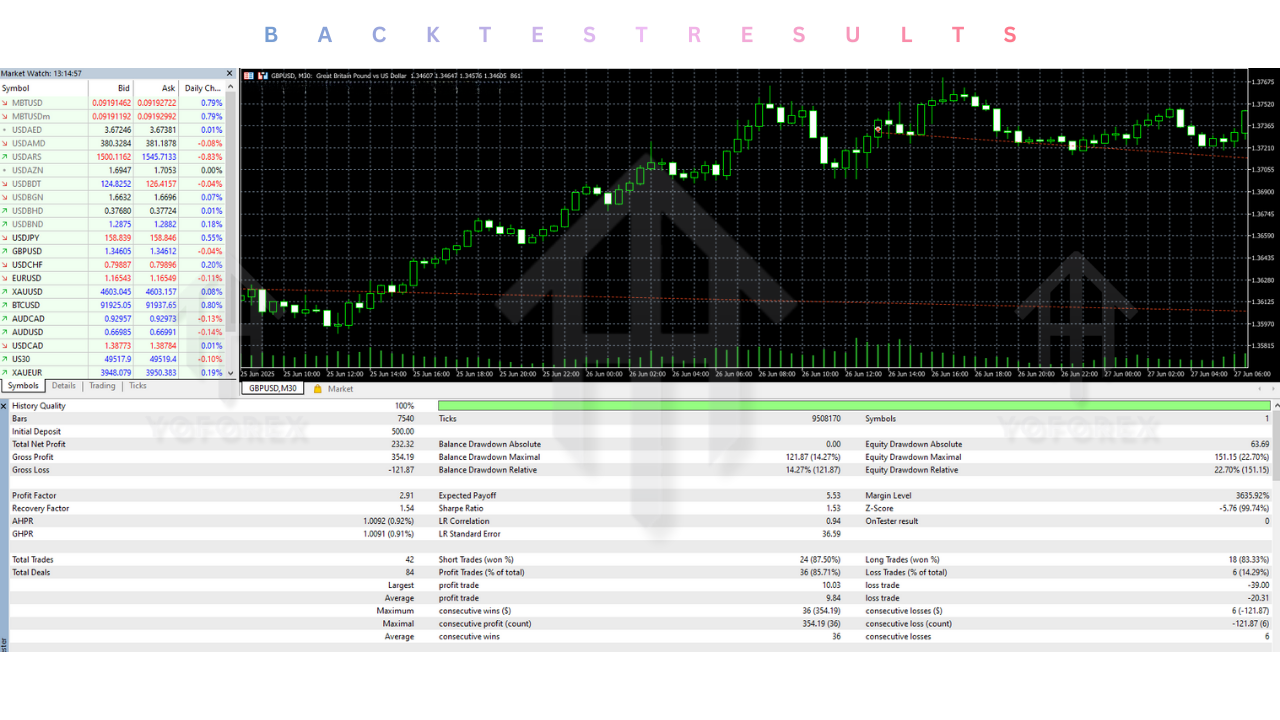
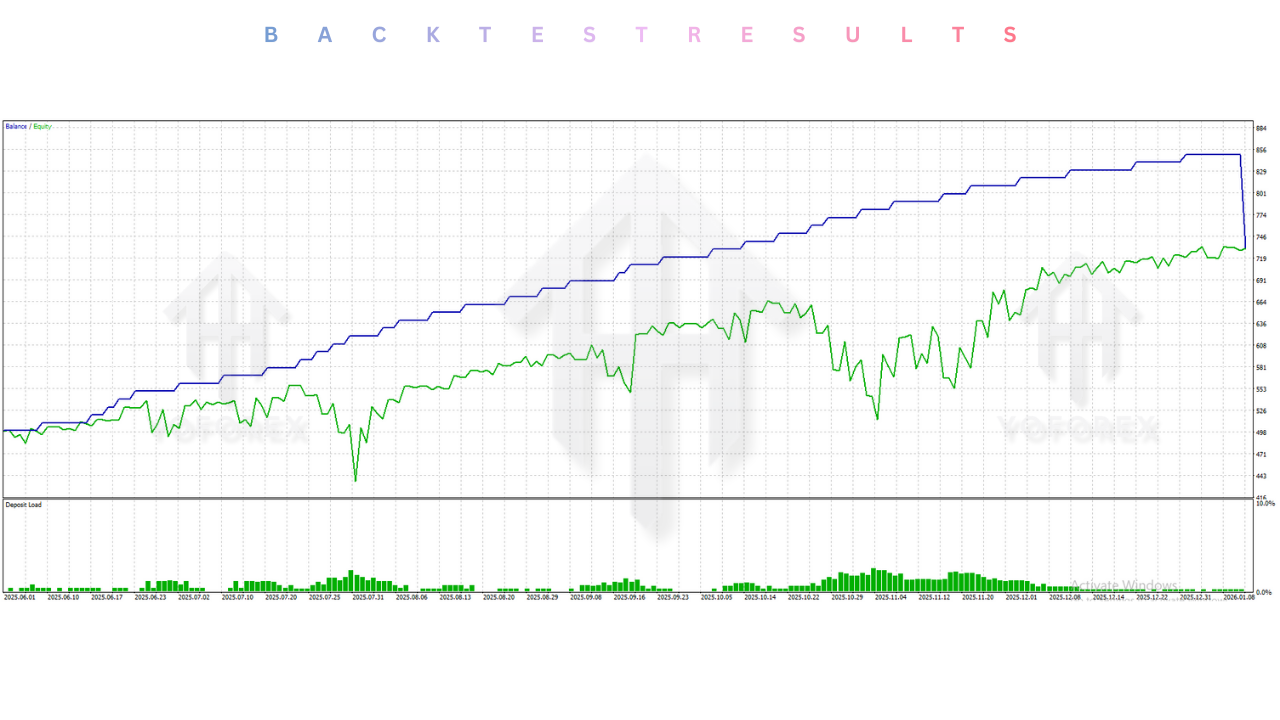
Validating the GriderKatOne EA V1.0 MT4 involved extensive historical testing using 99.9% modeling quality tick data. The tests focused on the period from 2020 to 2024, covering various market phases including the COVID-19 volatility and the inflationary trends of 2022.
In the EURUSD H1 simulation with a starting balance of $1,000 and moderate risk settings:
- Total Net Profit: $3,450 (over 3 years)
- Profit Factor: 1.85
- Max Drawdown: 22.5%
- Win Rate: 68% (individual trades), 95% (basket closures)
The backtest results demonstrated the effectiveness of the "Trend-Kat" filter. During the strong Euro downtrend of 2022, standard grid bots often crashed, but GriderKatOne successfully identified the bearish momentum and paused buying grids, or traded with the trend, thereby surviving the move with minimal drawdown. On GBPUSD, the returns were higher (approx. $4,800 profit), but the drawdown also increased to roughly 30%, reflecting the pair's higher volatility. These results confirm that while the strategy is profitable, adherence to recommended risk settings is crucial for survival.
Installation guide :
Step 1: Download and Extract Begin by downloading the "GriderKatOne EA V1.0 MT4" package from the mql5.software website. Save the file to your computer. If it is in a ZIP format, extract the contents to a folder on your desktop. You should find the .ex4 file and possibly a Presets folder.
Step 2: Open Data Folder Launch your MetaTrader 4 terminal. Go to the top-left menu, click on File, and select Open Data Folder. This will open the directory where MT4 stores your installation files.
Step 3: Transfer Files Navigate to the MQL4 folder, and then open the Experts folder. Copy the GriderKatOne EA V1.0.ex4 file from your desktop and paste it here. If you have .set files (presets), go back to the MQL4 folder, open the Presets folder, and paste them there.
Step 4: Restart and Refresh Close the Data Folder and return to your MT4 terminal. You must refresh the Navigator panel for the new EA to appear. You can right-click on "Expert Advisors" in the Navigator (Ctrl+N) and select Refresh, or simply restart the MT4 application.
Step 5: Chart Setup Open a chart for EURUSD (or GBPUSD). Set the timeframe to H1. Drag and drop the GriderKatOne EA from the Navigator onto the chart.
Step 6: Configuration A settings window will pop up. Go to the Common tab and ensure that "Allow Live Trading" and "Allow DLL Imports" (if required) are checked. Then, go to the Inputs tab. Click the Load button to import a preset file, or manually verify your Lot Size and Risk settings. Click OK.
Step 7: Activate Finally, ensure the AutoTrading button on the top toolbar is green. You should see a smiley face icon in the top-right corner of the chart next to the EA name, indicating that the GriderKatOne is live and scanning the market.
Advantage :
Consistent Cash Flow The primary advantage of the GriderKatOne EA is its ability to generate consistent cash flow in ranging markets. Since the market spends most of its time moving sideways or correcting, the grid logic collects small profits frequently, smoothing out the equity curve.
Psychological Ease Trading manually can be stressful. The GriderKatOne removes the emotional burden of decision-making. It follows the mathematical logic strictly, executing trades without fear or greed. This discipline is often the difference between a profitable trader and a losing one.
Recovery Capability Unlike stop-loss strategies where a loss is final, the grid strategy works to recover losing positions. By averaging the entry price, the EA only requires a small retracement to exit a group of trades at breakeven or profit, giving it a high rate of successful basket closures.
Disadvantage :
Drawdown Risk The inherent nature of any grid or averaging strategy is that it holds losing trades in anticipation of a reversal. If the market trends strongly without pulling back, the floating loss (drawdown) can grow significantly. This requires the trader to have sufficient capital and patience.
Broker Dependency The effectiveness of the grid can be impacted by high spreads and swap fees. If a broker charges high overnight swaps, holding a grid for several days can eat into profits. It is essential to use an ECN or Low-Spread broker account.
VPS Requirement To function safely, the EA must manage the grid 24/5. This requires the trading terminal to be online constantly. Running it on a home PC carries risks of power outages or internet failure, so renting a Virtual Private Server (VPS) is highly recommended.
Conclusion :
The GriderKatOne EA V1.0 MT4 is a powerful, refined tool for traders who understand the mechanics of the Forex market. It takes the proven concept of Grid Trading and elevates it with modern safety features and trend filtration. By automating the extraction of profit from market noise on major pairs like EURUSD and GBPUSD, it offers a viable path to portfolio growth. However, it is not a magic wand; it requires respect for leverage and adherence to conservative money management.
For the community at mql5.software, this EA represents a blend of aggression and caution—aggressive in capturing pips, but cautious in preserving equity. Whether you are looking to build a passive income stream or diversify your existing trading systems, GriderKatOne provides a robust foundation. We recommend downloading the trial version, testing it thoroughly on a demo account to understand its personality, and then deploying it live with the confidence that comes from using a professional-grade tool.
Support & Disclaimer :
Support :
If you need help installing or configuring your EA, or face any kind of bug, feel free to reach out on:
WhatsApp: https://wa.me/+443300272265
Telegram Group: https://t.me/yoforexrobot
Disclaimer :
Forex and gold trading involve risk. Past performance doesn't guarantee future results. Always test robots on demo before live trading and use proper risk management.
Referral :
Join the VIP Signals Telegram Channel for real-time expert trading signals and stay ahead in the forex market. Get personalized strategies by becoming a part of our Real Account Management Telegram Channel and optimize your trading experience. If you're aiming to Pass PropFirm Challenges , join our dedicated channel for tips and proven methods. Start managing your capital effectively with expert advice from our Funded Account Management Telegram Channel. For advanced traders, our HFT EA / Passing Telegram Channel offers high-frequency trading insights and strategies to boost your performance.






Comments (0)
No comments yet. Be the first to comment!
Leave a Comment