
Content The financial markets have evolved significantly over the last decade, with algorithmic trading taking center stage in the retail forex sector. Among the most traded assets globally is Gold (XAUUSD), known for its high liquidity and substantial daily volatility. For traders seeking to automate their exposure to the precious metals market, the IS VIP Golden EA V1.0 for MetaTrader 4 has emerged as a topic of significant interest.
This comprehensive guide delves into the technical architecture of the IS VIP Golden EA, explores the mechanics of M1 scalping strategies, and provides a step-by-step roadmap for installation, backtesting, and risk management. Whether you are a seasoned algorithmic trader or a newcomer looking to understand how automated gold trading works, this article covers the essential details you need to know.
Understanding the IS VIP Golden EA V1.0
The IS VIP Golden EA V1.0 is a specialized automated trading software (Expert Advisor) built specifically for the MetaTrader 4 (MT4) platform. Unlike generic multicurrency bots that trade major forex pairs like EURUSD or GBPUSD, this software is fine-tuned for the unique characteristics of the Gold market.
Gold is distinct from fiat currencies because it is driven less by central bank interest rate differentials and more by global sentiment, inflation data, and geopolitical instability. These factors often create sharp, sudden price movements. The IS VIP Golden EA is designed to capitalize on these micro-movements using a high-frequency trading approach on the 1-minute (M1) timeframe.
Core Strategy Mechanics
The underlying logic of the IS VIP Golden EA revolves around short-term volatility breakouts and mean reversion. While the exact source code is proprietary, EAs in this category typically utilize a combination of technical indicators such as:
- Bollinger Bands or Envelopes: To identify overbought or oversold conditions on a micro-scale.
- Average True Range (ATR): To measure current market volatility and adjust dynamic Take Profit or Stop Loss levels.
- Moving Averages: To determine the immediate micro-trend direction.
The "Golden" designation in the name refers to its optimization for XAUUSD. The bot aims to enter and exit trades rapidly, often holding positions for only a few minutes or even seconds. This minimizes exposure to long-term market shifts but requires a robust technical setup to execute correctly.
Why Trade Gold on M1 Timeframe?
The 1-minute chart offers the highest resolution of price data available on standard MT4 terminals. For a scalper like IS VIP Golden EA, this granularity is crucial. Gold can move $2 to $5 in price within a single minute during the New York or London trading sessions.
Trading on the M1 timeframe allows the algorithm to:
- React Instantly: It can detect a surge in buying pressure the moment it begins.
- Reduce Market Exposure: By closing trades quickly, the bot avoids the risk of overnight gaps or weekend news events.
- Compound Growth: High-frequency trading generates a large number of trades. Even small profits per trade can accumulate significantly over a month if the win rate is maintained.
However, M1 trading also introduces challenges, primarily related to transaction costs (spreads and commissions) and execution speed (latency), which we will discuss later in the optimization section.
Installation Guide for MetaTrader 4
Installing the IS VIP Golden EA V1.0 follows the standard protocol for MT4 custom experts. If you have downloaded the file (usually ending in .ex4 or .mq4), follow these steps to deploy it correctly.
Step 1: Locate the Data Folder
Open your MetaTrader 4 terminal. Navigate to the top menu bar and click on File. From the dropdown menu, select Open Data Folder. This will open the root directory where your MT4 installation stores all custom data.
Step 2: Transfer the EA Files
Inside the Data Folder, double-click on the MQL4 folder. Inside MQL4, find the folder named Experts. Copy your IS VIP Golden EA file and paste it into this folder. If the EA came with any custom indicators or library files (.dll), ensure those are placed in the Indicators and Libraries folders respectively.
Step 3: Refresh and Activate
Close the Data Folder and return to your MT4 terminal. Look for the Navigator window on the left side of the screen (Press Ctrl+N if it is hidden). Right-click specifically on "Expert Advisors" and select Refresh. The IS VIP Golden EA should now appear in the list.
Step 4: Attach to Chart
Open a clean chart for XAUUSD (Gold). Ensure the timeframe is set to M1. Drag and drop the EA from the Navigator onto the chart.
Step 5: Configure Permissions
A settings window will pop up. Navigate to the Common tab. You must check the box labeled Allow Live Trading. If the EA uses dynamic link libraries (DLL), you must also check Allow DLL imports. Without these permissions, the automation will not execute.
Optimization and Settings Explained
Every Expert Advisor comes with a set of input parameters that control its behavior. While the default settings are often optimized by the developer, understanding them allows you to adapt the bot to different broker conditions.
Lot Size Management
This is the most critical setting. Most versions of IS VIP Golden EA will offer two modes:
- Fixed Lot: The bot trades a constant volume (e.g., 0.01 lots) regardless of account balance. This is the safest method for testing.
- Auto Lot / Risk Percent: The bot calculates lot size based on your equity. For example, if set to risk 1%, the lot size will increase as your account grows. While this compounds profits, it also compounds risk.
Take Profit and Stop Loss
Given the volatility of Gold, static Stop Losses can be dangerous. The EA may use "hidden" or virtual levels that are not visible to the broker to prevent stop-hunting. Ensure that the distance (in points) is sufficient to handle the average spread of your broker. If your broker's spread on Gold is 30 points (3 pips), a Take Profit of 10 points is mathematically impossible to achieve consistently.
Trading Hours (Time Filter)
Gold markets behave differently during the Asian session (quiet, ranging) compared to the London and New York sessions (high volume, trending). Many scalping EAs perform best during the quiet Asian session when prices oscillate in a predictable range. Check if the IS VIP Golden EA has a "Start Hour" and "End Hour" feature. Restricting trading to low-volatility hours can significantly increase the win rate, although it reduces the total number of trades.
The Importance of Infrastructure: VPS and Latency
Running a high-frequency M1 scalper like IS VIP Golden EA from a home laptop is not recommended. The success of this strategy depends heavily on execution speed.
Virtual Private Server (VPS)
A VPS is a remote server that runs 24/7. Installing your MT4 and EA on a VPS ensures that:
- Uptime: Your bot never disconnects due to power outages or internet failure at home.
- Proximity: You can rent a VPS located in the same data center as your broker (e.g., London or New York). This significantly reduces the time it takes for a trade signal to reach the broker's server.
Latency Sensitivity
Latency is the delay between your EA sending an order and the broker executing it. For the IS VIP Golden EA, a delay of 500 milliseconds can turn a winning trade into a losing one. Aim for a latency of under 100ms, and ideally under 20ms. You can check this by clicking on the connection bars in the bottom right corner of your MT4 terminal.
Risk Management Protocols
Automated trading is not risk-free. In fact, the speed of execution can amplify errors if risk is not managed strictly.
Drawdown Control
Before running the EA on a live account, decide on your maximum acceptable drawdown. If the EA has a "Max Drawdown %" setting, enable it. This acts as a hard brake; if the bot loses a certain percentage of the account in a day, it will close all trades and stop trading to prevent a total washout.
News Filtering
Gold is extremely sensitive to US economic news, such as Non-Farm Payrolls (NFP), CPI (Inflation) data, and FOMC meetings. During these events, spreads widen massively, and price creates gaps. A standard M1 scalper can suffer heavy losses in these conditions. If the IS VIP Golden EA includes a News Filter, ensure it is enabled. If not, you should manually disable the "AutoTrading" button on MT4 during high-impact news releases.
Backtesting: Verifying the Strategy
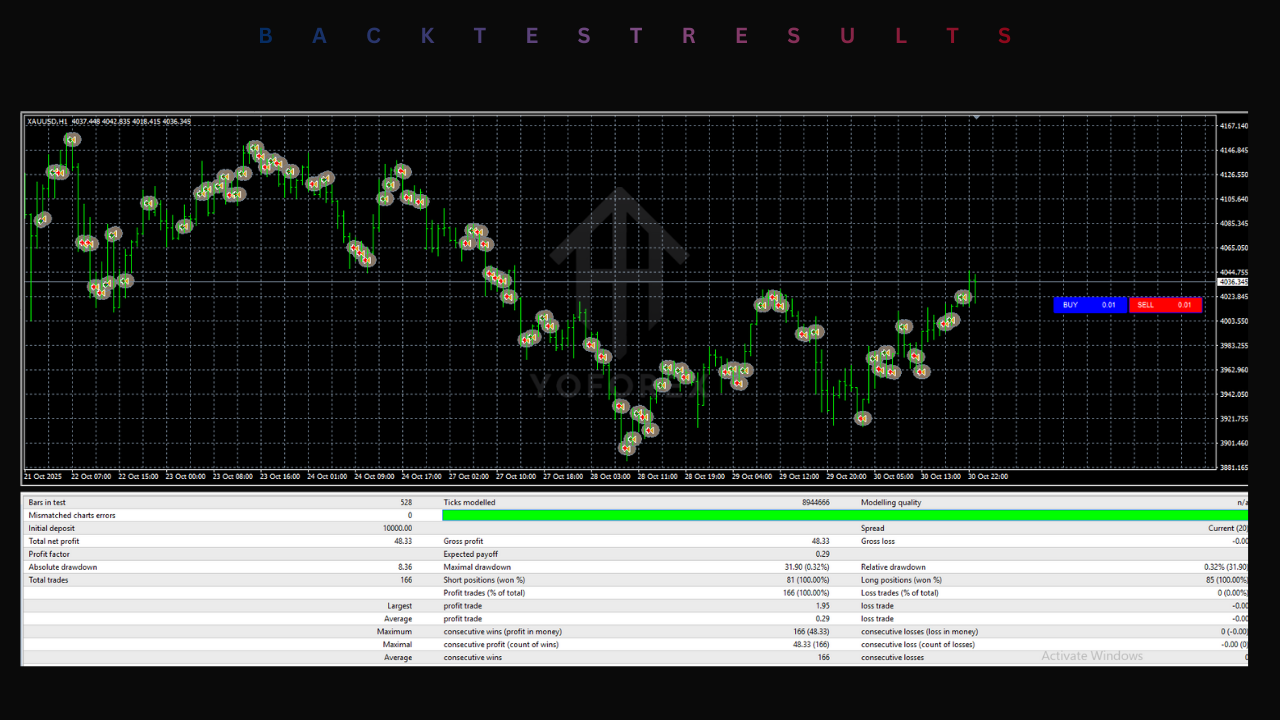
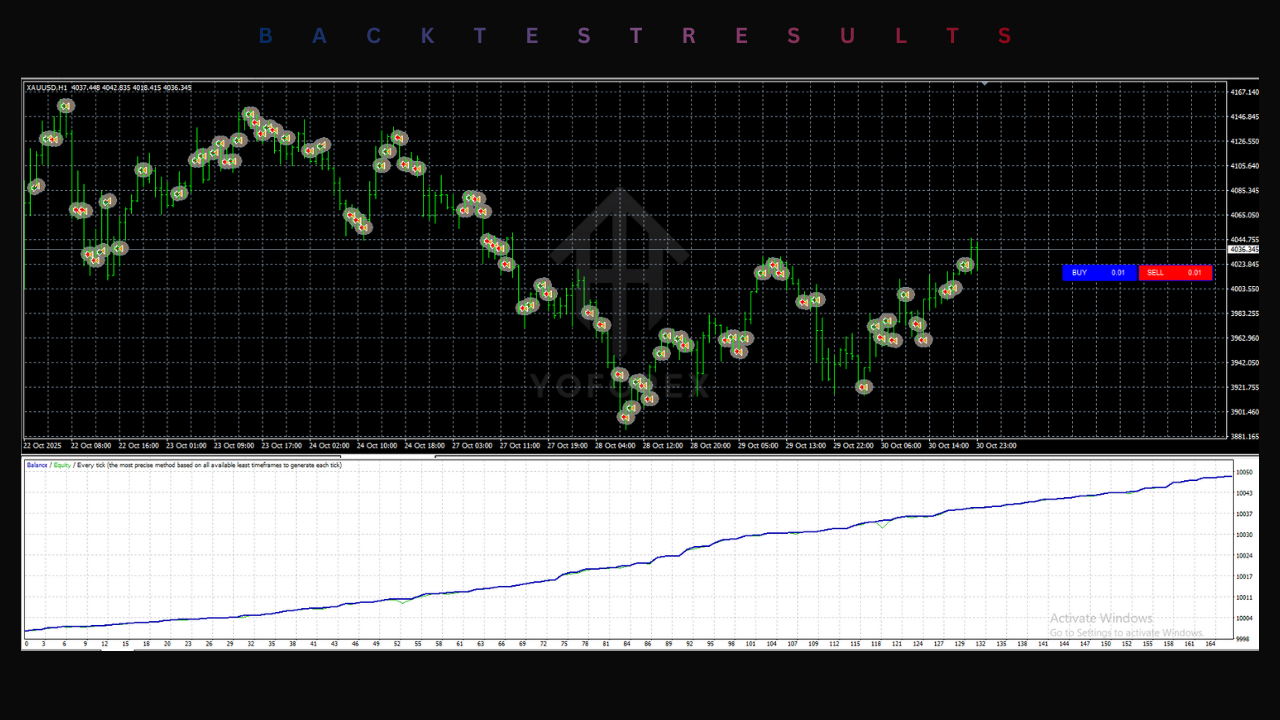
Do not rely solely on screenshots provided by vendors. You must verify the performance yourself using the MT4 Strategy Tester.
To get accurate results for the IS VIP Golden EA:
- Use Tick Data: Standard MT4 history data is often incomplete. Use third-party software to download 99.9% quality tick data.
- Variable Spread: Do not test with a fixed spread (e.g., 2 pips). Test with a variable spread that mimics real market conditions.
- Stress Testing: Run the backtest over a period that includes highly volatile years, such as 2020 or 2022. If the EA survives these periods without blowing the account, it demonstrates robustness.
Conclusion
The IS VIP Golden EA V1.0 MT4 represents a sophisticated approach to automating Gold trading. By leveraging the M1 timeframe and capitalizing on short-term volatility, it offers traders a tool to potential profit from market noise. However, it is not a "set and forget" money machine. Success requires a deep understanding of the settings, a low-latency technical setup, and strict adherence to risk management principles.






Comments (0)
No comments yet. Be the first to comment!
Leave a Comment