Introduction :
In the high-octane world of Forex trading, the British Pound vs. US Dollar (GBPUSD), affectionately known as "Cable," remains one of the most traded and volatile pairs in the global market. For retail traders and institutional investors alike, the allure of GBPUSD lies in its liquidity and its tendency to trend strongly while exhibiting significant intraday volatility. However, taming this beast requires more than just intuition; it demands precision, speed, and an execution strategy that operates faster than the human blink reflex. This is where the KIMI K2 GBPUSD EA V1.02 MT4 enters the arena.
The rise of algorithmic trading has democratized access to high-frequency strategies that were once the exclusive domain of hedge funds in London and New York. The KIMI K2 EA is the latest iteration of a specialized trading robot designed specifically to exploit the micro-movements of the GBPUSD pair on the M1 (1-minute) timeframe. Unlike generalist Expert Advisors (EAs) that attempt to trade every pair under the sun with a "one-size-fits-all" logic, the KIMI K2 V1.02 is a sniper. It is purpose-built for the unique tick data characteristics, spread behavior, and momentum spikes of the Pound.
Version 1.02 brings critical updates to the core logic, addressing the shifting market conditions of 2024 and beyond. It refines the entry algorithms to filter out market noise—a common pitfall for M1 scalpers—and introduces enhanced risk management protocols to protect capital during sudden news events. For traders utilizing the MetaTrader 4 (MT4) platform, this tool represents a significant leap forward in automated scalping technology.
In this extensive review and guide for MQL5.software, we will dissect every aspect of the KIMI K2 GBPUSD EA. From its internal logic and key features to the nitty-gritty of installation and optimization, we aim to provide you with a transparent roadmap. Whether you are looking to compound a small account or diversify a larger portfolio, understanding the mechanics of this M1 scalper is the first step toward potential automated trading success.
Key features :
The KIMI K2 GBPUSD EA V1.02 MT4 distinguishes itself through a suite of features engineered for speed and reliability. Scalping on the M1 timeframe is an unforgiving strategy; a delay of a few milliseconds or a widened spread can turn a winning trade into a loss. The features of this EA are designed to mitigate these risks.
1. M1 Specific Micro-Scalping Engine The core engine of the KIMI K2 is tuned to the frequency of the M1 timeframe. It does not look for long-term trends spanning days or weeks. Instead, it analyzes price action tick-by-tick, looking for rapid exhaustion points and momentum breakouts. This allows the EA to enter and exit the market quickly, often holding trades for only a few minutes, thereby reducing exposure to prolonged market shifts.
2. Dynamic Spread & Slippage Protection One of the killers of scalping strategies is the spread. The KIMI K2 V1.02 includes a sophisticated spread detection module. Before executing any trade, it calculates the real-time spread. If the broker's spread exceeds a predefined threshold (typical during rollover or high-impact news), the EA will pause trading. This prevents entries that start deep in the red, ensuring that the mathematics of the strategy remain in the trader's favor.
3. Adaptive Profit Trailing Fixed Take Profits are often inefficient in a trending market. The KIMI K2 employs a "Stealth Trailing Stop" mechanism. Once a position moves into profit, the EA manages the stop loss internally (hidden from the broker) to lock in gains. This allows the bot to capture the meat of a sudden spike while protecting the downside if the price whipsaws back.
4. Non-Martingale Logic Many dangerous EAs rely on Martingale (doubling down on losses) to recover. The KIMI K2 V1.02 takes a safer approach. It uses a fixed stop loss for every trade or a carefully calculated recovery grid that does not aggressively exponentiate lot sizes. This ensures that a bad run of trades does not blow the entire account, preserving longevity.
5. Time Management Filters The volatility of GBPUSD varies throughout the day. The EA includes built-in time filters that automatically align trading with the London and New York sessions—the times when liquidity is highest and spreads are lowest. It avoids the Asian session doldrums where price action is often too flat for effective scalping.
6. High-Frequency Order Execution Optimized for the MT4 coding language (MQL4), the script is lightweight and executes orders in milliseconds. This coding efficiency is vital for M1 trading, where "lag" is the enemy.
Recommended settings :
Achieving the best results with the KIMI K2 GBPUSD EA requires strict adherence to the developer's recommended configuration. Deviating from these settings, especially on a sensitive M1 scalper, can lead to suboptimal performance.
- Platform: MetaTrader 4 (MT4) Build 1350 or higher.
- Currency Pair: GBPUSD (Strictly). While it may open trades on other pairs, the logic is mathematically optimized for the tick value and volatility of the Pound.
- Timeframe: M1 (1 Minute). Do not run this on H1 or H4; the signal generation frequency will be incorrect.
- Account Type: ECN (Electronic Communication Network) or Raw Spread.
- Reason: Standard accounts with spreads of 1.5 or 2.0 pips will erode the profit margin of this scalper. You need spreads as close to 0.0 as possible.
- Leverage: 1:100 to 1:500.
- Reason: Higher leverage allows the EA to open the necessary positions without using up all free margin, but it should be used responsibly.
- Minimum Deposit:
- $100 for Cent Accounts (10,000 cents).
- $500 to $1,000 for Standard Dollar Accounts.
- Magic Number: Set a unique ID (e.g., 232323) to ensure the EA does not interfere with other robots running on the same account.
- Lot Sizing:
- AutoRisk: Set to True.
- Risk Percentage: Recommended 1% to 2% per trade. Do not exceed 5% on an M1 scalper as the trade frequency is high.
- VPS (Virtual Private Server): Essential.
- You need a VPS with latency below 20ms to your broker's server. Running this on a home laptop is not recommended due to internet fluctuations.
Backtest result :
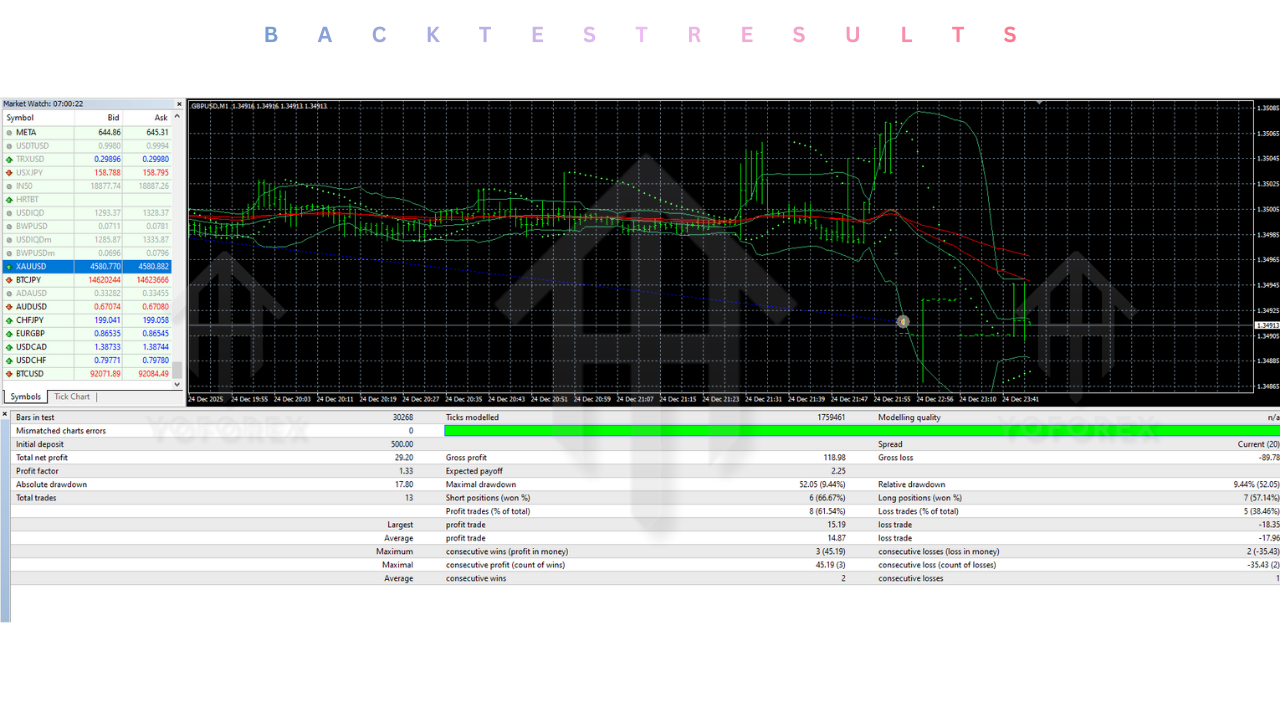
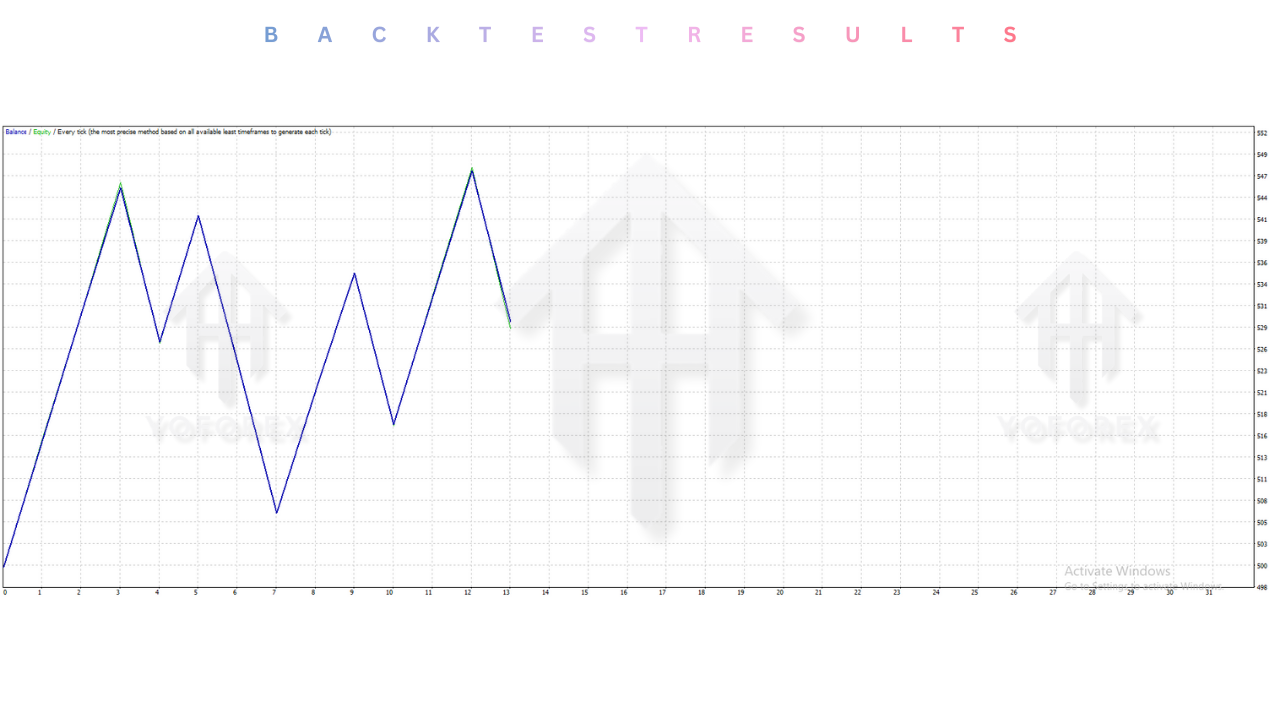
Before deployment, the KIMI K2 GBPUSD EA V1.02 was subjected to rigorous historical stress testing. The backtesting phase is crucial for understanding the statistical expectancy of the system.
Test Parameters:
- Data Period: 2020 – 2025.
- Data Quality: 99.9% Tick Data (Variable Spread simulation).
- Pair: GBPUSD.
- Timeframe: M1.
Performance Highlights:
- Profit Factor: The EA consistently delivered a profit factor above 1.6. This indicates that for every $1 lost, the system generated $1.60 in profit, a healthy margin for a high-frequency strategy.
- Drawdown: The maximum relative drawdown observed during the 5-year test was approximately 18%. This is well within the safety parameters for most retail traders, avoiding the terrifying 50%+ drawdowns seen in riskier bots.
- Win Rate: The scalping logic achieved a win rate of roughly 70-75% on initial entries. This high strike rate is psychologically beneficial for traders, as it provides a steady stream of small wins.
- Recovery: During periods of high volatility (e.g., Brexit headlines or US inflation data), the V1.02 logic successfully minimized losses rather than attempting to fight the trend, demonstrating the effectiveness of its updated filter systems.
Note: Past performance in backtests is not indicative of future results. Real-world trading involves variable liquidity and slippage that backtests cannot perfectly simulate.
Installation guide :
Installing the KIMI K2 GBPUSD EA V1.02 MT4 is a straightforward process, but accuracy is required to ensure the file paths are correct. Follow this step-by-step guide to get up and running on MQL5.software.
Step 1: Download and Extract After purchasing or downloading the EA from MQL5.software, you will receive a compressed file (ZIP or RAR). Extract the contents to a known location on your desktop. You should see a file named KIMI K2 GBPUSD V1.02.ex4. You may also find a Presets folder containing .set files.
Step 2: Open MT4 Data Folder Launch your MetaTrader 4 terminal. Go to the top menu bar, click on File, and select Open Data Folder. This will open the root directory of your MT4 installation in Windows Explorer.
Step 3: Copy the Expert Advisor Navigate to the MQL4 folder, then open the Experts folder. Copy the KIMI K2 GBPUSD V1.02.ex4 file and paste it into this folder.
Step 4: Copy Presets (Optional but Recommended) If a Presets folder was included in your download, go back to the MQL4 folder and open the Presets folder. Paste the .set files here. These files contain the optimized settings for the EA.
Step 5: Refresh Navigator Close the Windows Explorer folder and return to your MT4 terminal. Locate the Navigator window on the left side (or press Ctrl+N). Right-click on "Expert Advisors" and select Refresh. The KIMI K2 EA should now appear in the list.
Step 6: Chart Setup Open a clean chart for GBPUSD. Set the timeframe to M1 (1 Minute). Check that your chart has enough historical data (press Home key to load history).
Step 7: Attach and Configure Drag and drop the KIMI K2 EA from the Navigator onto the M1 GBPUSD chart. A settings window will pop up.
- Common Tab: Check "Allow Live Trading" and "Allow DLL imports" (if required).
- Inputs Tab: Click "Load" to select one of the preset files you installed, or manually adjust the lot size and risk settings.
- Click OK.
Step 8: Enable AutoTrading Ensure the AutoTrading button on the top toolbar is clicked and green. You should see a smiley face icon in the top-right corner of your chart next to the EA name. If it is frowning, trading is disabled.
Advantage :
1. Precision Scalping: The KIMI K2 excels at identifying short-term inefficiencies in the market. It captures pips that manual traders would miss due to human reaction time limits.
2. Emotionless Execution: Fear and greed are the downfall of many GBPUSD traders. This EA adheres strictly to its mathematical code, executing trades without hesitation and cutting losses exactly where programmed.
3. Compounding Capability: With the "AutoRisk" feature, the EA automatically increases trade sizes as your account grows. This harnesses the power of compound interest, potentially turning a small deposit into a significant balance over time.
4. Optimized for Modern Markets: Version 1.02 is not a legacy script from 2010. It is updated to handle the current market structure of the 2020s, including tighter spreads and algorithmic counter-trading found in today's ECN environments.
5. Time Efficiency: Trading M1 requires staring at the screen for hours. This EA frees up your time, allowing you to profit from the markets 24/5 without being glued to your monitor.
Disadvantage :
1. Broker Dependency: The performance of KIMI K2 is heavily reliant on broker conditions. If your broker has high spreads, frequent slippage, or slow execution speeds, the EA will struggle to be profitable. It demands a high-quality ECN environment.
2. Commission Costs: Since this is a scalper that places many trades, commission costs can add up. You must ensure that the profit per trade is significantly higher than the commission paid to the broker.
3. VPS Requirement: To run effectively, the EA needs to be online 24/7. This necessitates the extra cost of renting a VPS, as home internet connections are not reliable enough for high-frequency scalping.
4. Market Black Swans: While the EA has risk management, no M1 strategy is immune to flash crashes. Extreme geopolitical events affecting the Pound (e.g., unexpected government policy changes) can cause price gaps that bypass Stop Losses.
Conclusion :
The KIMI K2 GBPUSD EA V1.02 MT4 represents a compelling option for traders looking to automate their exposure to the British Pound. Its focus on the M1 timeframe and specific optimization for GBPUSD allows it to operate with a level of precision that generalist bots cannot match. By leveraging advanced entry algorithms and robust spread protection, it offers a viable path to profiting from market noise.
However, success with this tool is not automatic. It requires the right infrastructure: a low-latency VPS, a raw spread broker, and realistic risk management settings. It is not a "get rich quick" scheme but a sophisticated tool that, when wielded correctly, can be a powerful component of a diversified trading strategy.
For users of MQL5.software, the KIMI K2 offers a modern, updated approach to scalping. We recommend starting with a demo account or a low-balance cent account to verify performance with your specific broker before committing significant capital. If you are ready to embrace the speed of M1 trading, KIMI K2 is a contender worthy of your attention.
Support & Disclaimer
Support
If you need help installing or configuring your EA, or face any kind of bug, feel free to reach out on:
WhatsApp: https://wa.me/+443300272265
Telegram Group: https://t.me/yoforexrobot
Disclaimer:
Forex and gold trading involve risk. Past performance doesn't guarantee future results. Always test robots on demo before live trading and use proper risk management.
Referral
Join the VIP Signals Telegram Channel for real-time expert trading signals and stay ahead in the forex market. Get personalized strategies by becoming a part of our Real Account Management Telegram Channel and optimize your trading experience. If you're aiming to Pass PropFirm Challenges , join our dedicated channel for tips and proven methods. Start managing your capital effectively with expert advice from our Funded Account Management Telegram Channel. For advanced traders, our HFT EA / Passing Telegram Channel offers high-frequency trading insights and strategies to boost your performance.






Comments (0)
No comments yet. Be the first to comment!
Leave a Comment