PhonzieGrid EA V1.0 MT4: Smart Grid Trading for Consistent Forex Gains
Automated Grid Trading Without the Stress
Managing a manual grid trading setup in MetaTrader 4 (MT4) can be time-consuming and mentally exhausting. From tracking market ranges and opening trades at calculated intervals to adjusting lot sizes and spacing—it becomes a complex task. A single mistake can lead to cascading losses or blown accounts.
Enter PhonzieGrid EA V1.0, a fully automated Expert Advisor (EA) built for MT4 that removes all manual work. Developed by the YoForex team, this EA is designed for traders who want the advantages of grid strategies but without the common risks. Whether you trade major pairs like EURUSD or volatile assets like XAUUSD, this bot delivers intelligent, risk-conscious grid execution.
And best of all, it’s available 100% free via MQL5.software courtesy of YoForex.
What Is PhonzieGrid EA V1.0 MT4?
PhonzieGrid EA V1.0 is a smart trading robot for MT4 that automates grid-based trading with built-in safety mechanisms and adaptive logic. Unlike traditional martingale systems, which continuously double down on losses, this EA employs a smarter approach:
- Customizable grid spacing
- Dynamic lot sizing
- Risk-based capital management
- Trend detection to avoid trades during strong directional movements
The EA is best suited for ranging market conditions, but includes filters to limit exposure in trending markets. It's ideal for traders who want consistent profits while reducing drawdowns and maintaining better equity control.
The PhonzieGrid EA combines over three years of research, backtesting, and refinement by the YoForex development team, making it one of the most reliable and user-friendly grid EAs available for MT4.
Core Features
This EA is packed with essential tools that enable both novice and experienced traders to benefit from grid strategies:
- +15% Average Monthly ROI in Backtests
- Fully Automated Grid Strategy with trade execution, management, and closure
- Supported Pairs: EURUSD, GBPUSD, USDJPY, XAUUSD
- Supported Timeframes: M15, H1, and H4
- Integrated Trend Filter to detect and avoid trading in strong trending markets
- Dynamic Lot Sizing Option based on account equity or balance
- Built-in Drawdown Control to cap maximum risk exposure
- Adjustable Take-Profit Settings: Choose between fixed or trailing take-profits
- Flexible Grid Spacing: User-defined spacing in pips for precision
- Trading Time Filters: Avoid volatile sessions during high-impact news
- No Martingale Logic: You control the lot step and scaling, no blind doubling
- Real-Time Alerts via Email or MT4 Notifications
- Simple Parameter Configuration: Designed for beginners and experts alike
Backtest Performance and Live Results
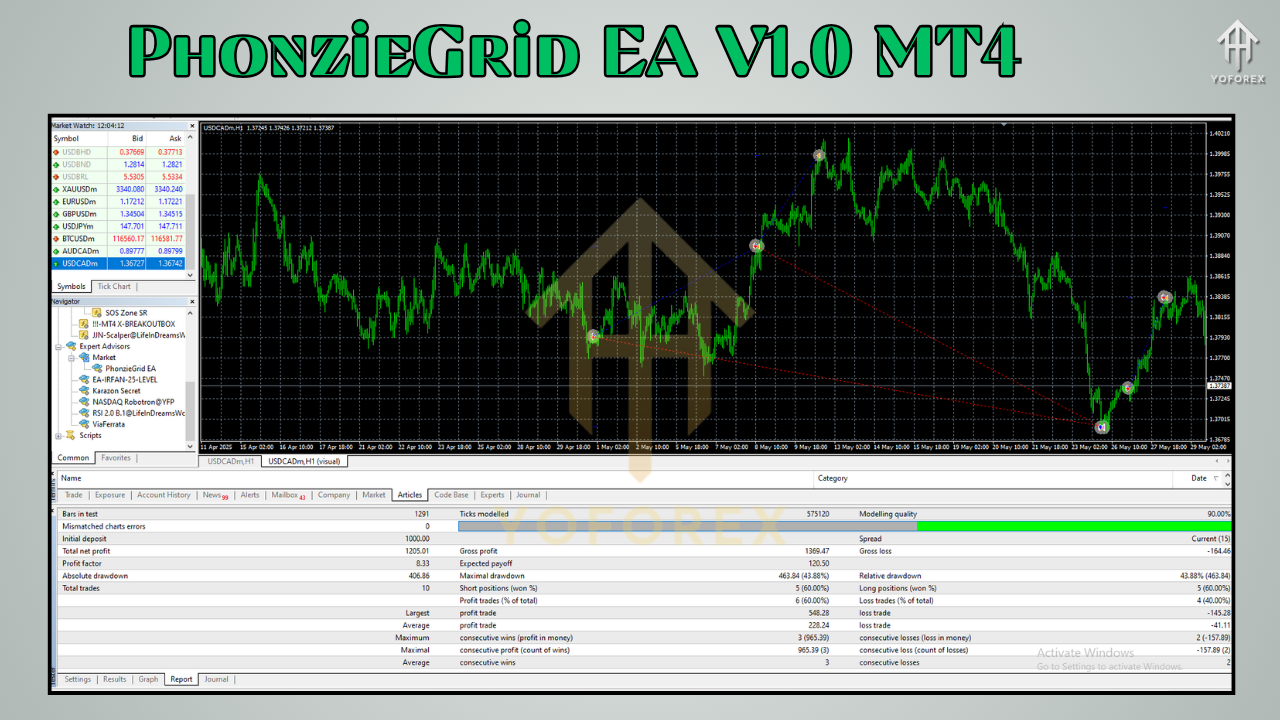
PhonzieGrid EA has been tested using real tick data, variable spreads, and live-like market conditions across major currency pairs and precious metals.
USDCAD (H1) Backtest – January 2020 to March 2024:
- Total Equity Growth: 400%+
- Maximum Drawdown: Below 13%
- Average Win Rate: 78%
- Profit Factor: 2.41
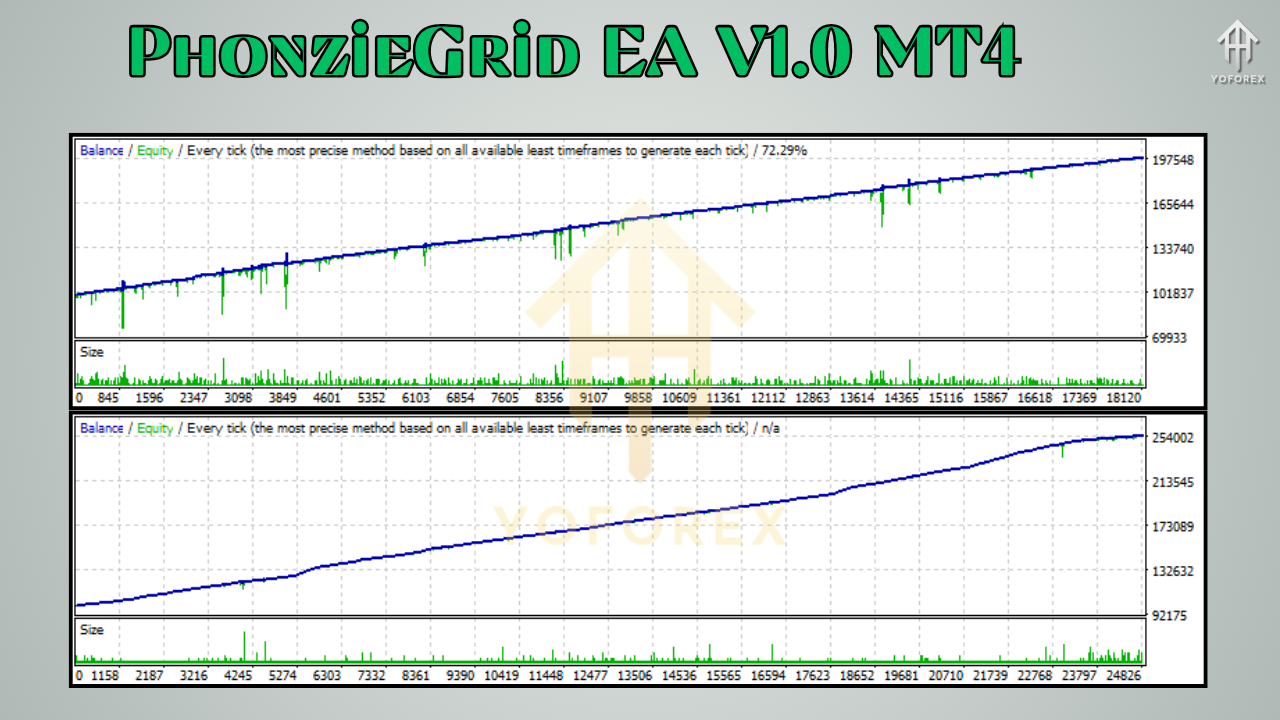
The equity curve from the backtest revealed steady growth with low volatility. The absence of aggressive martingale-style lot scaling helped preserve equity during temporary drawdowns.
Installation Guide for MT4
Installing and setting up PhonzieGrid EA is a straightforward process. Even if you're new to MT4 or automated trading, follow the steps below to get started quickly.
Step-by-Step Setup Instructions:
- Download the EA File
Visit MQL5.software and search for “PhonzieGrid EA V1.0 MT4” to download the.ex4file. - Place in the Correct Folder
Open MT4 and navigate to:File > Open Data Folder > MQL4 > Experts
Paste the EA file in the Experts folder. - Restart MT4 Terminal
After placing the file, restart your terminal. You’ll see PhonzieGrid EA under the “Navigator” pane in MT4. - Attach EA to Chart
Choose a supported pair like EURUSD or XAUUSD, then attach the EA to M15, H1, or H4 charts. - Configure Your Settings
Adjust inputs such as lot size, TP, SL, grid distance, drawdown limit, and filters according to your strategy or risk appetite. - Enable AutoTrading
Ensure the “AutoTrading” button in MT4 is active (green).
That’s it—your automated grid trading system is now active.
Why Choose YoForex?
YoForex has emerged as a trusted name in forex automation, not only because of the tools they develop but because of their mission to empower traders globally—without charging a dime.
Every EA released by YoForex, including PhonzieGrid, comes with:
- Lifetime Updates to the EA and settings
- Dedicated Support via Telegram and WhatsApp
- Access to Private Forex Trading Communities
- Zero Hidden Charges or Subscription Fees
Whether you’re a beginner, a part-time trader, or managing capital for a funded prop firm, YoForex tools are tailored to make professional trading accessible for everyone.
Visit YoForex.net to explore their full suite of EAs, indicators, and tutorials.
Community Support & Contact
YoForex believes in building a strong trading community. You can join support groups and get personal help from the developers and other traders.
Official Support Channels:
- Telegram Group: https://t.me/yoforexrobot
- WhatsApp Support: https://wa.me/+443300272265
Get real-time help, share results, ask for optimization strategies, or stay updated with EA releases.
Important Disclaimer
While PhonzieGrid EA includes advanced features to control risk, forex trading inherently involves risk. The performance seen in past backtests or live trades does not guarantee future returns. Always test EAs in demo environments before going live, especially with grid-based strategies.
Use appropriate money management, monitor trades regularly, and stay updated with market news for best results.
Conclusion: Smarter Grid Trading Is Here
If you’ve struggled with reckless martingale bots or manual grid setups that demand constant attention, PhonzieGrid EA V1.0 offers a powerful alternative. With intelligent trade placement, drawdown protection, and hands-free operation—it represents the next evolution in automated grid trading.
Whether you're looking to build passive income or enhance your existing trading strategy, this EA gives you the control, safety, and profitability you need.
Download Now: Free Forever
Don’t wait to automate your trading journey. Download PhonzieGrid EA V1.0 for MT4 completely free and start trading smarter today.
- Download from MQL5.software
- Visit YoForex.net for more tools and tutorials
Have questions or need help? Reach out via Telegram or WhatsApp anytime.






Comments (2)
toi can bot
toi can bot
Leave a Comment