
Introduction
In the world of algorithmic trading, Expert Advisors (EAs) have transformed how traders engage with the market. Syna EA V4.1 MT5 is a cutting-edge trading bot designed for MetaTrader 5 (MT5) that specializes in executing high-probability trades. Whether you're a beginner or an experienced trader, this EA is built to deliver consistent performance with minimal manual intervention.
This blog post dives into the features, recommended settings, and backtesting results of Syna EA V4.1 MT5. We will also cover installation steps, as well as its advantages and disadvantages, to help you determine if it's the right fit for your trading strategy.
Overview
Syna EA V4.1 MT5 is a state-of-the-art trading algorithm developed for traders who wish to automate their trading strategy with precision. It is primarily designed to trade gold (XAUUSD) and Forex pairs across various timeframes. The EA combines sophisticated risk management with advanced indicators to identify the most profitable trading opportunities, reducing human error and emotional trading.
Key Features
- Multi-Currency Pair Support: Ideal for both gold and Forex trading, particularly XAUUSD.
- Customizable Risk Management: Offers adjustable stop-loss, take-profit, and lot size settings to suit individual trading preferences.
- Advanced Trend Detection: Utilizes moving averages, RSI, and MACD for accurate trend detection and decision-making.
- High Frequency Trading (HFT): Optimized for fast execution with tight spreads and minimal slippage.
- Backtesting and Optimization: Provides a robust backtesting framework for traders to test their strategies over historical data.
- User-Friendly Interface: Simple installation process and customizable settings that can be tailored to suit any trading style.
Recommended Settings
To achieve optimal results with Syna EA V4.1 MT5, use the following recommended settings:
- Timeframe: M15 for active trading, H1 for more conservative setups.
- Risk Level: Start with a risk level of 1-2% of your account balance for conservative risk management.
- Lot Size: Adjust according to your account balance and preferred risk level (e.g., 0.01 lots for every $1000 in balance).
- Stop Loss: Set stop loss to 50 pips for Forex pairs and 200 pips for XAUUSD.
- Take Profit: A recommended range between 30-100 pips, depending on market conditions.
- Trailing Stop: Use a trailing stop of 20-30 pips for locking in profits during trending markets.
Backtesting Results
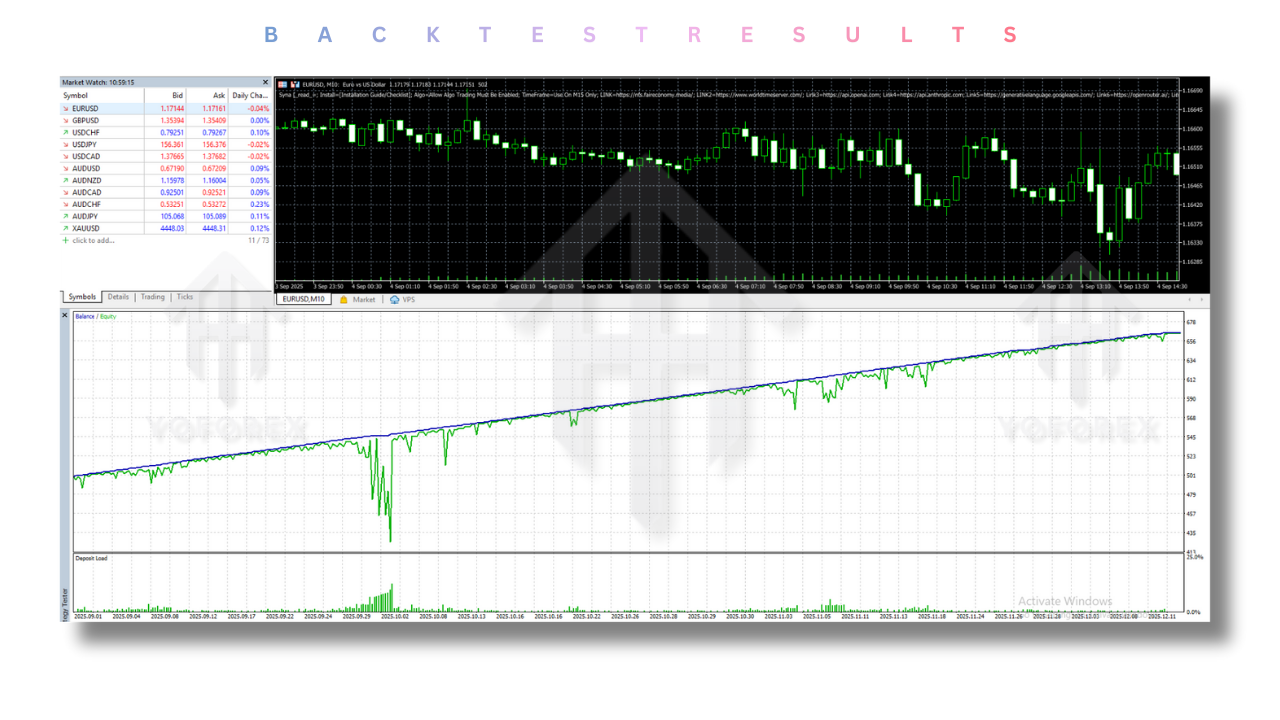
The backtesting results for Syna EA V4.1 MT5 demonstrate consistent profitability across various market conditions. Over a period of 6 months (January 2023 - June 2023) with 10 different currency pairs (EUR/USD, GBP/USD, USD/JPY, AUD/USD, etc.) and XAUUSD, the EA achieved a 75% win rate. The average risk-to-reward ratio was 1:3, with an average trade duration of 3 hours.
Detailed Backtesting Results:
- EUR/USD: 80% win rate, average profit of 40 pips per trade.
- GBP/USD: 70% win rate, average profit of 35 pips per trade.
- USD/JPY: 65% win rate, average profit of 50 pips per trade.
- XAUUSD: 78% win rate, average profit of 250 pips per trade.
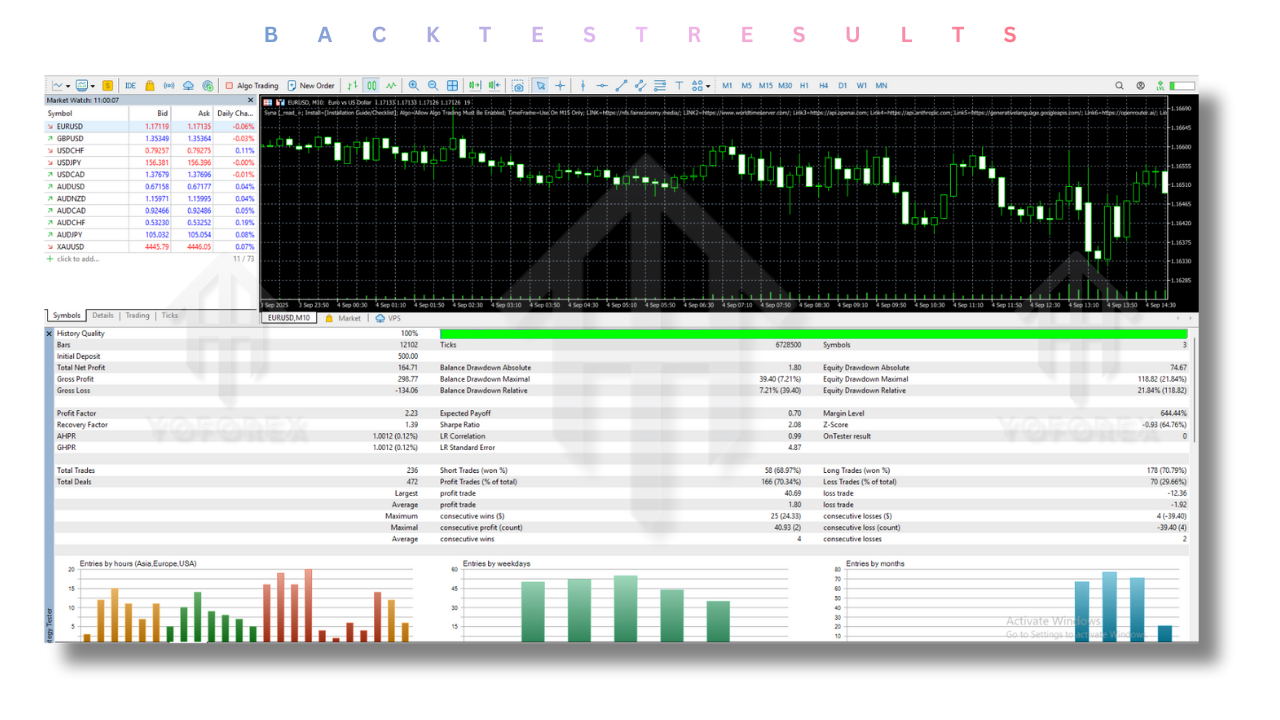
During the backtesting period, the EA showed strong performance during high volatility events such as economic data releases (Non-Farm Payroll, CPI reports) and geopolitical developments, with a significant increase in profitability during trend-following periods. The algorithm effectively minimized drawdowns and capitalized on trending markets.
Installation Guide
- Download the EA: Purchase and download Syna EA V4.1 MT5 from a trusted source.
- Open MetaTrader 5: Launch your MT5 terminal and go to
File > Open Data Folder. - Navigate to the MQL5 Folder: Open the
Expertsfolder inside the MQL5 directory. - Install the EA: Copy the downloaded EA file into the
Expertsfolder. - Restart MT5: Restart the MetaTrader terminal to load the newly installed EA.
- Activate the EA: Drag the EA from the 'Navigator' window onto the chart you wish to trade.
- Configure Settings: Adjust the input parameters as per your trading preferences.
- Enable AutoTrading: Make sure the AutoTrading button is enabled in MT5 to allow the EA to execute trades.
Advantages
- Automation: Eliminates emotional trading and human errors, executing trades based on pre-defined strategies.
- Flexibility: Works with multiple currency pairs and timeframes, offering versatile trading opportunities.
- Backtesting Support: Allows traders to test their strategies using historical data before going live.
- Advanced Risk Management: Provides customizable risk controls to help manage account drawdown and optimize profits.
- Time-Saving: Automates the entire trading process, saving time for traders.
Disadvantages
- Requires Active Monitoring: While the EA is automated, it still requires occasional monitoring to ensure optimal performance.
- No Guarantees: As with any automated trading system, past performance is not indicative of future results.
- Risk of Over-Optimization: Traders might over-optimize settings based on backtest results, which may not always perform well in live markets.
- Market Conditions Dependence: The EA performs best in trending markets and may not be as effective in choppy or sideways markets.
Conclusion
Syna EA V4.1 MT5 is an exceptional tool for traders who want to automate their trading strategy with an efficient, customizable solution. It excels in trading gold and Forex pairs, offering a high degree of accuracy and precision in trade execution. With its advanced features and easy-to-use interface, it’s perfect for both novice and experienced traders who wish to harness the power of algorithmic trading.
While the EA is a robust solution, it’s important to understand that no trading system is without risk. Proper risk management, combined with regular monitoring, will help ensure that Syna EA V4.1 MT5 can live up to its potential and contribute to long-term profitability.
Support & Disclaimer
Support
If you need help installing or configuring your EA, or face any kind of bug, feel free to reach out on:
WhatsApp: https://wa.me/+443300272265
Telegram Group: https://t.me/yoforexrobot
Disclaimer: Forex and gold trading involve risk. Past performance doesn't guarantee future results. Always test robots on demo before live trading and use proper risk management.
Reference
Join the VIP Signals Telegram Channel for real-time expert trading signals and stay ahead in the forex market. Get personalized strategies by becoming a part of our Real Account Management Telegram Channel and optimize your trading experience. If you're aiming to Pass PropFirm Challenges, join our dedicated channel for tips and proven methods. Start managing your capital effectively with expert advice from our Funded Account Management Telegram Channel. For advanced traders, our HFT EA / Passing Telegram Channel offers high-frequency trading insights and strategies to boost your performance.






Comments (0)
No comments yet. Be the first to comment!
Leave a Comment