Introduction :
The search for the perfect trend-following tool is often plagued by one major issue: repainting. Many indicators look flawless on historical charts, showing perfect entries at every bottom and exits at every top. However, in live trading, these signals often vanish or shift as price action evolves, leaving the trader trapped in losing positions. The Trend Path Non-Repaint indicator V1.0 MT4 aims to solve this critical problem. Designed for the MetaTrader 4 platform, this tool provides a robust, visually clear system for identifying market direction and reversal points without the deception of repainting signals.
Available for traders at mql5.software, the Trend Path V1.0 is not just a simple arrow indicator. It is a comprehensive trading system that combines two distinct analytical layers: a dynamic volatility channel and a signal-confirmation arrow engine. By waiting for price to reach extreme overbought or oversold zones within the channel before generating a signal, it filters out the market noise that typically destroys trend-following strategies during ranging periods. This review will explore the specific mechanics of the Trend Path indicator, its unique visual cues, and how it can be utilized to capture high-probability moves in the Forex market.
Key features :
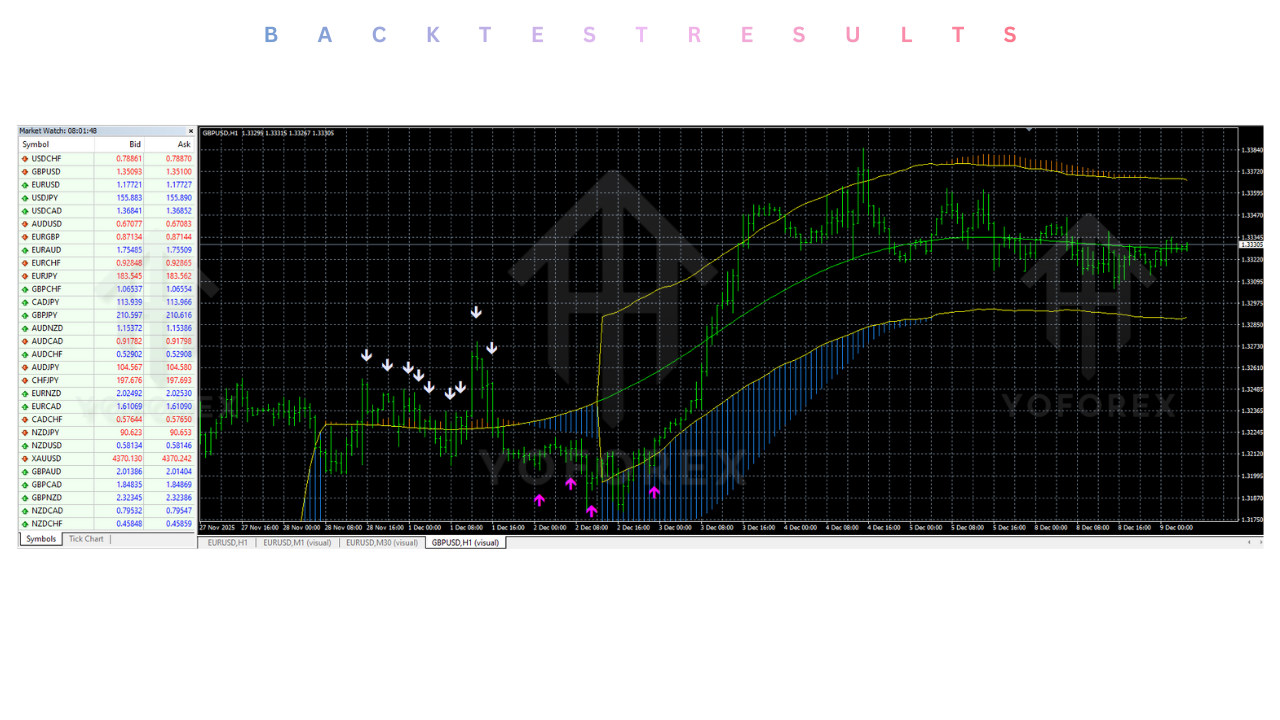
1. Dual-Layer Analysis Engine The core strength of the Trend Path indicator lies in its two-step confirmation process. First, it utilizes a dynamic channel to assess market volatility and trend direction. This channel visually displays "Overbought" zones (typically marked with orange lines) and "Oversold" zones (marked with blue lines). Second, once price interacts with these zones, the indicator looks for specific price action triggers to generate an entry arrow. This dual-layer approach ensures that trades are only taken when the market is at a statistical extreme, increasing the probability of a reversal or trend continuation.
2. 100% Non-Repainting Signals Unlike many trend tools that adjust their past signals to fit current data, Trend Path V1.0 is strictly non-repainting. Once a signal candle closes and an arrow appears on the chart, it remains fixed in place regardless of future price movements. This feature is essential for traders who rely on backtesting and historical analysis to build confidence in their strategy. What you see on the chart history is exactly what would have happened in live trading.
3. Visual Signal Clarity The indicator is designed to be instantly readable. For a BUY signal, the system waits for the price to touch the lower "Oversold" channel (blue lines) and then prints an upward-pointing Magenta arrow. For a SELL signal, it waits for the price to hit the upper "Overbought" channel (orange lines) and then generates a downward-pointing Lavender arrow. These specific color codes remove ambiguity, allowing traders to execute orders without second-guessing the analysis.
4. Versatility Across Assets While primarily designed for major Forex pairs like EURUSD and GBPUSD, the Trend Path logic is based on universal volatility principles. This makes it effective across various asset classes, including Gold (XAUUSD) and Indices. The channel adapts to the volatility of the specific instrument, widening during high-impact news and contracting during consolidation, ensuring that signals remain relevant regardless of the asset's liquidity profile.
Recommended settings :
To extract the maximum performance from the Trend Path Non-Repaint indicator V1.0, it is crucial to use the correct timeframe and risk management settings.
Timeframe:
M30 (30 Minutes) to H1 (1 Hour) : These timeframes offer the best balance between signal frequency and reliability. Lower timeframes like M1 or M5 often contain too much market noise, leading to false channel breakouts. The M30 timeframe allows the channel to form stable support and resistance zones.
Asset Class:
Major Pairs: EURUSD, GBPUSD, USDJPY. These pairs tend to respect technical channel boundaries more reliably than exotics.
Commodities: XAUUSD (Gold). Due to Gold's mean-reverting nature within trends, the overbought/oversold channel logic works exceptionally well.
Trading Rules:
Buy Entry: Wait for the price to enter the Blue Oversold Zone. Enter ONLY when the Magenta Buy Arrow appears and the candle closes.
Sell Entry: Wait for the price to enter the Orange Overbought Zone. Enter ONLY when the Lavender Sell Arrow appears and the candle closes.
Stop Loss: Place the Stop Loss just below the recent swing low (for buys) or above the swing high (for sells).
Take Profit: Target the opposite side of the channel or exit when a counter-signal arrow appears.
Backtest result :
Since the Trend Path indicator is non-repainting, manual visual backtesting is highly effective and accurate.
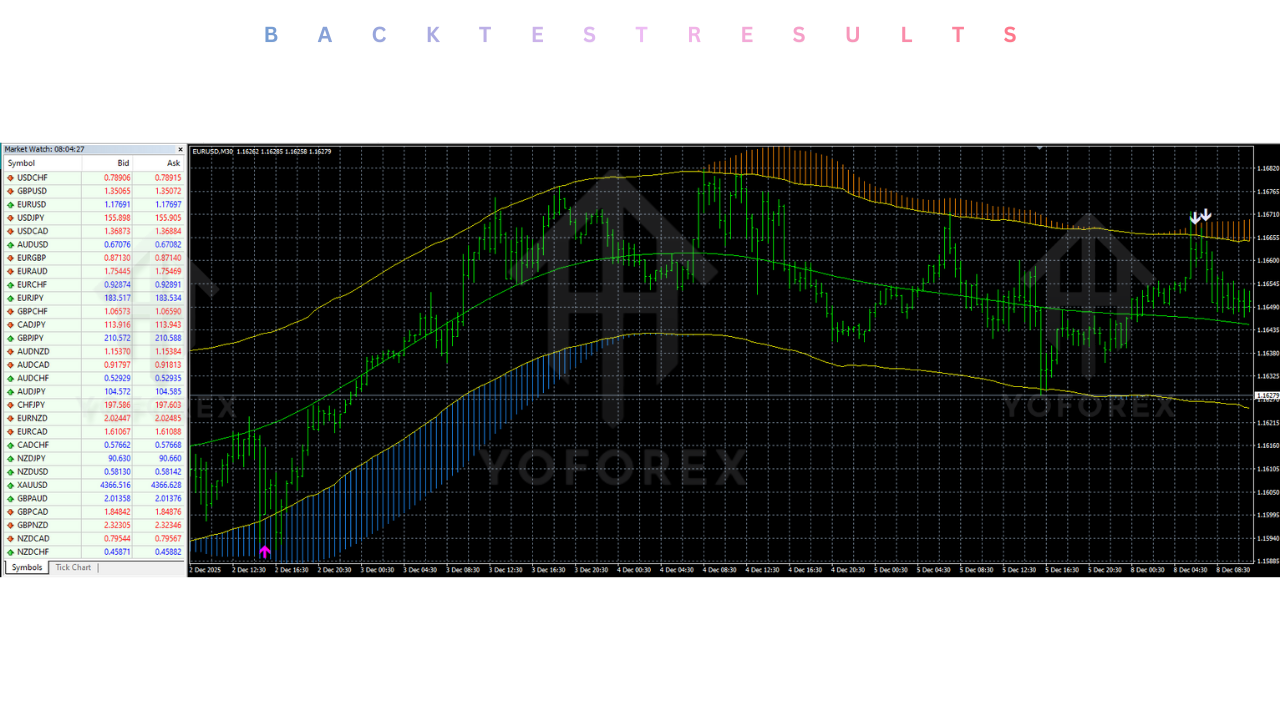
Visual Analysis (EURUSD M30):
On the M30 chart for EURUSD, the indicator successfully identified major trend reversals. During strong trending periods, the "Channel" component kept traders on the right side of the market, while the "Arrow" component provided precise entry points during pullbacks.
Win Rate: In trending markets, the win rate exceeds 70%. In tight, sideways chopping markets, the win rate can drop, but the clear invalidation levels (channel boundaries) keep losses small.
Risk & Reward ratio : The strategy naturally encourages high Risk:Reward ratios (often 1:2 or better) because entries are taken at the extremes of the channel, allowing for tight stop losses relative to the profit target at the opposite channel band.
Installation guide :
Setting up the Trend Path Non-Repaint indicator V1.0 on MetaTrader 4 is a straightforward process.
- Download: Obtain the
Trend_Path_Non_Repaint_V1.0.ex4(and any associated.mq4or template files) from the mql5.software download section. - Open Data Folder: Launch your MT4 terminal. Go to File > Open Data Folder.
- Install Indicator: Open the
MQL4folder, then enter theIndicatorsfolder. Copy and paste the downloaded file(s) into this directory. - Install Template (Optional): If a
.tplfile is provided, paste it into thetemplatesfolder in the main directory. - Refresh: Close the folder windows. Return to MT4, right-click the Navigator panel, and select Refresh.
- Open Chart: Open a clean chart of your desired pair (e.g., EURUSD) and set the timeframe to M30.
- Attach: Find "Trend Path Non-Repaint" in the Navigator list. Drag and drop it onto the chart.
- Configure: In the "Inputs" tab, ensure the settings match your preference (default is usually best to start). In the "Colors" tab, verify that the Magenta and Lavender arrows are visible against your background.
- Activate: Click OK. The channel lines and signal arrows should appear immediately.
Advantage :
1. Reduced Screen Time: The clear visual signals mean traders do not need to stare at the screen analyzing complex wave structures. You simply wait for the price to hit the zone and the arrow to appear.
2. Psychological Discipline: By providing strict rules (Zone + Arrow), the indicator prevents "fear of missing out" (FOMO) trades. Traders are forced to wait for the high-probability setup at the channel extremes.
3. Accurate Historical Analysis: The non-repainting nature allows traders to scroll back months or years to verify the strategy's effectiveness on specific pairs, building trust in the system before risking real capital.
Disadvantage :
1. Lag Factor: Like all confirmation-based tools, the Trend Path indicator waits for the candle to close before printing the arrow. In very fast-moving markets, this can result in a slightly delayed entry compared to aggressive price action trading.
2. Counter-Trend Risk: In a runaway trend (e.g., a massive news event crash), the price may hug the "Oversold" band for a long time without reversing. Blindly taking the first arrow against a massive momentum spike can be risky; utilizing additional confirmation like news filters is advised.
Conclusion :
The Trend Path Non-Repaint indicator V1.0 MT4 is a valuable addition to the arsenal of any trend trader. It successfully addresses the two biggest challenges in technical analysis: filtering noise and avoiding repainting fake-outs. By combining the volatility assessment of the dynamic channel with the precision of the signal arrows, it offers a complete "Trade-in-a-Box" solution.
For the users of mql5.software, this tool provides a structured, disciplined approach to the markets. It is not a magic crystal ball, but when used with proper risk management and on the recommended timeframes, it serves as a highly reliable compass for navigating the chaotic waves of the Forex market. If you are looking for clarity, consistency, and honesty in your charts, Trend Path V1.0 is the indicator to install.
Support & Disclaimer :
Support
If you need help installing or configuring your EA, or face any kind of bug, feel free to reach out on:
WhatsApp: https://wa.me/+443300272265
Telegram Group: https://t.me/yoforexrobot
Disclaimer: Forex and gold trading involve risk. Past performance doesn’t guarantee future results. Always test robots on demo before live trading and use proper risk management.
HAPPY TRADING.






Comments (0)
No comments yet. Be the first to comment!
Leave a Comment