
CENTRO DE GRAVIDADE Indicator V1.0 MT4 — Zero-Lag Precision for Smarter Reversals
If you’ve ever felt your indicator fires after the move, you’re not alone. Most tools are built on moving averages that lag, so the best part of the swing is already gone by the time a signal shows up. The CENTRO DE GRAVIDADE (COG) Indicator V1.0 for MT4 takes a different path. Inspired by John Ehlers’ digital signal processing work, it’s designed to cut lag, react earlier, and still feel stable enough for real trading. In plain English: it’s built to help you see turning points sooner—without a mess of false noise… or at least a whole lot less of it.
This post walks you through what the COG is, how it works, practical setups, risk tips, and how to get it running in MetaTrader 4. Pairs? EUR/USD, GBP/USD, USD/JPY. Time frames? Any (seriously). If you love a smooth oscillator that doesn’t sleep on momentum shifts, keep reading.
What Is the CENTRO DE GRAVIDADE (COG) Indicator?
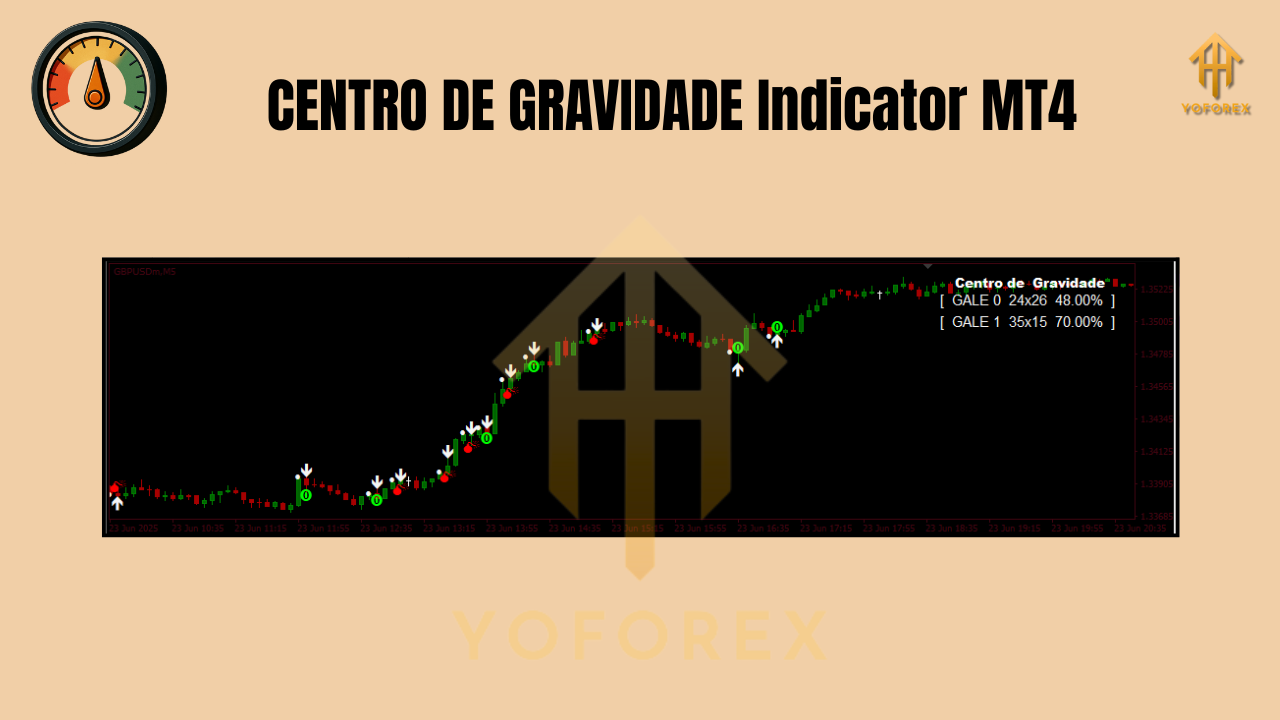
At its core, the CENTRO DE GRAVIDADE Indicator is a zero-lag oscillator. Rather than averaging price the usual way (which always trails), COG uses weighted prices with heavier emphasis on recent action. That weighting creates a central “gravity” point and a smooth line oscillating around it. When price stretches too far from this center, gravity tends to pull it back—hence the name.
In MT4, you’ll typically see the COG plotted in a separate subwindow beneath your price chart. Many traders add a signal line (a smoothed line of the COG itself) to confirm entries, or they’ll watch for crosses and slope changes. Unlike a regular MA that drifts behind, COG aims to keep up, giving you a clearer read on now, not just what happened.
Why traders like it:
- It’s designed to reduce lag while keeping the line readable.
- It highlights overbought/oversold conditions without needing a dozen extra filters.
- It plays well with multiple time frames and a variety of pairs, especially the majors listed above.
How It Works (Without the Math Headache)
The COG calculates a kind of center point of recent prices by weighting the most recent data more heavily. That creates two useful effects:
- Responsiveness: Fresh price changes matter more, so the line reacts quickly.
- Mean-Reversion Insight: You can read distance and angle from the “center” as clues for potential reversions or momentum continuation.
You’ll often combine the COG line with:
- A signal line (smoothed COG) for crossovers.
- Reference zones for contextual overbought/oversold reading (not fixed numbers; more on that below).
- A higher-timeframe COG view for trend bias.
No crystal ball here—just sharper timing and context. And coz it’s zero-lag by design, signals feel more “on time” than classic smoothing tools.
Key Features You’ll Actually Use
- • Zero-lag design based on Ehlers-style digital signal processing ideas
- • Clear overbought/oversold visualization around a dynamic gravity center
- • Works on any timeframe (scalping M5, intraday M15/H1, swing H4/D1)
- • Pairs: EUR/USD, GBP/USD, USD/JPY (plus other liquid majors)
- • Optional signal line for straightforward crossover entries/exits
- • Slope-based momentum cues without waiting for price to “catch up”
- • Divergence spotting (COG vs price) to anticipate slowdowns
- • Multi-timeframe friendly: align with higher-TF COG for better odds
- • Clean, minimal UI in a separate subwindow—no chart clutter
- • Sensible defaults with input parameters you can tune quickly
Practical Trading Setups With COG
Below are battle-tested approaches. Keep it simple first; layer nuance later.
1) Reversion Bounce (Classic Mean-Reversion)
- Bias: Flat or gently ranging market.
- Trigger: COG line pushes into a local extreme (your “overbought/oversold” context), then rolls back toward the center.
- Entry: After the COG crosses back over its signal line in the direction of reversion.
- Exit: Near the center/neutral zone, or trail with structure (recent swing highs/lows).
2) Trend Pullback With COG Slope
- Bias: Clear trend on the higher timeframe (e.g., H4 uptrend).
- Trigger: On your trade TF (e.g., M15/H1), wait for a pullback where COG slopes against trend and then hooks back with the trend.
- Entry: On the hook + crossover of COG over its signal line, in trend direction.
- Exit: Partial at recent high/low; let a runner trail behind higher-TF structure.
3) Divergence Read
- Bias: Extended moves, suspicious momentum.
- Trigger: Price makes a new extreme but COG doesn’t confirm (higher price high, lower COG high; or lower price low, higher COG low).
- Entry: After a COG slope flip or crossover, once price shows failure to continue.
- Exit: Into the mid-zone; re-assess if trend reasserts.
Pro tip: On EUR/USD and GBP/USD, COG divergences on M15/H1 can be powerful around session opens (London/NY); for USD/JPY, watch for momentum flushes during Tokyo/London overlap.
Inputs & Settings (Start Here)
Every implementation differs a bit, but these guidelines keep you out of trouble:
- Length/Period: Start with a short-to-medium window (e.g., 10–20). Shorter = more responsive, but twitchier.
- Signal Smoothing: A small smoothing (e.g., 3–5) keeps things readable without re-introducing lag.
- Price Type: Close price is fine; test HLC/median if your data is noisy.
- OB/OS Context: Don’t fixate on a number like “±100.” Instead, build zones by eyeballing recent extremes for your pair & timeframe. Markets aren’t static—your filters shouldn’t be either.
- Alerts: If the indicator supports alerts on crossover or slope flip, enable them. You’ll catch fewer late entries.

Risk & Trade Management (Don’t Skip)
- Position sizing: 0.5–1.0% risk per trade is a sensible starting point.
- Stops: Logical stops beyond recent structure (e.g., above/below swing points), not just fixed pips.
- Time filter: If a trade goes nowhere after X candles (decide this upfront), reduce risk or scratch it.
- News filter: For majors, big macro news can invalidate mean-reversion reads. Consider standing aside during high-impact events.
- Multi-TF check: A quick glance at the higher-TF COG slope prevents counter-trend traps.
Installation (MT4) In Under a Minute
- Download the CENTRO DE GRAVIDADE Indicator V1.0 file.
- Open MT4 → File → Open Data Folder.
- Navigate to MQL4 → Indicators and paste the file.
- Restart MT4 (or right-click Indicators in Navigator → Refresh).
- Drag CENTRO DE GRAVIDADE onto your chart.
- Adjust Inputs (Length, Smoothing, any visuals).
- Add a signal line if included, then save a template for reuse.
Best Practices & Workflow
- Pick your lane: Are you mean-reverting or trend-pullback trading with COG? Mixing both on the same chart can blur decision-making.
- Session awareness: Range setups often behave better in Asia; momentum/trend pullbacks can shine in London/NY.
- Data first: Forward-test your favorite pair/timeframe in demo for 2–3 weeks before going live.
- Keep charts clean: COG + signal line + maybe one confirmation tool (ATR or structure). That’s enough.
- Journal entries: Track which COG conditions precede winners vs chop. You’ll quickly spot your edge.
Final Word
The CENTRO DE GRAVIDADE Indicator V1.0 MT4 gives you a cleaner, earlier read on potential reversals and pullbacks without drowning you in lag. Keep the playbook simple—pick one or two setups, respect risk, and let COG do what it’s built to do. You’ll see the difference on your charts, and—if you’re disciplined—on your P/L over time.

Comments (0)
No comments yet. Be the first to comment!
Leave a Comment