
CuteDragon ALGO EA MT4 might sound like a playful name, but behind the “cute” branding is a serious trading engine built for precision, discipline, and automation. This Expert Advisor is designed for MetaTrader 4 users who want to combine intelligent algorithmic trading with low-stress execution, without sitting in front of charts all day.
In this blog, we’ll explore what CuteDragon ALGO EA MT4 does, how its core strategy works, recommended settings, risk management ideas, and why it can be a great fit for both beginners and experienced traders looking for consistent results.
What Is CuteDragon ALGO EA MT4?
CuteDragon ALGO EA MT4 is an automated forex trading robot that runs on the MetaTrader 4 platform. It scans the market in real time, looks for high-probability entries based on trend, volatility, and price action, and then places trades automatically when the conditions match its built-in logic.
Rather than trying to “gamble” the market, CuteDragon ALGO EA MT4 focuses on controlled entries with defined stop loss and take profit levels. The goal is simple: capture clean PIPs from structured moves, while protecting the account from emotional, impulsive decisions.
Core Trading Logic of CuteDragon ALGO EA MT4
Under the hood, CuteDragon ALGO EA MT4 is powered by a rules-based algorithm that reacts to price behavior, not random guesses. The EA typically combines:
- Trend Detection: Uses moving averages and market structure to identify the dominant direction.
- Momentum Filters: Confirms that price has enough strength before entering any trade.
- Volatility Check: Avoids flat, low-energy markets where signals tend to fail.
- Support & Resistance Zones: Looks for entries near key levels to improve risk-to-reward.
- Risk Management Engine: Every trade is opened with strict SL and TP, with optional trailing stop.
By combining these filters, CuteDragon ALGO EA MT4 aims to reduce false signals and stay aligned with the bigger flow of the market instead of fighting it.
Trading Style: Scalper, Intraday or Swing?
CuteDragon ALGO EA MT4 is flexible enough to be used as:
- Light Scalper on lower timeframes like M5 or M15
- Intraday EA on M15 or H1
- Short-term Swing EA on H1 or H4, depending on the settings
Most traders prefer using CuteDragon ALGO EA MT4 in intraday mode, where it hunts for 10–40 PIP moves in strong sessions like London and New York.
Recommended Pairs and Timeframes
To get the best out of CuteDragon ALGO EA MT4, you can start with:
- Major Pairs: EURUSD, GBPUSD, USDJPY, AUDUSD
- Optional Metals: XAUUSD (if your broker offers tight spreads)
Suggested Timeframes:
- EURUSD / GBPUSD: M15 or H1
- USDJPY / AUDUSD: M15
- XAUUSD (optional): M15 or H1 with conservative risk
Because CuteDragon ALGO EA MT4 is very sensitive to spreads and execution quality, an ECN or Raw Spread account is highly recommended.
Minimum Deposit and Account Requirements
CuteDragon ALGO EA MT4 is designed to work even on smaller accounts, but proper money management is always key.
- Minimum Deposit: $100–$200
- Leverage: 1:200 to 1:500 (depending on broker rules)
- Account Type: ECN / Raw Spread with low commission
- VPS: Strongly recommended for 24/7 stable performance
Even though CuteDragon ALGO EA MT4 can technically run on micro accounts, more breathing room (for example $300–$500) gives better flexibility and smoother risk distribution.
Key Features of CuteDragon ALGO EA MT4
-
Fully Automated Trading
Once attached to the chart, CuteDragon ALGO EA MT4 identifies setups, opens trades, manages stops and takes profit, and closes positions automatically. -
No Martingale, No Grid
The EA avoids dangerous systems that multiply lot sizes after losses. Lots are calculated logically based on your risk settings. -
Dynamic Stop Loss & Take Profit
Instead of fixed values only, CuteDragon ALGO EA MT4 can adjust exits according to volatility, making it more adaptive to different sessions. -
Built-In News Protection (Optional via Settings)
Users can manually avoid high-impact news windows by disabling trading or adjusting settings ahead of major events. -
User-Friendly Inputs
The settings panel is clean: you can control risk percentage, maximum number of open trades, trading sessions, and pair filters without needing coding skills. -
Low Drawdown Focus
CuteDragon ALGO EA MT4 tries to avoid deep floating losses by cutting slow or failing trades early according to its rules.
Example Settings for CuteDragon ALGO EA MT4
These are general example guidelines (each trader must backtest and forward test):
- Risk Per Trade: 1%–2% of account
- Max Trades Open: 3–5 (depending on account size)
- Lot Size Mode: Percentage-based, not fixed, for better scalability
- Trade Direction: Follow trend (avoid counter-trend unless you understand the logic)
- Trading Sessions: London and New York only for majors, avoid low-liquidity Asian session on some pairs
Using conservative risk ensures CuteDragon ALGO EA MT4 can recover from normal losing streaks and continue growing over the long term.
Backtesting & Forward Testing Behaviour
In well-structured backtests with quality tick data, traders often see that CuteDragon ALGO EA MT4:
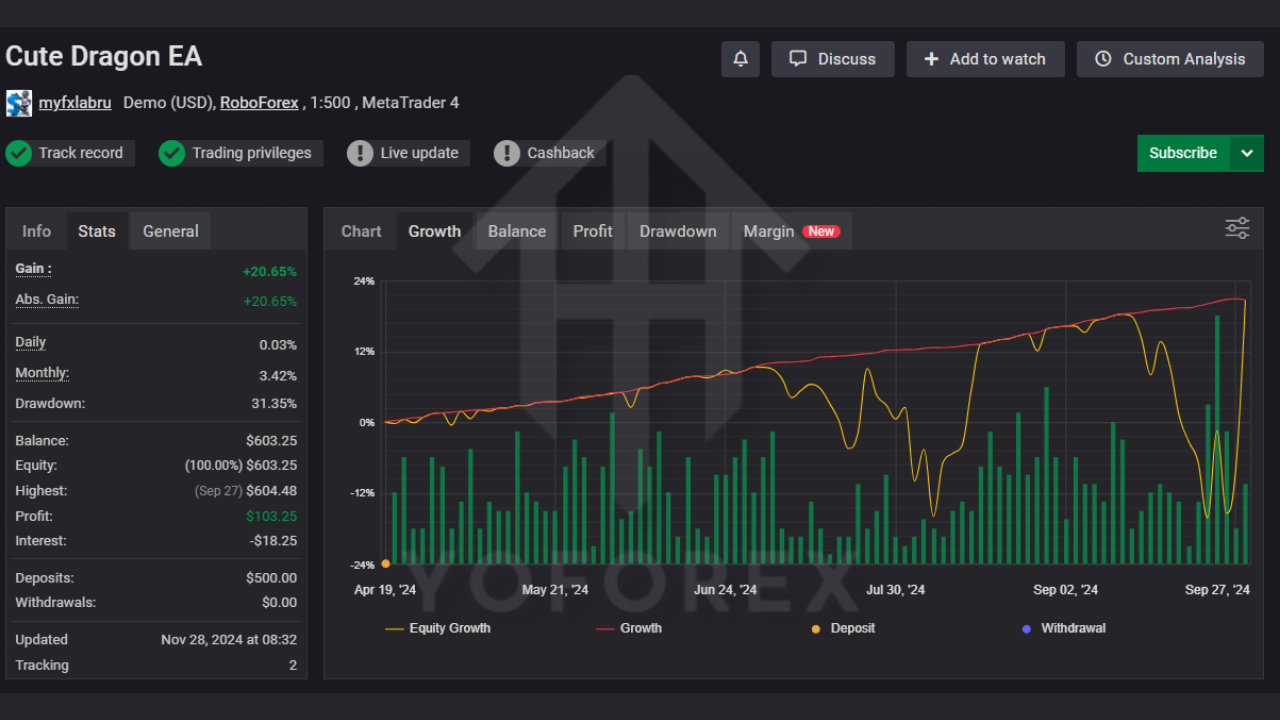
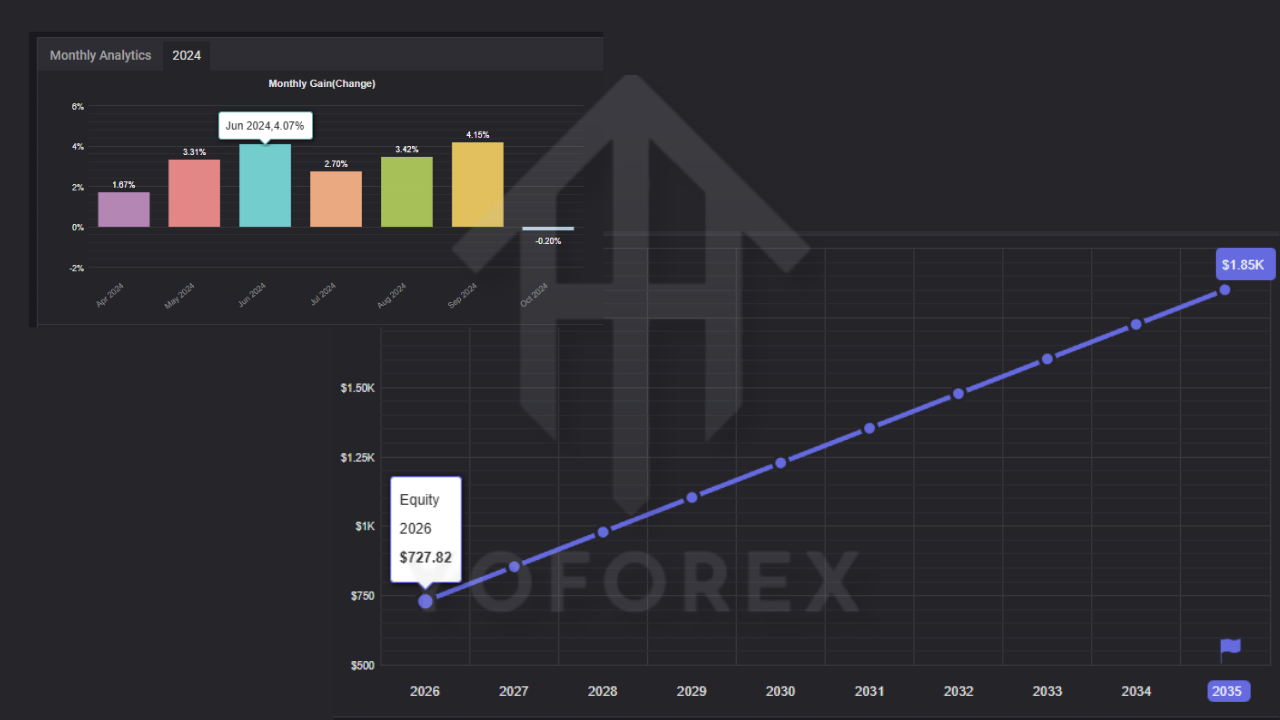
- Generates a steady equity curve instead of wild spikes
- Keeps maximum drawdown at a controlled level when used with 1–2% risk
- Performs best in trending or semi-trending conditions
- Experiences fewer trades but higher quality entries when strict filters are enabled
Forward testing on a demo or cent account is always recommended before going live with larger capital. This helps you learn how CuteDragon ALGO EA MT4 behaves under your broker’s execution conditions.
Advantages of CuteDragon ALGO EA MT4
- Easy to install and configure
- Suitable for beginners and experienced traders
- Works on multiple major pairs
- Focus on risk management and capital protection
- No complex indicators required from the user
- Fully hands-free once configured properly
- Cute branding but serious algorithm underneath
Possible Limitations
Like any EA, CuteDragon ALGO EA MT4 is not a magic money machine:
- Results can vary between brokers and liquidity providers
- Performance is weaker in choppy, sideways markets
- Requires patience during slow periods with fewer trades
- A VPS and stable internet connection are essential for best results
Understanding these limitations helps set realistic expectations and prevents emotional over-reactions to short-term outcomes.
How to Install CuteDragon ALGO EA MT4
- Open MetaTrader 4.
- Click on File → Open Data Folder.
- Go to MQL4 → Experts.
- Paste the CuteDragon ALGO EA MT4 file (.ex4 or .mq4).
- Close and restart MT4.
- In the Navigator panel, find Expert Advisors.
- Drag CuteDragon ALGO EA MT4 onto your chosen chart.
- Enable Allow live trading and check that AutoTrading is turned on.
- Set your risk parameters and press OK.
After that, CuteDragon ALGO EA MT4 will start monitoring the market and taking trades according to its strategy.
Trading Tips for Using CuteDragon ALGO EA MT4
- Start with a demo or very small real account.
- Avoid changing settings too frequently; let the EA show its behavior over a meaningful sample of trades.
- Use a journal to record account growth, drawdowns, and psychological reactions.
- Regularly check broker spreads, swaps, and execution speed.
- Combine CuteDragon ALGO EA MT4 with good money management and realistic profit targets.
Conclusion
CuteDragon ALGO EA MT4 brings together a fun brand identity with a disciplined, rule-based trading engine built for modern forex traders. It doesn’t promise “get rich overnight” results but instead focuses on consistent PIP collection, capital safety, and smart automation.
When used with proper risk control, reliable brokers, and a stable VPS, CuteDragon ALGO EA MT4 can become a powerful companion for traders who want to step into algorithmic trading without needing to code their own strategies.






Comments (0)
No comments yet. Be the first to comment!
Leave a Comment