Introduction: Struggling to Catch the Trend?
One of the biggest challenges traders face—whether you’re scalping gold or swing trading EURUSD—is knowing when a trend is really happening and when it’s just noise. Enter too early, and you risk a whipsaw. Enter too late, and you miss the meat of the move.
The FMX Trend Indicator V1.20 for MT4 was designed to solve exactly this problem. With a clean interface, easy-to-read color-coded signals, and no repainting, this tool helps you see the true market trend in real time—on any pair, any timeframe.
It’s the kind of tool that both beginners and seasoned pros can use without overcomplicating their charts.
Overview: What Is the FMX Trend Indicator V1.20 MT4?
The FMX Trend Indicator is a custom-built trend detection tool for MetaTrader 4 that filters out market noise and focuses on directional momentum.
It works with any asset—forex pairs, gold, indices, crypto CFDs—and adapts to any timeframe from 1-minute scalping to daily swing trades.
The core logic uses a combination of moving averages, momentum filters, and custom smoothing to reduce false signals. The result? Clear, color-based trend direction you can follow with confidence.
Whether you’re a breakout trader, pullback trader, or even a range scalper who wants to trade with the larger flow, the FMX Trend Indicator can fit your style.
Key Features of FMX Trend Indicator
- Works with all forex pairs, commodities, indices, and crypto CFDs
- Adapts to all timeframes—M1 to MN1
- Non-repaint logic—signals stay once they appear
- Color-coded trend line or background shading for quick reading
- Filters market noise—avoids choppy false reversals
- Suitable for scalping, intraday, and swing trading
- Can be used standalone or with other confirmations (RSI, MACD, S/R)
- Low CPU usage—ideal for running on multiple charts or VPS setups
- Adjustable sensitivity—tweak it for faster or slower trend detection
- Free download from MQL5.Software
- Fully tested and supported by YoForex development team
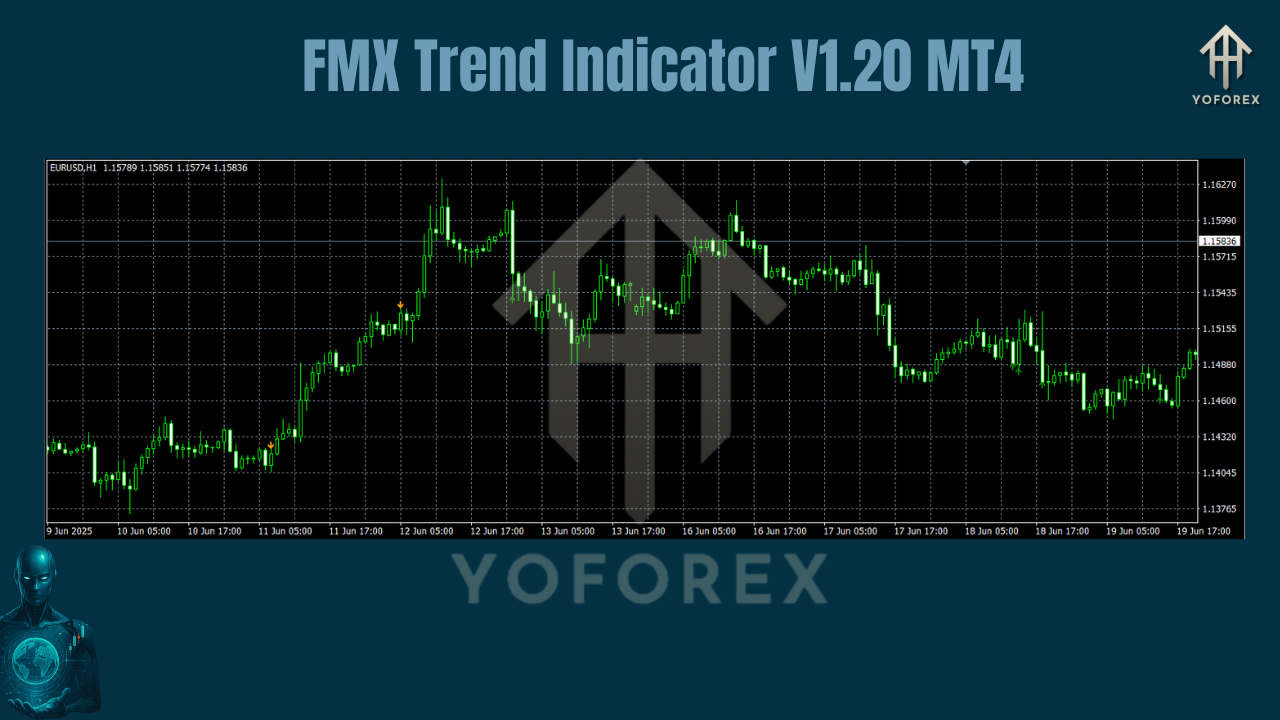
How It Works: The Trend Logic Behind FMX
The FMX Trend Indicator uses a multi-factor approach to determine the current market direction:
- Price Positioning: Checks where the current price is relative to smoothed moving averages.
- Momentum Strength: Measures the speed and consistency of recent price moves.
- Noise Filtering: Removes minor pullbacks from triggering false reversals.
Once the indicator confirms a trend shift, it changes the color of its plotted line (or background) to reflect the new direction.
Example:
- Blue/Green Color → Uptrend confirmed.
- Red/Orange Color → Downtrend confirmed.
This simple visual shift makes it incredibly easy to follow trends without staring at candles all day.
How Traders Use FMX Trend Indicator
- Scalping Example (XAUUSD M5)
- A gold scalper waits for FMX to flip green before entering. Once the trend is confirmed, they ride the move for 20–30 pips, avoiding early whipsaws.
- Swing Trading (GBPJPY H4)
- A swing trader uses FMX on H4 to confirm the higher timeframe direction before entering on M30 pullbacks—catching multi-day trends for hundreds of pips.
- Day Trading (EURUSD M15)
- An intraday trader waits for FMX to agree with their S/R levels. Only trades in the same direction as the indicator trend, boosting win rate.
How to Install & Start Using FMX Trend Indicator
Step 1: Download the Indicator
Go to MQL5.Software and download FMX Trend Indicator V1.20 MT4 for free.
Step 2: Install on MT4
- Open MT4
- Click
File > Open Data Folder - Navigate to
MQL4 > Indicators - Paste the downloaded
.ex4or.mq4file - Restart MT4
Step 3: Attach to Chart
- Open any pair and timeframe
- Drag
FMX Trend Indicatorfrom the Navigator window - Adjust sensitivity and colors to your preference
Step 4: Trade With Confidence
- Buy when FMX flips bullish and matches your strategy conditions
- Sell when FMX flips bearish
- Always use stop-loss and proper risk management
Pro Tips for Best Results
- Combine with Support & Resistance zones for higher accuracy
- Check FMX direction on higher timeframe before entering lower timeframe trades
- Avoid trading just before major economic news, even if FMX shows a trend shift
- Use with YoForex’s other free tools like Natural Momentum Indicator for confirmation
Why YoForex Tools Are Different
At YoForex, we focus on building tools that traders actually use—not flashy marketing gimmicks. Every indicator:
- Is free for lifetime use
- Comes with full installation support
- Is tested on live market data before release
- Has no hidden ads or locked features
We’re not here to sell you an overhyped “holy grail.” We’re here to give you a reliable edge.
Visit yoforex.org to explore our complete indicator library.
Support & Contact
Need help setting up FMX or tuning it for your style? We’re available via:
WhatsApp Support → https://wa.me/+443300272265
Telegram Group → https://t.me/yoforexrobot
Final Thoughts: Should You Try FMX Trend Indicator?
If you’re tired of second-guessing the trend, the FMX Trend Indicator V1.20 MT4 is worth adding to your toolkit. It’s:
Accurate
Non-repaint
Easy to use
Works on any chart
Whether you’re scalping, day trading, or swinging multi-day moves, FMX gives you visual clarity so you can ride trends with more confidence.
Download FMX Trend Indicator V1.20 Here
Get help anytime on WhatsApp or Telegram
YoForex – empowering traders worldwide, one free tool at a time.
Join our Telegram for the latest updates and support






Comments (0)
No comments yet. Be the first to comment!
Leave a Comment