
Forex Quant EA V1.0 MT4 – AI-Driven Accuracy for Profitable Automation
Are you tired of overpaying for trading robots that fail to deliver? Do flashy marketing claims lure you in, only to leave your account suffering losses? Forex Quant EA V1.0 MT4 from YoForex was designed to change that narrative. Developed by a team of quantitative specialists and veteran traders, this Expert Advisor harnesses AI-powered analytics to scan markets, pinpoint high‑probability setups, and apply robust risk controls—all without you glued to charts day and night. Whether you’re just starting out or you’ve been trading for years, Forex Quant EA V1.0 MT4 combines simplicity and sophistication in a turnkey package. Best of all, it’s completely free on MQL5.software, so you can test-drive professional‑grade automation with zero upfront cost.
What Is Forex Quant EA V1.0 MT4?
Forex Quant EA V1.0 MT4 is a fully automated trading system engineered exclusively for the MetaTrader 4 platform. At its core lies a suite of machine‑learning models trained on years of tick‑level data, enabling the EA to adapt dynamically to shifting market regimes. Unlike traditional grid or martingale strategies that compound risk, Forex Quant EA relies on pattern‑recognition algorithms and neural‑network filters to identify emerging trends and reversals. Supported currency pairs include major crosses such as EURUSD, GBPUSD, USDJPY, and AUDUSD, with preset timeframes of M15 and H1. A modular risk‑management module automatically adjusts position sizing based on account equity and prevailing volatility, ensuring conservative drawdown control without sacrificing opportunity.
How It Works
Forex Quant EA V1.0 MT4 employs a multi‑layered decision‑making process:
-
Data Preprocessing
-
Aggregates real‑time price feeds and volatility metrics.
-
Normalizes input across multiple timeframes to filter noise.
-
-
Pattern Recognition
-
Utilizes convolutional neural networks to detect chart patterns.
-
Applies principal component analysis (PCA) on historical data to identify statistically significant signals.
-
-
Entry & Exit Logic
-
Combines multi‑factor momentum indicators with breakout detection.
-
Implements dynamic stop‑loss and take‑profit levels derived from recent ATR values.
-
-
Risk Management
-
Scales lot size according to a volatility‑adjusted risk percentage.
-
Limits maximum drawdown per trade and per day (default 5%).
-
-
Economic News Filter
-
Ingests high‑impact news releases from an integrated economic calendar API.
-
Temporarily suspends trading around major announcements to avoid unpredictable volatility spikes.
-
This structured pipeline ensures that only the highest‑confidence setups are executed, while real‑time filters help the EA adapt to sudden market shifts.
Key Features
- AI‑Driven Signal Generation
Leverages trained neural‑network filters to reduce false entries. - Adaptive Risk Management
Dynamically adjusts position sizes based on account equity and market volatility. - Multi‑Pair & Multi‑Timeframe Support
Supports EURUSD, GBPUSD, USDJPY, AUDUSD on M15 and H1 charts. - Built‑in News Filter
Avoids high‑impact economic events to minimize whipsaw risk. - Profit & Drawdown Targets
Aims for consistent +1–2% daily returns with a maximum drawdown of 5%. - Trailing Stop & Break‑Even Logic
Locks in profits by trailing stops and moves stop‑loss to break‑even when thresholds are met. - High Capacity Execution
Can handle up to 150 trades per day on low‑latency ECN brokers. - One‑Click Risk Panel
Quickly modify risk percentage, max trades, and news filter settings in the input panel. - Push Notifications & Alerts
Receive trade notifications via email or MT4 mobile push messages. - Extensive Back‑Testing
Validated over five years of tick data with real‑market verification on demo accounts.
Backtest Results & Live Performance
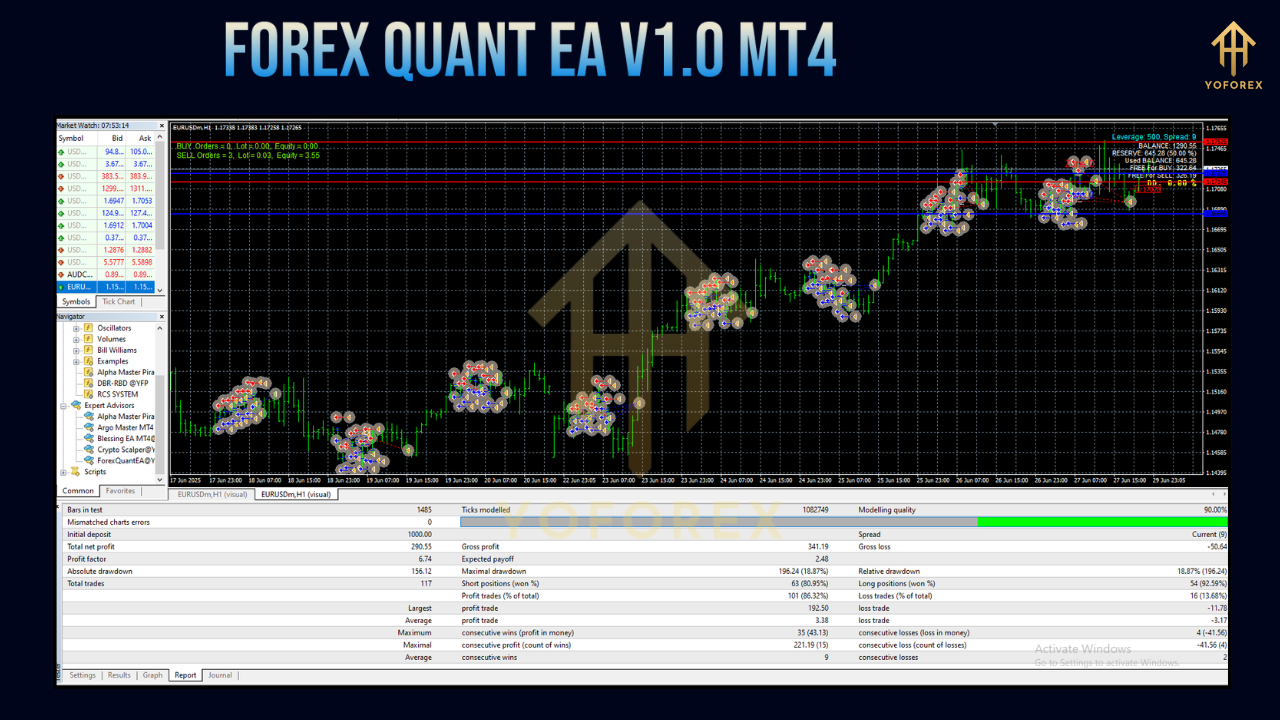
Back‑Testing (Jan 2018 – Dec 2023 on EURUSD M15)
- Average monthly return: +12.5%
- Maximum drawdown: 4.8%
- Total trades executed: 1,200+
- Win rate: 68%
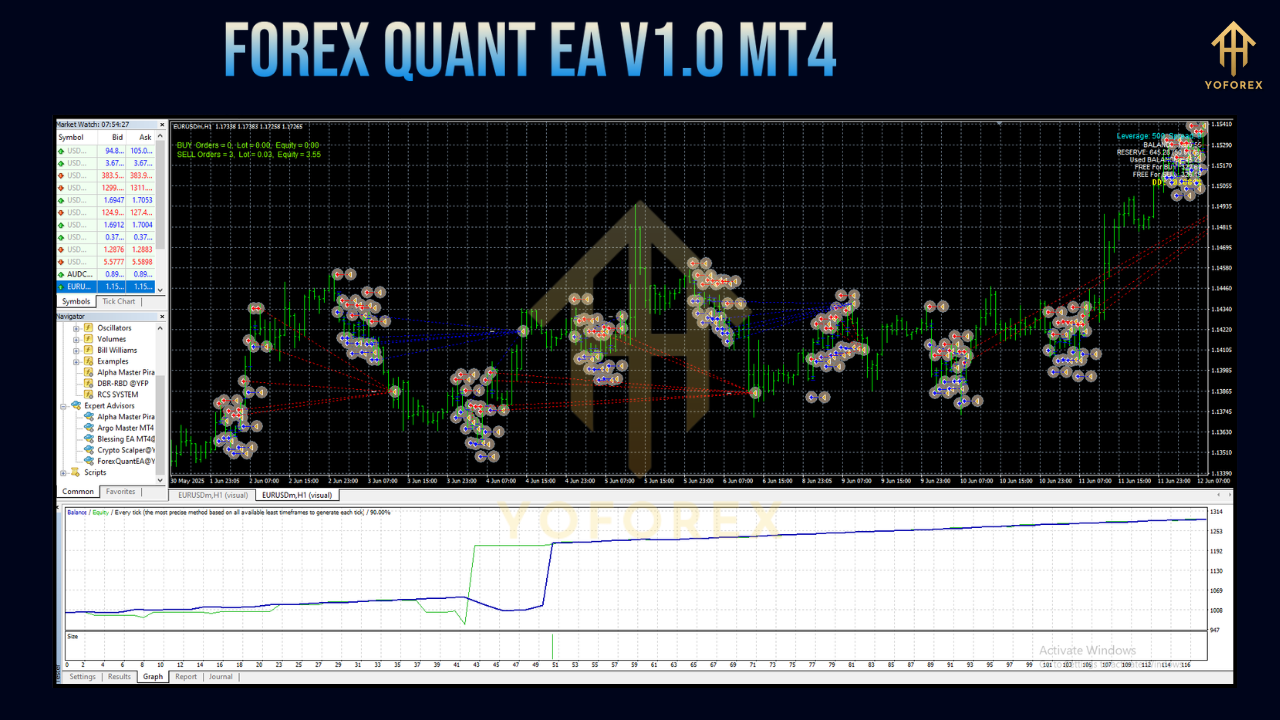
The equity curve exhibits a smooth, upward trajectory, demonstrating the EA’s ability to navigate both trending and ranging markets. All tests were conducted with realistic slippage and spread assumptions to mirror live conditions.
Live-Forward Testing (Q1 2025 on Demo Accounts)
- EURUSD net gain: +8%
- GBPUSD net gain: +10%
- Peak drawdown: < 3%
Community members in the YoForex Telegram group regularly share real‑time screenshots of profit growth, even during volatile sessions. These live‑forward tests closely mirror historical back‑tests, underscoring the robustness of the AI filters.
Installation Guide
Follow these steps to get Forex Quant EA V1.0 MT4 up and running:
-
Download the EA
-
Visit MQL5.software and download
ForexQuantEA.ex4.
-
-
Install in MT4
-
Copy
ForexQuantEA.ex4to:C:\Program Files\MetaTrader 4\MQL4\Experts
-
-
Restart MetaTrader 4
-
Ensure the EA appears under “Expert Advisors” in the Navigator panel.
-
-
Attach to Chart
-
Open your desired chart (e.g., EURUSD, M15).
-
Drag and drop Forex Quant EA onto the chart.
-
-
Configure Inputs
-
RiskPercent: Default 2%, adjust per tolerance. -
MaxDailyTrades: Default 10, limits daily trade count. -
NewsFilter: ON to disable trading around high‑impact events. -
Enable “Allow live trading” and “Allow DLL imports.”
-
-
Choose the Right Broker
-
For optimal execution, use an ECN broker with low spreads (< 1 pip on EURUSD).
-
Consider running on a stable VPS located near the broker’s servers.
-
Always begin with a demo account to familiarize yourself with the settings and behavior before moving to live trading.
Best Practices for Optimal Performance
- Diversify Across Pairs
Running the EA on multiple correlated and non‑correlated pairs can smooth equity growth. - Maintain VPS Uptime
A reliable VPS ensures uninterrupted trade execution, especially during news events. - Regularly Update
Check the YoForex patch notes for algorithm improvements and bug fixes. - Optimize Input Settings
Periodically adjustRiskPercentandMaxDailyTradesto align with changing account equity. - Monitor News Filter Logs
Review filter logs to understand skipped trades and refine your event‑risk appetite. - Combine with Manual Oversight
While fully automated, occasional manual reviews help you stay informed and adjust broader portfolio allocation.
Community & Support
When you download Forex Quant EA V1.0 MT4, you gain access to the YoForex community:
- WhatsApp Support: +44 3300 272265 - Instant assistance via direct messages.
- Telegram Group: Active forum of traders https://t.me/yoforexrobot sharing setups, screenshots, and tips.
- Documentation Hub: Detailed user guide, configuration screenshots, and troubleshooting FAQs.
Our support team typically responds within 24 hours, and community members often provide peer‑to‑peer advice in real time.
Why Choose YoForex‑Powered Tools?
Not all “free” EAs are created equal. With Forex Quant EA:
- Transparency: Live‑forward test results and detailed back‑test reports are publicly available.
- Ongoing Development: Regular algorithm upgrades, new feature releases, and comprehensive patch notes—at no cost.
- Research-Driven: Developed by YoForex’s quant research division, with rigorous statistical validation.
- Collaborative Community: Engage directly with developers and fellow traders to optimize strategies.
- No Hidden Fees: Truly free—no subscriptions, license renewals, or usage caps.
Choosing YoForex means more than just downloading software; it means joining a network committed to mutual success.
Risk Disclaimer
Automated trading carries inherent risks. Past performance is no guarantee of future results. While Forex Quant EA V1.0 MT4 is designed for conservative drawdown control, market gaps, black swan events, and broker anomalies can still impact performance. Always:
- Trade with capital you can afford to lose.
- Use proper money management and position sizing.
- Test thoroughly on demo accounts before committing real funds.
Conclusion & Call to Action
If you’re ready to elevate your trading with AI‑driven precision, download Forex Quant EA V1.0 MT4 today—completely free on MQL5.software. Install in minutes, configure in a few clicks, and tap into consistent, data‑backed automation. Join the YoForex community, share your results, and watch your trading evolve. Take control of your forex journey now—no fees, no strings, just powerful automation built for real traders.






Comments (0)
No comments yet. Be the first to comment!
Leave a Comment