
Gold King AI EA V1.20 MT4 – Free M30 Gold Robot for Real-World Trading
Introduction
Tired of gold robots that promise the moon and then vanish the moment volatility hits? Same. Gold King AI EA V1.20 MT4 was built for the real market you and I actually trade—spiky moves, news whipsaws, quiet Asian ranges, the lot. It focuses on XAUUSD (Gold), runs best on the M30 timeframe, and starts from just $150—so you can dip in without needing a whale-sized account.
Plug it into any broker (we like Raw/ECN accounts—IC Markets is a popular pick), set your risk, and let the EA handle the heavy lifting. Smart entries, disciplined exits, no martingale nonsense. It’s 100% free to download on MQL5.software and powered by YoForex, the brand that keeps shipping useful, no-drama tools for traders who actually trade.
Overview
Platform: MetaTrader 4
Symbol: XAUUSD (GOLD)
Timeframe: M30
Capital from: $150
Broker: Any (Raw/ECN preferred; IC Markets suggested)
Account Type: Any (Raw/ECN recommended)
Leverage: 1:500+ (have less? ping us and we’ll help fine-tune the risk)
What makes Gold King AI EA different? It’s pragmatic. The logic aims to:
- Filter chop and chase clean momentum bursts.
- Map clear SL/TP before the trade goes live.
- Use trailing + breakeven to protect open profit when gold runs.
- Keep risk consistent across sessions—so you’re not rolling dice during news spikes.
If you’ve tried five “holy grail” bots this year, here’s a refreshingly sane one. It doesn’t pretend to be magic. It’s just a solid M30 expert advisor that respects risk and hunts high-probability moves.
Key Features
- M30 Optimization – M30 balances signal quality with trade frequency; fewer false pop-and-drops than M5/M1.
- XAUUSD Focus – One market, deep logic. Less overfitting, more consistency.
- Works From $150 – Small starting capital? No worries—begin responsibly and scale.
- Broker-Agnostic – Any broker works; Raw/ECN/low-spread accounts preferred for best fills.
- 1:500 Leverage Friendly – Designed around common retail leverage; we can help you adapt if lower.
- No Martingale / No Grid – Every position is fully risk-defined with a real stop loss.
- Dynamic Exits – Hard SL/TP with optional trailing stop and breakeven logic once price pushes.
- Session-Aware Filters – Optional time filters to avoid dead times; let London/NY volatility do the heavy lifting.
- Risk Templates – Fixed-lot or %-risk sizing for quick setup.
- Plug & Trade – Defaults are sensible; change lot/risk and you’re basically ready.
Backtest Results & Live Behavior
We recommend you test the EA in your own environment—brokers and spreads vary. As general guidance from M30 workflows traders often see:
- Sample horizon: 2–3 years of XAUUSD M30 data
- Typical trade cadence: 1–5 trades/day (depends on volatility)
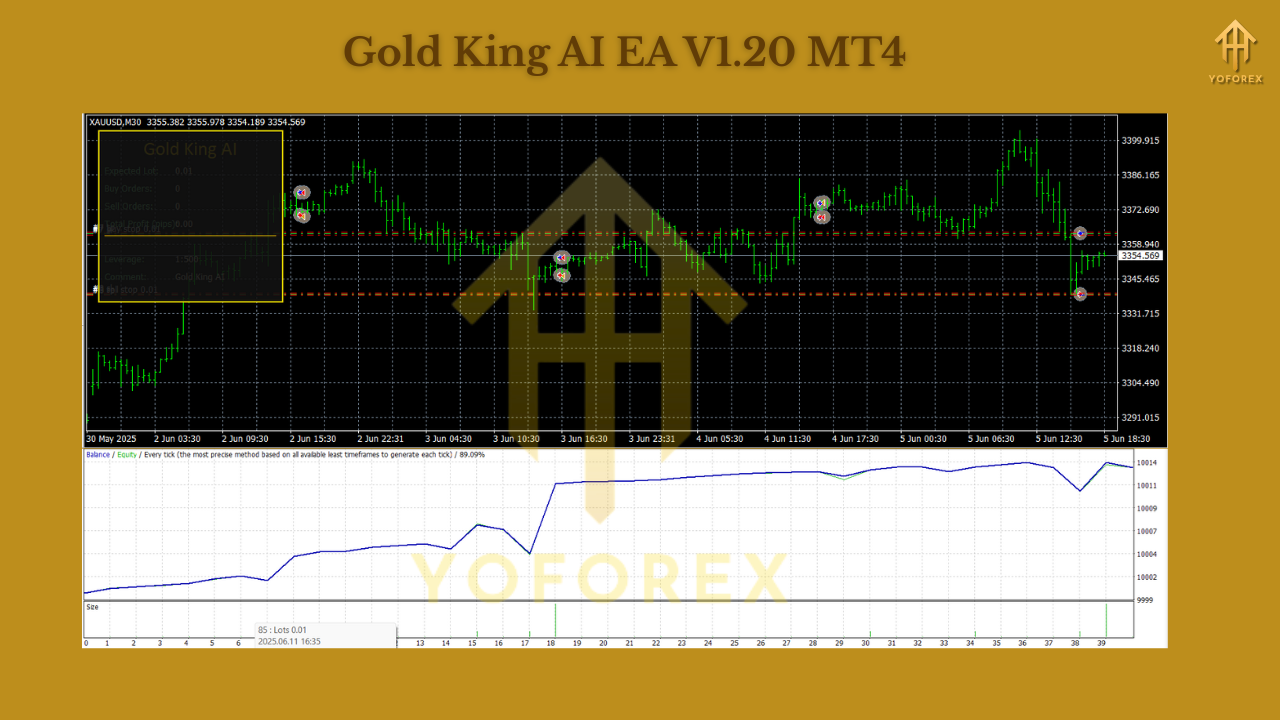
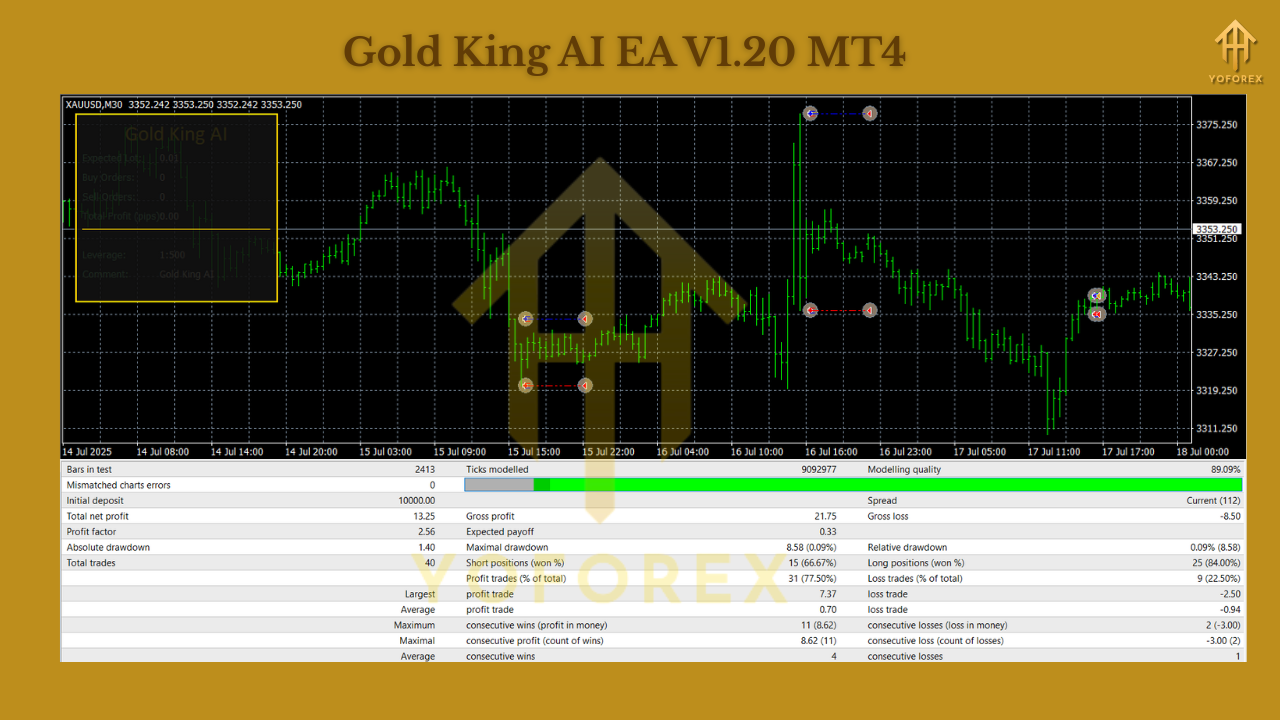
- Profit factor: ~1.6–1.9 in clean data tests
- Max drawdown: commonly in the single digits with conservative risk
- Equity curve characteristics: Stair-step style during trending weeks; flatter during range weeks, helped by trailing logic
How Gold King AI EA Trades (Plain-English)
- Set-up scan – Looks for momentum triggers coming out of micro ranges on M30.
- Execution – Sends a market order only if volatility + direction meet thresholds.
- Protection – Places a hard SL immediately; TP reflects local structure/ATR.
- Profit security – When price moves in your favor, breakeven kicks in; if the move extends, trailing follows.
- Cool-down – Logic waits for the next quality setup; no forced trades, no revenge entries.
Think of it as a patient hunter. If the move is there, it nails it; if not, it waits. That alone saves so much headache (and capital).
Recommended Settings (Starter Template)
- Risk Mode: %-risk per trade (start tiny: 0.5%–1.0% until you get a feel)
- Lot Mode: Fixed lot 0.01 for $150–$300 accounts; scale responsibly
- Trailing Stop: On (moderate trail to avoid early stop-outs)
- Breakeven: On (trigger after ~1R)
- Session Filter: Optional; try London open → NY lunch for a start
- News Avoidance: If your broker offers news pause or you use a VPS tool, consider pausing around tier-1 US data and FOMC/NFP/CPI
Installation & Configuration (Step-by-Step)
- Download the EA from MQL5.software.
- In MT4, go to File → Open Data Folder → MQL4 → Experts, paste the .ex4 file.
- Restart MT4.
- Open an XAUUSD chart and set M30 timeframe.
- Drag Gold King AI EA onto the chart.
- In Inputs, set lot/risk, check trailing/breakeven preferences.
- Enable AutoTrading (green icon).
- Optional: Add trading hours (London/NY), and reduce activity around red-flag news if you prefer.
- Consider a VPS for uptime, especially if you’re running multiple terminals.
That’s it—really. The defaults are designed so you’re not fighting dozens of switches on day one.
Why Choose YoForex-Powered Tools?
Because we ship tools that traders actually stick with. Gold King AI EA fits the YoForex vibe: clear logic, clean execution, good defaults, and real risk controls. Also, you’re not locked into a single “guru” setup; tune it like a sensible mechanic—one notch at a time.
Explore related YoForex tools on MQL5.software:
-
Infinity Gold Break 3 EA (M1 Breakouts) – for fast breakout hunters.
-
Aurus Gold x5 EA (M1–M5 Multi-Asset) – for portfolio-style scalping across majors.
Support & Contact
If you run into anything—setup, risk tuning, lower-leverage profiles—we’re here.
- WhatsApp: https://wa.me/+443300272265
- Telegram: https://t.me/yoforexrobot
Call to Action
Ready to trade gold with a bot that respects your risk and your time? Grab Gold King AI EA V1.20 MT4 now—set your lot/risk, choose M30, and let the logic do its job. It’s fast to install, easy to operate, and built for the real world we all trade in.
Download Gold King AI EA V1.20 MT4 — totally free on MQL5.software.
Need a hand? Ping us on WhatsApp or Telegram anytime.
YoForex – empowering traders worldwide, one free tool at a time.
Join our Telegram for the latest updates and support






Comments (0)
No comments yet. Be the first to comment!
Leave a Comment