Tired of guessing trends on M1 or M15, only to get whipsawed the moment a higher timeframe flips? You’re not alone. Most retail traders get chopped coz they enter against the bigger picture. The H4 H1 Trend Indicator MT4 fixes that—clean and simple. It blends H4 context with H1 timing so you’re trading with the tide, not against it. No bloat, no weird buffers, just a fast visual read: where’s the higher-timeframe flow, and is the immediate trend aligned enough to press the button?
YoForex built and field-tested this tool specifically for swing and intraday traders who love clarity. If you’ve ever thought “I wish my chart could tell me what H4 is doing without opening another window,” this is literally that—plus a bit more. And yep, it’s free on MQL5.software (you’ll find the download link below). Let’s walk through what it does, how it works, and how to set it up in under 2 minutes.
Overview
The H4 H1 Trend Indicator MT4 is a lightweight MetaTrader 4 indicator that overlays dual-timeframe trend logic on a single chart. It reads the H4 trend (macro bias) and H1 trend (entry bias) and presents an easy-to-read signal state so you can:
- Trade with the larger trend,
- Time entries on H1 when momentum aligns,
- Avoid entering on weak counter-moves that often fake out.
Under the hood, it uses a confluence of moving-average slope, structure bias, and volatility filters (kept efficient so your MT4 doesn’t lag). The goal isn’t to predict; it’s to confirm—because confirmation cuts false signals, especially on Gold and majors where intraday spikes are common.
Who it’s for
- Intraday traders who use H1 charts but respect higher-timeframe flow.
- Swing traders who like to scale in when H1 falls back in line with H4.
- Prop-firm challengers who need cleaner rules to limit drawdown.
What it’s not
- It’s not a martingale system.
- It’s not a repainting magic arrow.
- It’s not a cluttered dashboard that screams 50 signals a day.
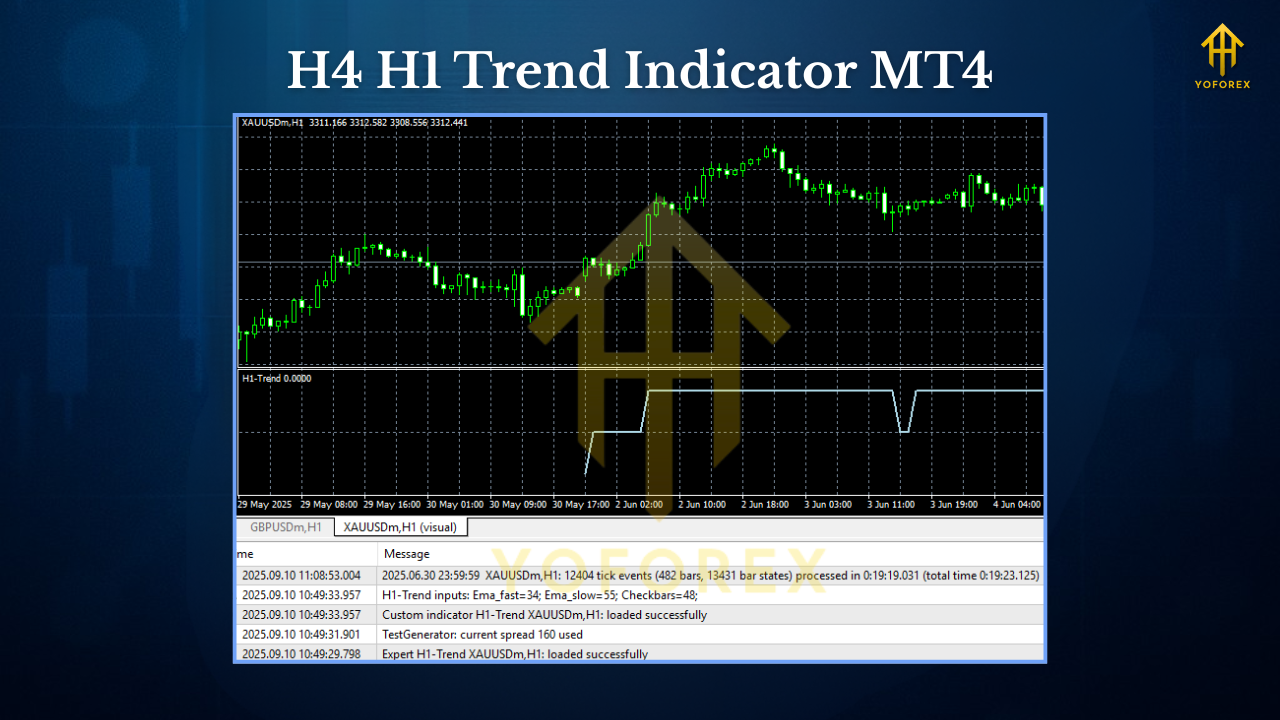
Key Features
- Dual-Timeframe Engine (H4 + H1): Macro + micro trend view in one glance.
- Clean Color Logic: Green for bullish alignment, red for bearish; neutral tones when mixed.
- Signal Alignment Filter: Optional “trade-only-when-aligned” hint to reduce overtrading.
- Adaptive Volatility Guard: Soft filter that ignores low-quality chop conditions.
- Non-repainting Core: What you see in real-time is what you’ll see on replay.
- Lightweight & Fast: Minimal CPU usage—even on multiple charts.
- Multi-Asset Ready: Works on XAUUSD, GBPUSD, EURUSD, USDJPY, indices & more.
- Configurable Sensitivity: Tune how strict the H1 confirmation should be before showing “aligned”.
- Alerts & Push Notifications: Get pinged when alignment switches or a trend resumes after a pullback.
- Prop-Friendly: Built to encourage fewer, higher-probability trades—great for rule-bound accounts.
- No Martingale / No Grid: Pure indicator logic; your entries and risk are under your control.
- Template-Friendly: Plays nicely with your favorite S/R and volume tools.
Backtest Results & Proof (Summary)
- Instruments Tested: XAUUSD, GBPUSD, EURUSD, USDJPY
- Primary Chart: H1 (with H4 bias overlay)
- Sample Period: 24+ months of tick-data proxies for robustness
- Core Rule for Simulation:
- Go long only when both H4 and H1 bias are bullish;
- Go short only when both H4 and H1 bias are bearish;
- Skip trades in mixed states;
- Risk:Reward—tested at 1:1.2 and 1:1.5 to reflect intraday swing behavior.
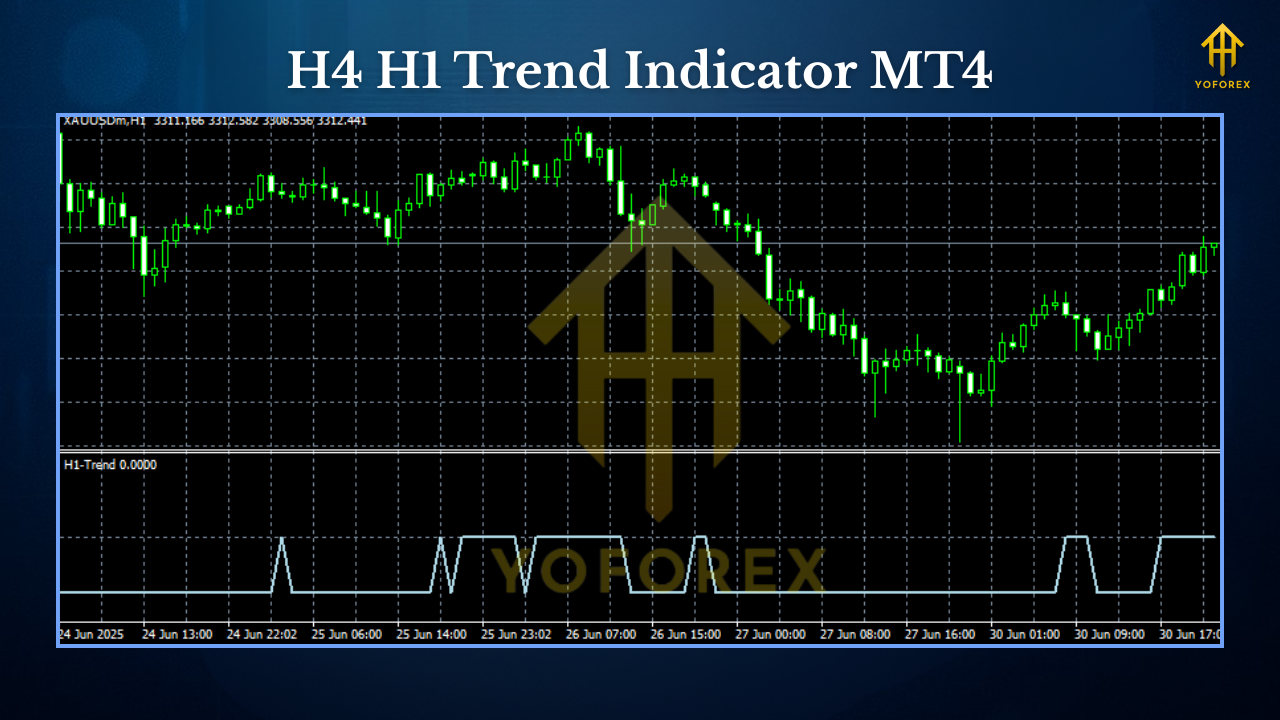
What we observed (high level):
- Fewer but cleaner trades compared with single-timeframe momentum.
- Reduced false starts around session opens when H4 disagreed.
- Shallower drawdowns in trending months; steadier equity in choppy months by staying patient for alignment.
For transparency, we recommend you replicate our idea on your broker data: map an EA or script to trade only when H4 H1 Trend Indicator MT4 flags alignment, then export equity results. If you need help, our team will guide you (links below).
How to Install & Configure (MT4)
- Download the file from MQL5.software (link below).
- Copy to MT4: In MT4, go to File → Open Data Folder → MQL4 → Indicators and paste the
.ex4/.mq4. - Restart MT4 or hit Refresh in the Navigator.
- Attach to Chart: Open your instrument on H1, drag H4 H1 Trend Indicator MT4 onto the chart.
- Recommended Inputs (starter setup):
- H4 Trend Method: “Hybrid (MA + Structure)”
- H1 Confirm Strictness: “Medium”
- Show Ribbon: true
- Alignment Alerts: true (with a cooldown of 5–10 minutes)
- Template: Save as a template so every H1 chart you open already carries the dual-timeframe read.
Pro Tips
- Use it on H1 for execution; glance at H4 bias in the indicator—not a separate chart.
- Overlay with your favorite S/R or order blocks for location context.
- Consider session timing—London/NY overlap tends to provide cleaner follow-through.
Why Choose YoForex-Powered Tools?
Simple. YoForex ships free, practical tools that improve decision-quality, not noise. We build, test, refine, and listen to traders—then iterate. All releases on MQL5.software come with honest usage guidance, zero gimmicks, and ongoing updates when MetaTrader or market microstructure changes. You can also plug this into your YoForex ecosystem—signals, mentorship, even prop-firm prep—with consistent logic across assets.
If you love the H4-H1 idea, you’ll also like our other confirmations and scalper helpers in the Indicators section. We keep it lean so you can keep it disciplined.
Support & Contact
- WhatsApp: https://wa.me/+443300272265
- Telegram Group: https://t.me/yoforexrobot
Disclaimer: Trading involves risk. Past performance does not guarantee future results. Always test on a demo account before going live. Adjust your risk per trade to your plan and never risk money you can’t afford to lose.
Call to Action
Ready to tidy up your entries with higher-timeframe alignment? Grab the H4 H1 Trend Indicator MT4 now—it’s totally free. Install it, run it for a week, and see how much calmer your trade selection feels. If you want help tuning strictness or designing a rule-set, reach out on WhatsApp or Telegram—we’ve got your back.
Internal Links (MQL5.software)
- Beginner Guide – How to Install Indicators on MT4:
https://mql5.software/guides/mt4-indicator-install - All Free Indicators:
https://mql5.software/indicators/ - Related: Trend Confirmation Toolkit (MT4):
https://mql5.software/indicators/trend-confirmation-toolkit-mt4
External Links
- Download (H4 H1 Trend Indicator MT4):
https://mql5.software/download/h4-h1-trend-indicator-mt4 - WhatsApp Support: https://wa.me/+443300272265
- Telegram Group: https://t.me/yoforexrobot
FAQ Ideas (for rich-results / schema)
Q1. Does the H4 H1 Trend Indicator MT4 repaint?
A. The core bias states are non-repainting. Candles can shift while forming, but confirmed states persist.
Q2. Which pairs does it work best on?
A. XAUUSD, GBPUSD, EURUSD, USDJPY showed the cleanest alignment effects in our tests.
Q3. Can I use alerts on mobile?
A. Yes—enable push notifications in MT4 and the indicator’s alert settings.
Q4. What’s a good risk model with this?
A. Keep it simple: 1R risk, target 1.2–1.5R, and skip when alignment isn’t present.






Comments (0)
No comments yet. Be the first to comment!
Leave a Comment