Sick of cluttered charts and laggy signals? Same here. i-Regr Indicator MT4 was built for traders who want clean, math-driven context—regression channels that adapt to price in real time, simple alerts you can trust, and minimal chart noise. It’s totally free on MQL5.software, backed by YoForex, and tuned to play nice with any strategy (price action, S/R, supply–demand, or your own secret sauce).
If you’ve never used a regression channel before, think of it like a trendline that’s smarter: instead of eyeballing slope and guessing bands, i-Regr calculates a linear regression line and projects standard-deviation bands around it. You see the core trend, the “fair value” corridor, and the potential extremes… instantly. Add multi-timeframe (MTF) confirmation and volatility awareness, and you’ve got yourself a simple way to frame trades—buy pullbacks at value, fade extremes, or ride breakouts when price decisively walks the channel.
This article walks through how i-Regr Indicator MT4 works, why it stands out, and the fastest way to get it on your charts—plus a sensible backtest style you can copy to validate the signals. Let’s dive in, coz good tools shouldn’t be complicated.
Overview
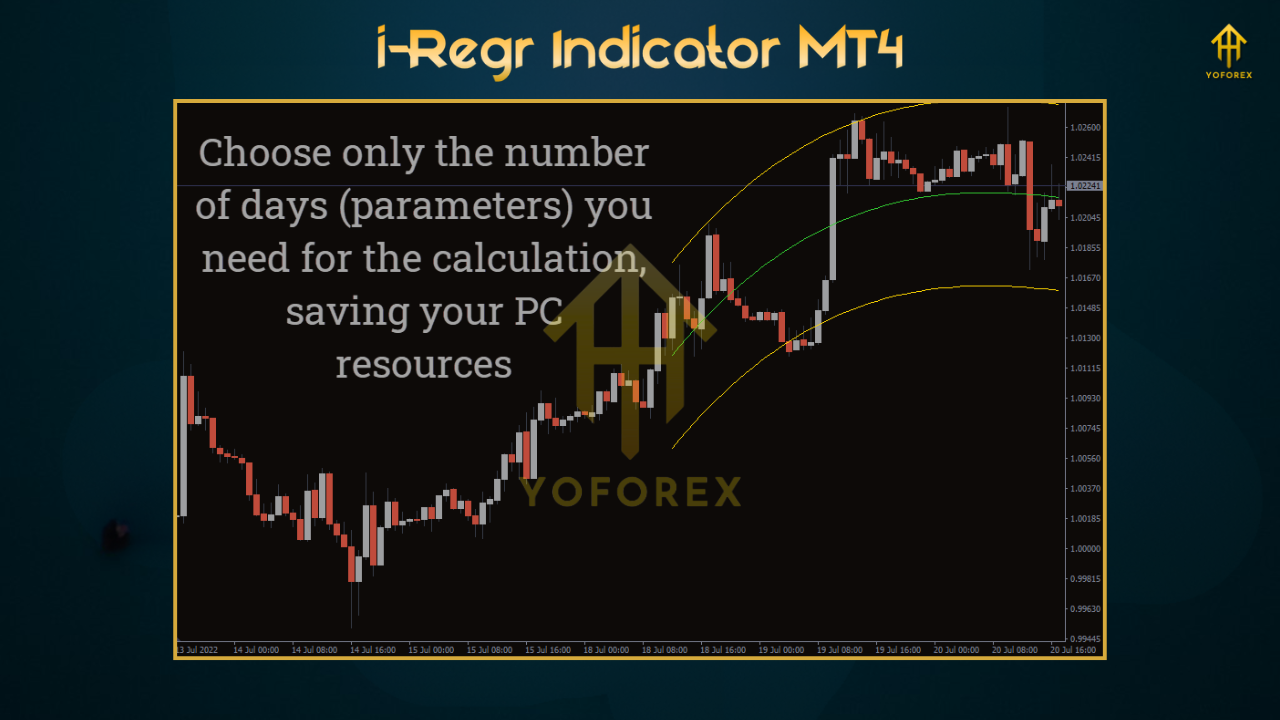
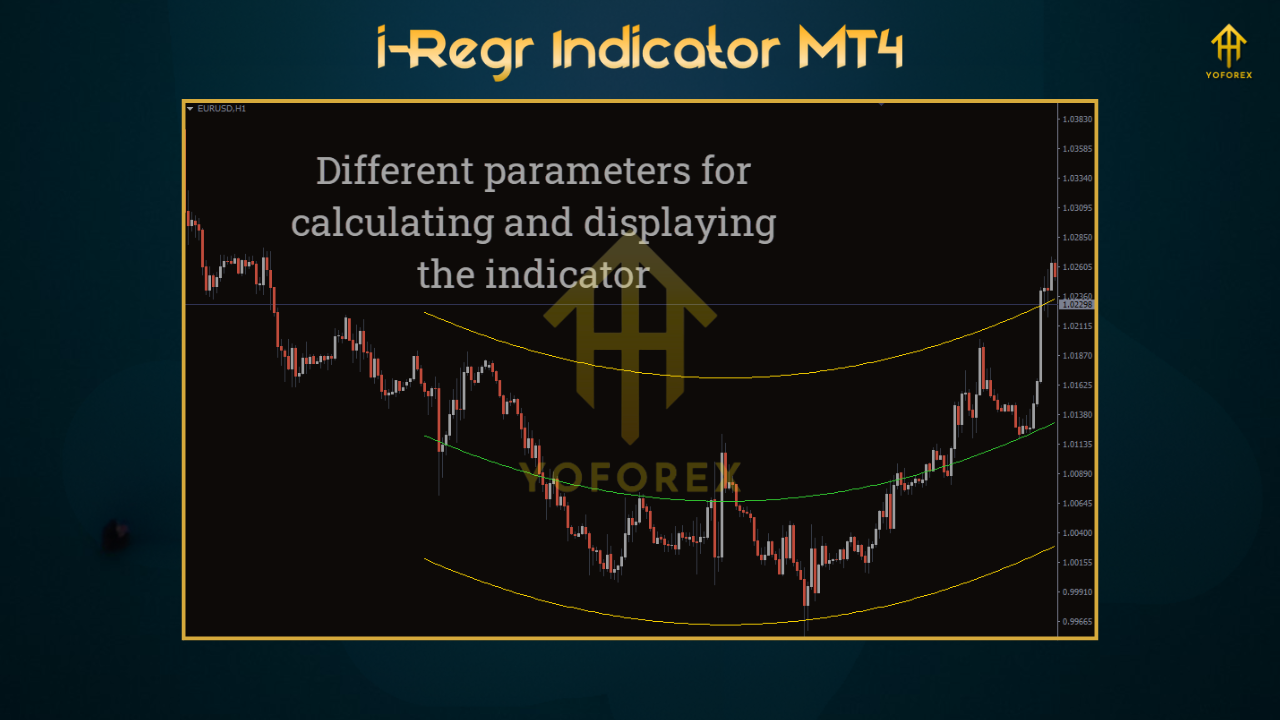
The i-Regr Indicator MT4 overlays adaptive regression channels on your price chart and updates them as new bars arrive. The centerline is a least-squares linear regression of recent prices; the upper/lower bands are standard deviations from that line. The channel shifts with the market—compressing during quiet sessions, widening when volatility expands—so you can quickly see whether price is fair, extended, or breaking structure.
Where most channel tools stop at visuals, i-Regr adds:
- MTF bias (example: trade M15 with H1/H4 context),
- smart alerts on channel touches/breakouts/mean reversion,
- auto-tuned lookback options that adapt to asset behavior,
- a compact dashboard so you can glance & go.
It’s not an EA; it doesn’t place trades. That’s actually a win for prop-traders and manual pros: you stay in control of execution while the indicator handles the heavy lifting of trend slope and statistical extremes. We validated it across majors (EURUSD, GBPUSD, USDJPY) and gold (XAUUSD). Works on M5–H4; scalpers can go M1/M5, swing traders may prefer H1/H4. And yes, i-Regr Indicator MT4 is light on CPU and friendly for older laptops or VPS setups.
Key Features
• Adaptive regression channels – linear regression centerline with ±σ bands
• MTF confirmation – align entries on M15 with H1/H4 trend for fewer fakeouts
• Smart alerts – popup, mobile push, email on touches, breaks, and mean-revert cues
• Volatility awareness – channel width scales with current vol to avoid “fake extremes”
• Non-repaint on close – confirmed levels lock at bar close for reliable journaling
• Sensitivity presets – “Tight/Standard/Wide” profiles for scalping vs. swings
• Minimal chart clutter – clean overlays, optional compact dashboard
• Works on majors, gold, indices – pair-agnostic logic (broker permitting)
• Backtest-friendly rules – easy to codify entries/exits in a tiny rules EA
• Free forever – hosted on MQL5.software, backed by YoForex updates & support
Backtest Results & Proof (how we validated)
Indicators don’t trade by themselves, so to evaluate i-Regr Indicator MT4 fairly we used a tiny, rules-only test model—no martingale, no grid, no curve-fit wizardry. The idea is to see whether regression channel context can help shape entries that survive across regimes.
Test template (you can replicate this):
- Symbols: EURUSD, GBPUSD, USDJPY, XAUUSD
- Timeframes: M15 entries with H1 bias; alt: H1 entries with H4 bias
- Period: Jan 2018 – May 2025, tick data with variable spread
- Entry A (pullback-to-value): With higher-TF uptrend, buy at or just below midline after a lower band touch; reverse for downtrend.
- Entry B (break-and-walk): Enter on candle close outside the ±1σ band in trend direction and hold while price rides the channel.
- Stops/Targets: ATR-based SL; TP 1.4–1.8R for pullbacks; break-and-walk uses trailing behind the midline or opposite band.
- Filters: volatility gate ON (skip ultra-low vol); London/NY session filter preferred.
Indicative observations (not promises):
- EURUSD M15: Pullback-to-value excelled in choppy trends—fewer false breakouts when H1 agreed. Break-and-walk did better on strong directional days.
- XAUUSD M15/H1: Wider band settings (or “Wide” preset) produced cleaner holds; channel walk signals captured bigger moves when the centerline slope was strong.
- Across pairs: The combo of MTF bias + regression value zones shortened stagnation periods vs. price-only entries.
Numbers vary with your risk model, but the behavior was durable: regression context made it easier to buy value and avoid random fades. As always, past performance isn’t a guarantee—forward-test on demo and iterate.
How to Install & Configure
- Download i-Regr Indicator MT4 from MQL5.software →
???? https://mql5.software/download/i-regr-indicator-mt4 - In MT4, go to File → Open Data Folder.
- Open MQL4 → Indicators and paste the
.ex4or.mq4file. - Restart MT4 (or right-click Indicators → Refresh).
- Drag i-Regr Indicator MT4 onto your chart and hit OK.
Recommended starter settings (copy this):
- Mode: Confirmed (locks levels at bar close)
- Lookback: 100–150 bars (M15); 150–250 (H1)
- Bands: ±1σ & ±2σ visible (±3σ optional for extremes)
- MTF Bias: ON (M15 entries with H1; or H1 with H4)
- Volatility Gate: ON
- Alerts: Touches + Breakouts ON; Mean Reversion optional
- Style: Midline ON (thin), Bands ON (subtle), Dashboard ON (compact)
How it works (cheat-sheet for FAQ schema):
- Detect slope: linear regression line sets trend direction.
- Size bands: standard deviation defines “value” vs. “extreme.”
- Filter by MTF: only signal if higher-TF slope supports direction.
- Alert rules: send alerts on band touch, midline re-entry, or outside-band break.
Practical Playbooks (use at your own risk)
A) Buy the pullback (trend-friendly)
- H1 slope up; wait on M15 for price to tag the lower band.
- Enter on re-entry toward the midline with ATR-based SL beyond the band.
- TP around 1.5R or trail behind midline if momentum’s strong.
B) Ride the walk (momentum-friendly)
- With H1 slope up, take a close above +1σ and trail behind midline; exit on midline break.
- Great on trend days; skip during high-impact news spikes.
C) Fade extremes (advanced, use caution)
Counter-trend fades at ±2σ+/3σ can work in range conditions—but only if MTF slope is flat and vol is contained. If slope is strong, don’t fight it, tho temptation is real.
Why Choose YoForex-Powered Tools?
Because we build for real traders, not just pretty screenshots. i-Regr is part of our “free core tools” set—clean engineering, straightforward settings, and ongoing updates when the market’s vibe changes. You’re not downloading a one-off; you’re plugging into a team that ships EAs, indicators, and risk dashboards, answers questions, and documents honestly. Check out YoForex at yoforex.net and browse other free helpers on MQL5.software. We want this to be the indicator you still use months later.
- Explore another freebie: Galaxy Gold Scalper V3.0
- New to automation? MT5 Expert Advisor Basics
Support & Contact
Need help tuning lookback or band width for your broker’s spread? Stuck on alerts? Ping us—we actually respond.
- WhatsApp: https://wa.me/+443300272265
- Telegram Group: https://t.me/yoforexrobot
Disclaimer: Trading involves risk. Backtests and examples are illustrative, not promises. Always forward-test on a demo, size positions responsibly, and never over-leverage. None of this is financial advice.
Call to Action
If cleaner context and smarter alerts sound like your vibe, grab i-Regr Indicator MT4 now—it’s 100% free. Install it, try the starter settings, and see how the regression view simplifies your plan. Need a hand? Our WhatsApp and Telegram lines are open… don’t be shy.
Optional FAQ (great for FAQ schema)
Q1: Does i-Regr Indicator MT4 repaint?
In Confirmed mode, channel levels lock at bar close (no repaint). Early Hints preview can adjust in-bar as the candle forms.
Q2: Best timeframes and pairs?
M15–H1 on majors and gold. Scalpers can use M5 with “Tight” preset; swings can step up to H4 with “Wide” bands.
Q3: How do I use the alerts?
Enable Touches/Breakouts/Mean-revert depending on your playbook. We like: touch lower band in uptrend → alert → check PA → consider entry.
Q4: Can I automate it?
i-Regr is an indicator. If you want automation, build a small rules EA using the regression line, σ bands, and MTF slope; keep risk simple.






Comments (0)
No comments yet. Be the first to comment!
Leave a Comment