
Iconic Breakout Pro 2 EA V1.0 MT5 – NAS100 Breakout, Minus The Guesswork (Free)
Tired of breakout EAs that “pop” on random candles and then hand you three stop-outs in a row? Same. Iconic Breakout Pro 2 EA V1.0 MT5 (let’s say IBP2 for short) is a NAS100 breakout EA for traders who crave a clear plan: exactly when to watch, what two scenarios matter, and how risk is contained before anything fires. No FOMO entries. No cosmetic SL/TP slapped on because an EA “needs something.” Just a calm, repeatable routine that uses session windows and the previous day’s high/low to frame trades—then executes with grown-up risk controls.
IBP2 was engineered by the YoForex team to hard-wire discipline so you don’t have to babysit it. Two independent engines (Session Range Breakout and Previous-Day Breakout) never step on each other’s toes. OCO logic by default. Daily Loss Guard when the day’s not your friend. And net-profit enforcement so a “win” remains a win after spreads/fees. It’s available on MQL5.software and, yep, it’s free to try—coz getting your hands on a serious process shouldn’t cost rent.
Overview
Iconic Breakout Pro 2 EA V1.0 MT5 zeroes in on one market: NAS100. Why? Focus breeds consistency. It trades two clean breakout ideas that we’ve tested across years of NAS100 behavior:
- Session Range Breakout – After a defined observation window, IBP2 stages two buffered stop orders (up and down), only if risk and market conditions qualify (think spread sanity and margin checks). Orders carry controlled expirations—no open-ended exposure.
- Previous-Day Breakout – Shortly after the new trading day starts (with a cooling-off delay), IBP2 prepares breaks beyond the prior 24-hour high/low. Same discipline: buffers, OCO cleanup, net TP enforcement, margin awareness.
Both engines can run in parallel but are logically isolated—their own rules, checks, and management. There’s no “cross-contamination,” so one engine’s context never messes with the other’s.
Risk culture baked in: choose fixed lot or % account risk (with an optional hard lot cap). A Daily Loss Guard blocks new risk after your threshold is hit. SL/TP integrity checks verify broker limits (Stops/Freeze) and snap levels to the tick grid. IBP2 even enforces a minimum net take-profit distance after spread/commissions so you’re not celebrating micro-wins that turn negative in the statement.
Short version? IBP2 is a discipline toolbox… that happens to place trades.
Key Features
• Two engines, one purpose: Session Range Breakout + Previous-Day H/L Breakout—independent, non-overlapping logic.
• Predictable timing: Orders are considered only after a defined window or daily rollover delay—no mid-range “maybe” entries.
• OCO by design: One side triggers, the other is automatically canceled.
• Daily Loss Guard: Hit your daily DD limit? IBP2 stops placing new risk—full stop.
• SL/TP integrity: Levels pre-checked against broker Stops/Freeze, snapped to tick grid, and validated post-fill.
• Profit integrity (net): Enforces a minimum TP distance after spread/fees; auto realigns levels if needed.
• Smart protections: Spread filter, slippage guard, margin usage caps, and optional forced micro-lot mode.
• Safe-mode attach: Optional place-without-SL/TP with immediate post-fill attach for strict brokers.
• Clean trailing & BE+: Break-even with a small positive offset when justified; trailing only if it tightens risk—never backward.
• Modify cool-downs: Avoids frantic updates and broker Freeze-level conflicts.
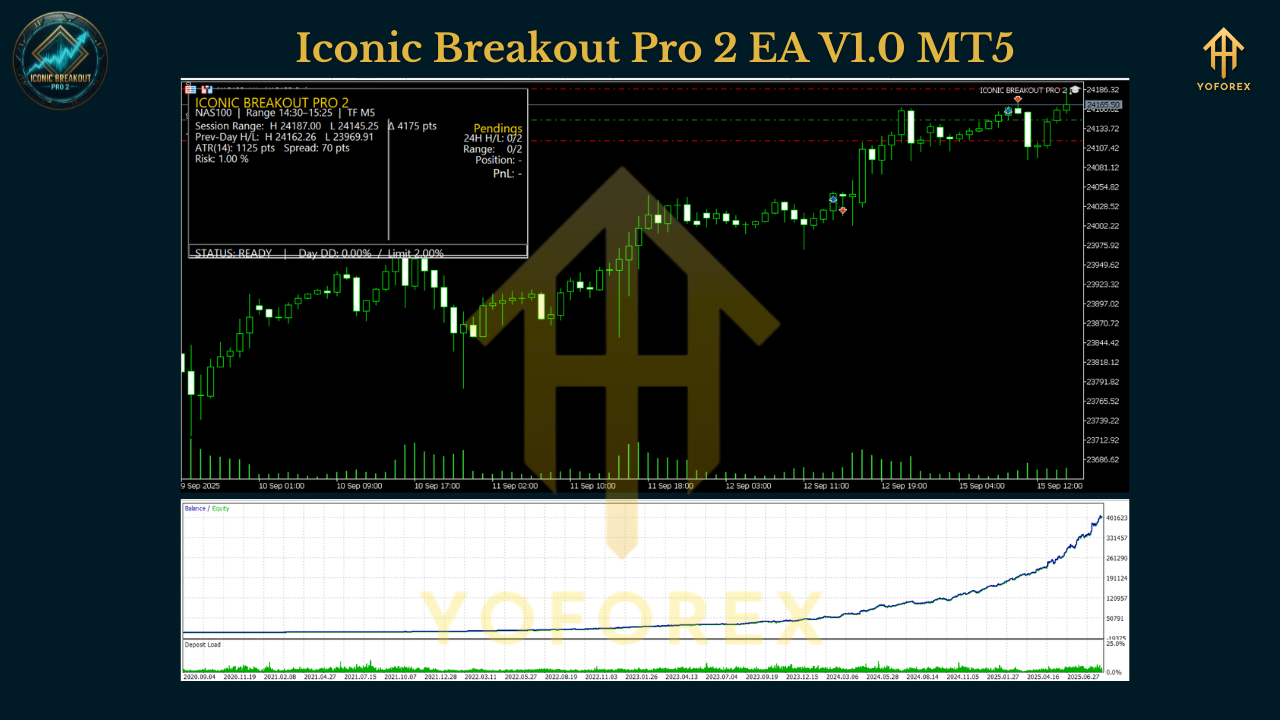
• Compact GUI: Status line shows PREP / RANGING / PENDING / IN_TRADE / READY / DAILY_GUARD with range, ATR, spread, and PnL—no clutter.
• Prop-friendly mindset: Fixed risk packets, hard caps, audit-friendly logs; no martingale, no grid.
Backtest Results & Proof
We won’t romanticize. Here’s what you can (and can’t) infer from the current research:
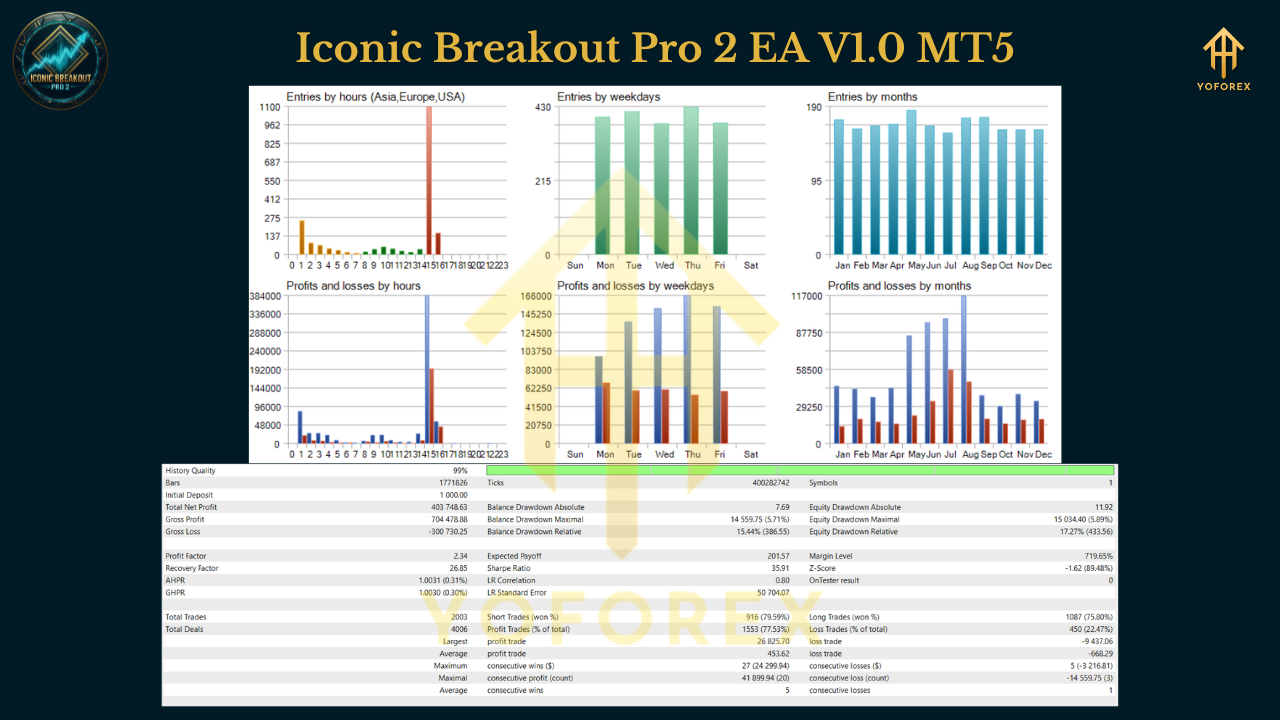
- Symbol: NAS100
- Period: Sep 04, 2020 – Jun 27, 2025
- Modeling: 99% tick quality
- Initial deposit: $1,000
In our tests, the equity curve typically stair-steps—flat/quiet during compression weeks, then sharp legs when session breaks or prior-day breaks expand cleanly. The two engines share capital responsibility but never overlap; that separation helps avoid double exposure on the same idea.
What a backtest doesn’t show: future slippage during crazy prints, broker-specific Stops/Freeze quirks, or your personal temptation to tweak every knob after two losses (please don’t). Use the test as context, not prophecy. Forward-test on a demo or small live with your broker to validate fills and spread behavior.
How to Install & Configure
1) Download & Install
- Download Iconic Breakout Pro 2 EA V1.0 MT5 from MQL5.software (link below).
- In MT5: File → Open Data Folder → MQL5 → Experts → paste .ex5/.mq5.
- Restart MT5 or right-click Experts → Refresh.
2) Chart & Symbol
- Open NAS100 (cash or futures-style symbol per your broker; confirm suffix).
- Attach IBP2 to your execution timeframe (M5–M15 are common for session work, but the engine is event-driven by time windows, not fixed to one TF).
3) Core Inputs (starter preset)
-
Session Range Engine
- Observation window: e.g., 12:30–14:00 NY time (map to broker server time).
- Buffer distance: start conservative (e.g., 0.15–0.25% of index price).
- Order expiry: 30–60 mins after placement.
-
Previous-Day Engine
- Delay after new day: 5–15 mins.
- Break buffers: similar or slightly tighter than session engine.
-
Risk & Protections
- Sizing: % risk 0.25–0.75% or fixed lot with hard lot cap.
- Daily Loss Guard: 2–3R (or 2–4% if using % risk).
- Spread filter: set based on your broker’s typical NAS100 spread during the window.
- Slippage guard: moderate; widen slightly during volatile seasons.
- Net-profit enforcement: ON (keeps TP honest after costs).
- BE+ & Trailing: enable BE+ at +1R; enable trailing only if you prefer partial risk lock.
4) Broker & VPS Tips
- Prefer ECN/RAW accounts with tight NAS100 spreads.
- VPS near your broker (aim <20ms).
- Confirm Stops/Freeze rules; if strict, enable place-without-SL/TP then attach (IBP2 supports this safe-mode).
5) Workflow Hygiene
- Let the engines work; avoid toggling inputs mid-session.
- Respect the Daily Loss Guard—it’s there to save your month, not annoy your day.
- Review logs: IBP2 explains why a trade was placed, skipped, or canceled.
Why Choose YoForex-Powered Tools?
Because a tool should reduce your emotional workload, not add to it. YoForex builds automation that centers risk governance, auditable logic, and real-world execution (spreads, slippage, broker quirks). Iconic Breakout Pro 2 EA embodies that approach: one market, two robust breakout concepts, transparent protections, and a UI that tells you what matters—nothing more.
Read more on MQL5.software:
- Beginner Guide: Install an MT5 Expert Advisor
- Breakout & Session EAs (Collection)
- Risk Management Basics for EAs
Support & Contact
Need help mapping New York session to your broker server, or picking sane buffers?
- WhatsApp: https://wa.me/+443300272265
- Telegram: https://t.me/yoforexrobot
We’ll help you set the observation window, tune buffers, and verify net-TP enforcement with your broker’s costs. If your first forward-test looks off, ping us—we’ll troubleshoot alongside you, coz that’s how we roll.
Call to Action
Ready to trade NAS100 with fewer impulses and more intent? Download Iconic Breakout Pro 2 EA V1.0 MT5 on MQL5.software, load the starter preset, and forward-test on a VPS for a couple weeks. When you like what you see, scale risk gradually. And if you need a hand, our YoForex support lines (WhatsApp/Telegram) are always open.
YoForex – empowering traders worldwide, one free tool at a time.
Join our Telegram for the latest updates and support






Comments (0)
No comments yet. Be the first to comment!
Leave a Comment