
Introduction
In the competitive world of forex trading, having the right tools can make all the difference. The Logistician EA V1.0 for MetaTrader 4 (MT4) is a robust, intelligent Expert Advisor designed to help traders automate their strategies on all major forex pairs. Whether you're a beginner or an advanced trader, this EA offers reliable performance on the H1 timeframe, supported by a strategic algorithm that adapts to market conditions.
Let’s dive into how Logistician EA works, its key features, setup requirements, and why it’s a strong choice for traders looking for consistency and automation.
Overview of Logistician EA V1.0
The Logistician EA is built with a goal in mind: streamlined execution of calculated trades across all major forex pairs. Its name is derived from the term “logistic,” indicating logical, structured, and analytical decision-making—exactly what this EA offers.
This MT4-based robot combines market analysis, timing, and risk control to give traders an edge. It executes trades based on a combination of trend-following strategies, momentum indicators, and multi-layered risk management.
Key Specifications
- Platform: MetaTrader 4 (MT4)
- Version: V1.0
- Supported Symbols: All major Forex pairs (EURUSD, GBPUSD, USDJPY, USDCHF, AUDUSD, USDCAD, NZDUSD)
- Timeframe: H1 (1 Hour)
- Minimum Deposit: $1000
- Recommended Capital: $3000 or more
- Leverage: 1:100
- Trading Type: Fully Automated
- Trade Style: Trend-based with risk-adjusted entries
How Does Logistician EA Work?
At its core, Logistician EA uses a mix of trend detection and price action confirmation to determine optimal entry and exit points. The logic is simple yet effective:
- Trend Filtering: It first detects the current trend using Moving Averages and Momentum indicators. This helps filter out trades that go against the prevailing market direction.
- Price Action Setup: The EA then waits for a confirmation through candle patterns and recent high/low tests before executing.
- Risk Management Layer: Each trade includes fixed stop-loss, dynamic take-profit, and optional trailing stop configurations, ensuring both security and adaptability.
- Session Awareness: It avoids trading during high-impact news or illiquid sessions to prevent slippage and unexpected volatility.
The combination of structured logic and dynamic market response makes this EA a stable performer in both trending and ranging markets.
Ideal for All Major Forex Pairs
Unlike many Expert Advisors that focus on a single pair, Logistician EA is built to operate across all major pairs. This gives traders the flexibility to diversify without needing multiple bots or separate strategies.Recommended Pairs:
- EUR/USD
- GBP/USD
- USD/JPY
- USD/CHF
- AUD/USD
- NZD/USD
- USD/CAD
Each of these pairs is characterized by high liquidity and lower spreads—ideal for the precision strategy of Logistician EA.
Installation and Setup Guide
- Download and Install:
- Place the Logistician EA
.ex4or.mq4file into your MT4 “Experts” folder. - Restart the platform and drag the EA onto an H1 chart of your preferred major forex pair.
- Set Input Parameters:
- Adjust lot size according to your risk tolerance.
- Choose whether to enable trailing stop, fixed TP/SL, or news filter.
- Enable Auto Trading:
- Make sure "AutoTrading" is turned on in your MT4 toolbar.
- Recommended VPS:
- For uninterrupted trading, it’s advised to run this EA on a forex VPS with low latency.
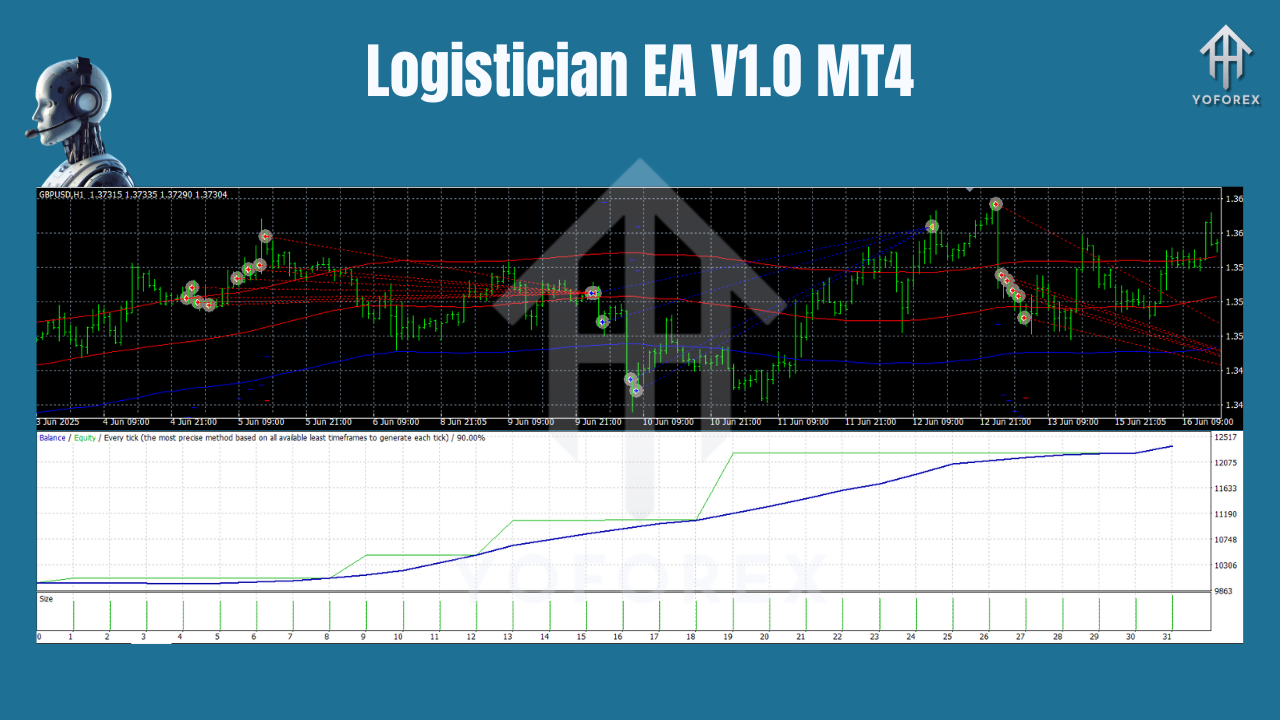
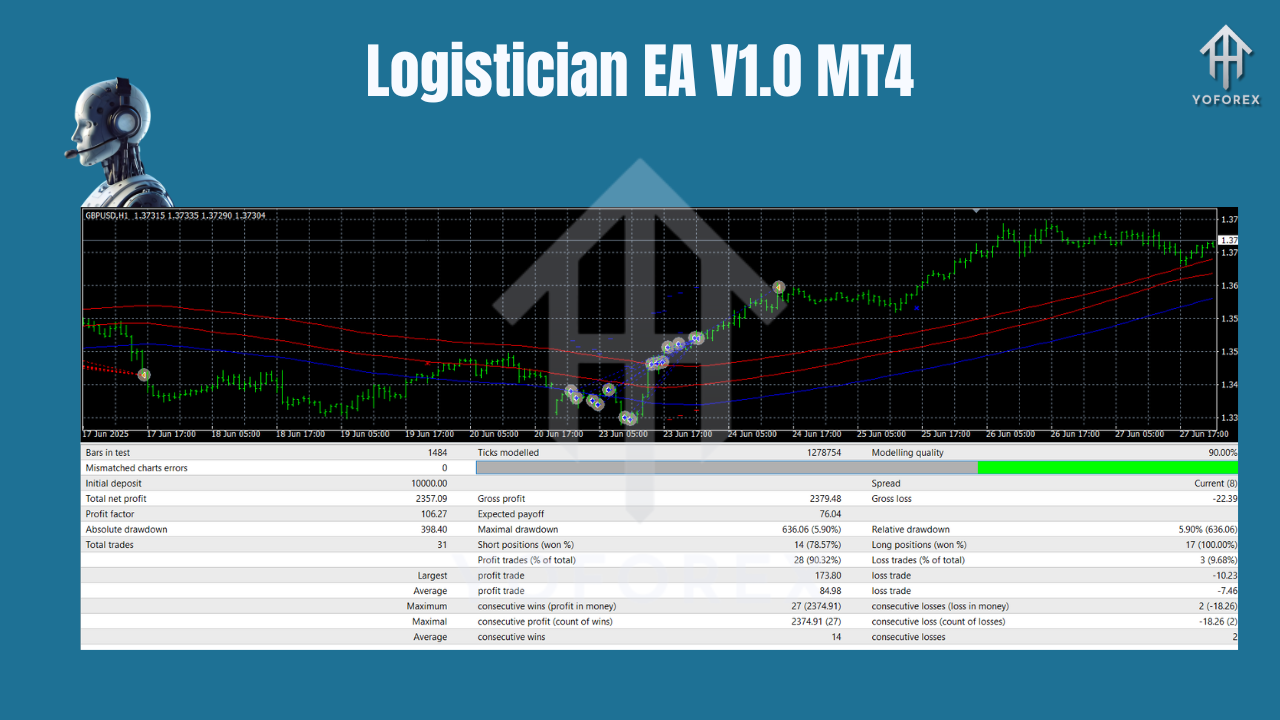
Backtesting and Performance
In historical tests across major pairs, Logistician EA has shown:
- High Win Rate: 65%–75% accuracy over 12-month simulations.
- Stable Drawdown: Max drawdown under 15% with moderate risk settings.
- Average Monthly Return: 7%–12% depending on capital and leverage.
These figures prove that the Logistician EA isn’t just about fast profits—it’s about sustained growth with minimal risk.
Who Should Use Logistician EA?
This EA is ideal for:
- Intermediate and Professional Traders looking for automation with smart logic.
- Part-time Traders who want consistent returns without manual intervention.
- Portfolio Diversifiers wanting a safe, multi-pair EA for capital preservation.
It’s also well-suited for traders managing funded accounts or prop firm challenges, thanks to its built-in risk management and realistic trading logic.
Advantages of Logistician EA
Works on all major forex pairs
Optimized for H1 timeframe – low noise, high clarity
Built-in risk management (SL, TP, Trailing, News Filter)
Compatible with prop firm challenges
Doesn’t use martingale or grid strategies
Easy to set up and customize
Tips to Maximize EA Performance
- Use Recommended Capital ($3000+) for better trade diversification.
- Avoid Overleveraging even though the EA supports 1:100 leverage.
- Run on VPS for better uptime and lower latency.
- Monitor Economic News: Though the EA includes a filter, staying aware of NFP, CPI, and FOMC days helps.
- Weekly Review: Analyze trading logs and tweak settings if necessary for evolving market conditions.
Conclusion
If you're searching for a reliable, logic-driven Expert Advisor that trades across all major currency pairs, the Logistician EA V1.0 MT4 is a top-tier choice. With its calculated approach, high compatibility, and robust design, this EA is built for serious traders who understand the importance of smart automation.
Whether you want to trade part-time or add diversification to your prop account, Logistician EA offers the consistency, control, and confidence needed to thrive in the forex market.
Download Logistician EA V1.0 MT4 Today
Get your copy of Logistician EA now and start trading smarter. Visit YoForex.org for the download and more premium trading tools.
Join our Telegram for the latest updates and support






Comments (0)
No comments yet. Be the first to comment!
Leave a Comment