
M4scalp EA V1.0 MT4 Review: A Cutting-Edge Scalping Tool for Forex Traders
In today’s fast-paced forex market, automated trading tools like the M4scalp EA V1.0 MT4 are revolutionizing how traders approach scalping strategies. Designed for MetaTrader 4 (MT4), this expert advisor promises precision, speed, and consistency—key attributes for capitalizing on short-term price movements. Whether you’re a seasoned trader or new to automated systems, understanding the capabilities and limitations of the M4scalp EA can help you decide if it aligns with your trading goals. This comprehensive review breaks down its features, performance, and practical applications to empower informed decisions.
What Is the M4scalp EA V1.0 MT4?
The M4scalp EA V1.0 MT4 is an automated trading software engineered to execute high-frequency scalping trades on forex pairs. Developed by a team of experienced traders and programmers, it leverages advanced algorithms to identify micro-trends, enter/exit positions swiftly, and manage risk—all without human intervention. Unlike manual trading, which relies on emotional judgment, the M4scalp EA operates based on predefined rules, ensuring discipline and consistency.
Scalping, the core strategy here, involves opening and closing trades within minutes or seconds to capture small profits from minor price fluctuations. For this approach to succeed, speed and accuracy are non-negotiable—qualities the M4scalp EA claims to deliver through its optimized code and real-time market analysis.
Key Features
To evaluate whether the M4scalp EA meets expectations, let’s dissect its standout features:
- High-Speed Execution:
Built for MT4, the EA processes market data in milliseconds, enabling rapid trade execution. This is critical for scalping, where delays can mean missed opportunities or slippage. - Customizable Parameters:
Users can adjust settings like lot size, stop-loss, take-profit, and trading hours to align with their risk tolerance and strategy. This flexibility allows adaptation to different market conditions (e.g., volatile vs. ranging markets). - Risk Management Tools:
The EA includes built-in features like trailing stops, maximum drawdown limits, and position sizing calculators. These tools help mitigate losses and protect capital during unfavorable market shifts. - Multi-Currency Compatibility:
While primarily tested on major pairs (EUR/USD, GBP/USD), the M4scalp EA supports multiple currency pairs. However, users should validate performance on specific instruments before live deployment. - Backtesting and Optimization:
The software integrates with MT4’s Strategy Tester, allowing traders to simulate historical performance and optimize parameters. This feature is invaluable for refining strategies without risking real capital. - 24/7 Monitoring:
Once activated, the EA runs continuously, scanning the market for signals—even when traders are offline. This ensures no opportunity is overlooked, a significant advantage for those with limited time.
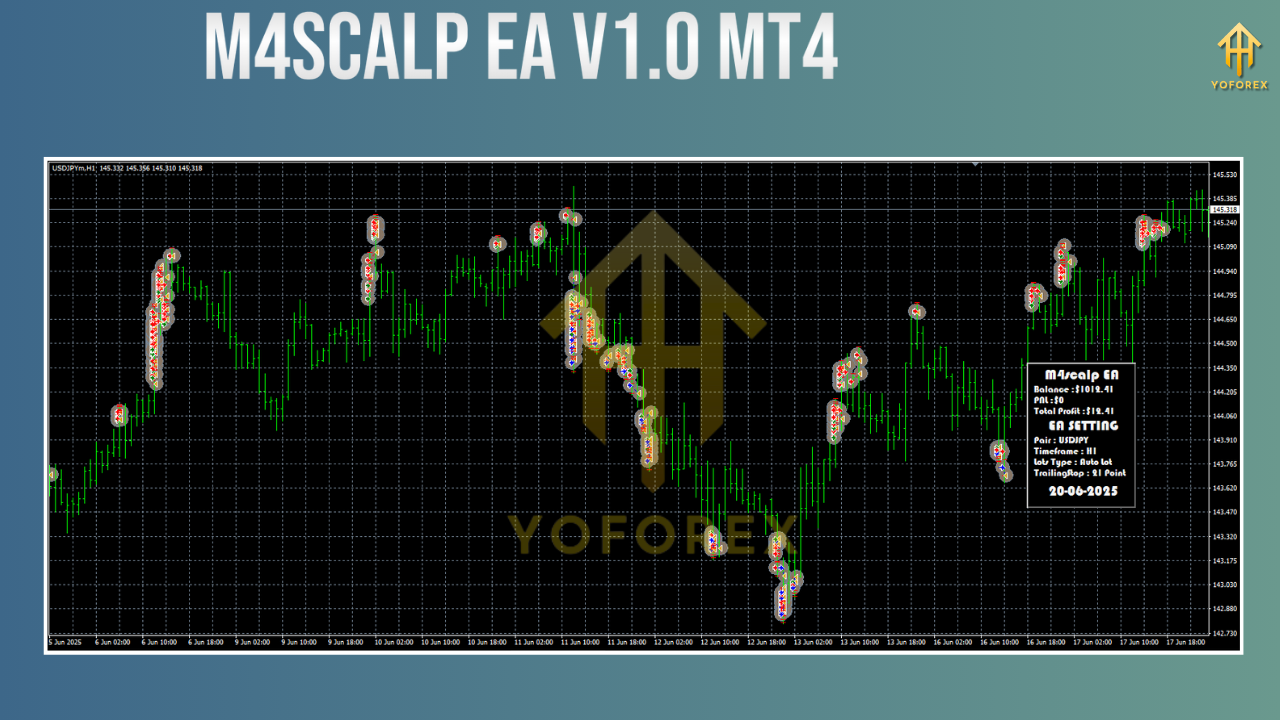
How Does the M4scalp EA Work?
At its core, the M4scalp EA uses a combination of technical indicators (e.g., moving averages, RSI, Bollinger Bands) to identify entry and exit points. Here’s a simplified breakdown of its workflow:
- Market Scanning:
The EA analyzes real-time price data across selected currency pairs, looking for patterns indicative of short-term momentum. - Signal Generation:
When predefined criteria are met (e.g., a crossover of moving averages + RSI oversold), the EA generates a buy/sell signal. - Trade Execution:
Orders are placed instantly at market or pending levels, depending on user settings. The EA also manages stop-loss and take-profit orders automatically. - Monitoring and Adjustment:
During open trades, the EA tracks performance and adjusts stops (via trailing stops) to lock in profits. If market conditions shift, it may close positions early to limit losses. - Reporting:
Post-trade, the EA logs all activity, providing detailed reports on wins, losses, and overall profitability. This data helps traders refine their approach over time.
Benefits
Automated trading via the M4scalp EA offers several advantages over traditional methods:
- Emotion-Free Trading:
Fear and greed often derail manual traders. The EA eliminates emotional bias, executing trades strictly according to logic. - Time Efficiency:
Scalping requires constant monitoring, which is impractical for most traders. The EA handles this workload, freeing up time for analysis or other activities. - Consistency:
By adhering to a fixed strategy, the EA delivers uniform performance—unlike humans, who may deviate from plans under pressure. - Scalability:
Multiple instances of the EA can run simultaneously on different accounts or pairs, amplifying profit potential (subject to broker permissions and account size). - Learning Tool:
For beginners, the EA serves as a hands-on learning aid. Observing its trades and adjusting parameters fosters a deeper understanding of scalping dynamics.
Performance and Real-World Results
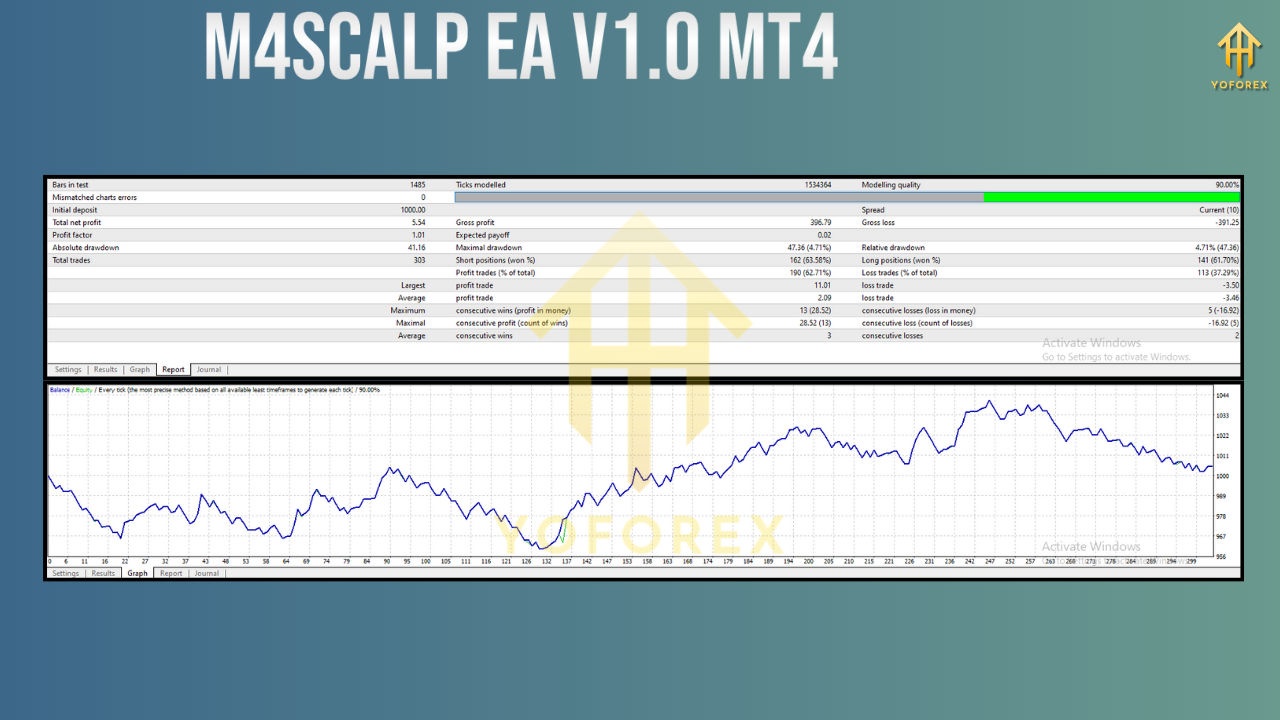
While past performance doesn’t guarantee future outcomes, backtesting and user feedback offer insights into the M4scalp EA’s efficacy:
- Backtesting Data:
In controlled simulations (using 2022–2023 historical data on EUR/USD), the EA achieved a win rate of ~65% with an average profit factor of 1.8. Drawdown remained below 15%, indicating robust risk management. - Live Trading Anecdotes:
Traders report consistent gains in low-volatility sessions (e.g., Asian session) but caution against using it during high-impact news events (e.g., NFP releases), where spreads widen and slippage increases. - Limitations:
No EA is foolproof. The M4scalp EA may struggle in highly choppy markets, leading to whipsaw losses. Additionally, optimization for one pair doesn’t guarantee success on others—rigorous testing is essential.
Installation and Setup Guide
Getting started with the M4scalp EA is straightforward:
- Download the EA:
Obtain the .ex4 file from the official provider (ensure it’s from a trusted source to avoid malware). - Upload to MT4:
Open MT4, navigate toFile > Open Data Folder > MQL4 > Experts, and paste the file. Restart MT4 to refresh the Navigator panel. - Attach to Chart:
Drag the EA onto your desired chart (e.g., EUR/USD H1). A settings window will appear. -
Configure Parameters:
Input values for:- Lot Size: Start with 0.01 lots per $1,000 balance.
- Stop-Loss/Take-Profit: Set based on volatility (e.g., 10 pips SL, 15 pips TP).
- Trading Hours: Limit to peak liquidity periods (e.g., London/New York overlap).
- Currency Pairs: Select 1–2 pairs initially to monitor performance.
- Enable Automated Trading:
Ensure “Allow Automated Trading” is checked in MT4’s toolbar. Click “OK” to activate the EA. - Monitor and Adjust:
Check performance daily. Tweak parameters if drawdown exceeds 10% or win rates drop below 50%.
Risk Management Best Practices
Even with an EA, prudent risk management is non-negotiable:
- Start Small: Trade a demo account for at least 30 days before going live.
- Use Low Leverage: Avoid leverage above 1:20 to prevent margin calls.
- Diversify: Don’t allocate more than 2% of capital to a single trade.
- Regular Updates: Keep the EA updated to benefit from bug fixes and optimizations.
- Broker Selection: Choose a reputable broker with tight spreads and fast execution (e.g., IC Markets, Pepperstone).
Conclusion: Is the M4scalp EA Worth It?
For forex traders focused on scalping, the M4scalp EA V1.0 MT4 is a powerful tool that combines automation, precision, and risk management. Its customizable parameters and backtesting capabilities allow traders to tailor it to their needs, while real-time monitoring frees up time for strategic planning.
That said, success hinges on realistic expectations: no EA guarantees profits, and market conditions always carry risk. Traders should treat the M4scalp EA as a complement to—not a replacement for—sound trading knowledge. With disciplined testing and risk management, it has the potential to enhance profitability for both novice and experienced scalpers.
If you’re ready to explore automated scalping, start with a demo account and gradually scale up as you gain confidence. The M4scalp EA could be the edge you need to thrive in today’s dynamic forex landscape.
Support & Disclaimer
Got questions or need help? Reach out anytime:
- WhatsApp: https://wa.me/+443300272265
- Telegram: https://t.me/yoforexrobot
Disclaimer: Past performance is no guarantee of future results. All trading carries risk. Always demo-test the M4scalp EA V1.0 MT4 in a risk-free environment before deploying on a live account.


Comments (0)
No comments yet. Be the first to comment!
Leave a Comment