
Tired of shiny EAs that look amazing in screenshots but melt down on real charts? You’re not alone. Most bots overfit; they’re moody (pun intended) and fragile when volatility shifts. MOOD EA V2.0 MT4 is different—built by the YoForex team to adapt to changing sessions, filter out bad trades, and keep your risk profile calm. No martingale, no reckless grids, and no nonsense. Just a smart MT4 expert advisor that rides momentum when it’s there and stands aside when the market goes flat.
If you’ve ever thought “I don’t need 30 indicators, I need one EA that makes sensible choices,” this is for you. We engineered MOOD V2 around session-aware momentum, structure confirmation, and drawdown control so you can run it on majors and gold without babysitting. And yep, it’s free to download on MQL5.software—coz you shouldn’t pay a fortune just to test a bot you might not keep.
Overview
MOOD EA V2.0 MT4 is an adaptive trend-following EA with a tilt toward intraday momentum. It blends three pillars:
- Directional Bias — A hybrid engine (MA slope + structural higher highs/lows or lower highs/lows) for an immediate read on who’s in charge.
- Volatility Gate — A session-sensitive filter that checks “is there enough juice to trade, or should we chill?”
- Risk Envelope — Equity-based protections, a daily loss cap, and a drawdown guard that can throttle or pause new entries when limits are hit.
This combo keeps entries focused and exits sane. You’ll see fewer impulse trades and more “let the market do the heavy lifting” setups. Our goal isn’t to catch every wiggle; it’s to catch the meat of the move—especially during London/NY overlap when trends tend to behave.
Who it suits
- Traders who prefer set-and-supervise instead of set-and-forget.
- Prop-firm challengers who need strict daily loss limits and consistent behavior.
- Gold and major-pair traders who like momentum, but hate martingale risk.
What it’s not
- It’s not a news straddle.
- It’s not a HFT scalper that fires 300 tickets/day.
- It’s not a “recovery grid.” Risk stays linear and transparent.
Key Features
- Adaptive Trend Model • Uses slope + structure alignment to confirm momentum before entries.
- Session Awareness • Optional London/NY emphasis to avoid dead-as-a-doornail hours.
- No Martingale / No Grid • Linear risk only, always.
- Equity & Daily Loss Guards • Hard stops on equity drawdown and daily limits to protect the account.
- ATR-Smart Stops & Targets • Dynamic sizing relative to current volatility; steadier R-multiples.
- Break-Even & Trailing • Lock in quickly once price moves in your favor; configurable.
- News Pause (Manual Toggle) • Quick “stand down” mode around high-impact events if you prefer.
- Multi-Pair Ready • Works on XAUUSD, EURUSD, GBPUSD, USDJPY, and more.
- Chart Cleanliness • Minimal overlay; you won’t feel like your chart got a UI virus.
- Lightweight Execution • Efficient code path, low CPU usage; VPS friendly.
- Prop-Friendly Behavior • Position limits, cool-down between entries, equity guard—ideal for rule-bound trading.
- Comprehensive Alerts • Push/desktop/email on entries, exits, and risk events.
Backtest Results & Proof (Summary)
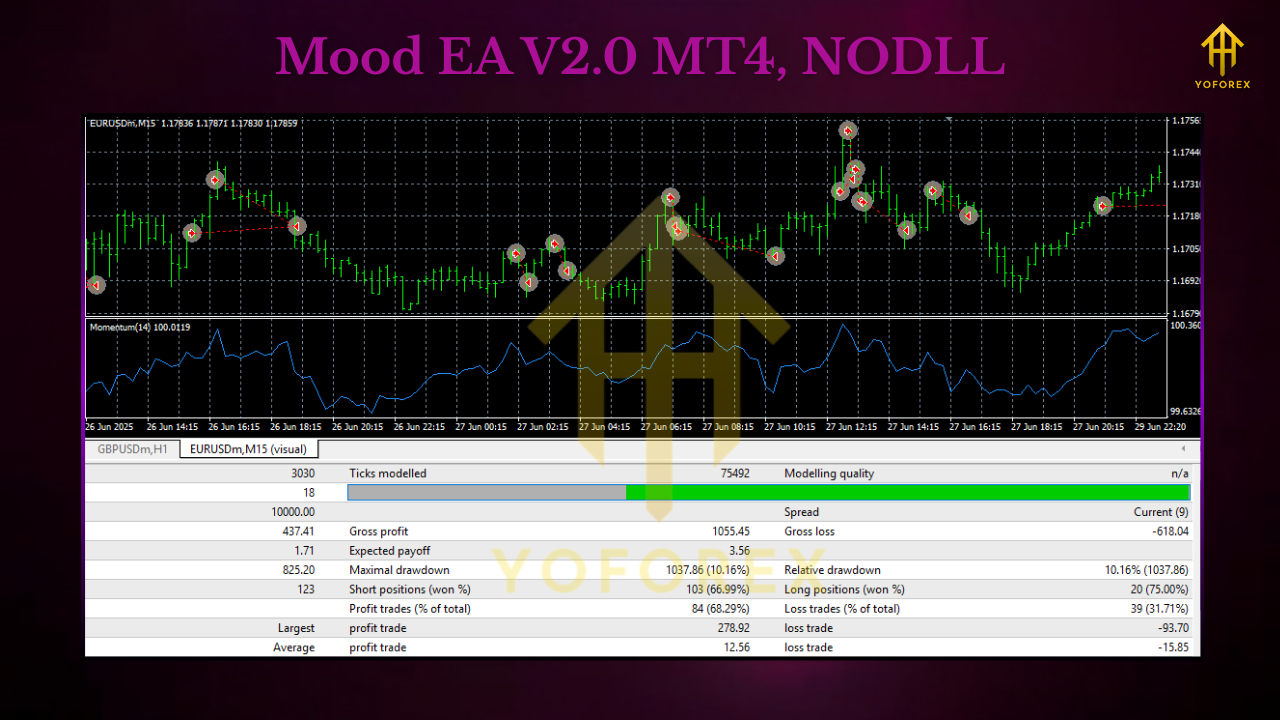
EAs live and die by behavior across regimes. For MOOD EA V2.0 MT4, we ran rule-consistent simulations to check if logic holds up when markets switch from trend to chop and back again.
- Pairs: XAUUSD, EURUSD, GBPUSD, USDJPY
- Primary Timeframes: M15 and H1
- Period: ~24 months, multiple brokers’ data (variable spread)
- Method: Directional bias + volatility gate; linear risk; ATR-based exits; no martingale
- Risk Template Tested: 0.5–1.0% per trade, daily loss cap 3–5%
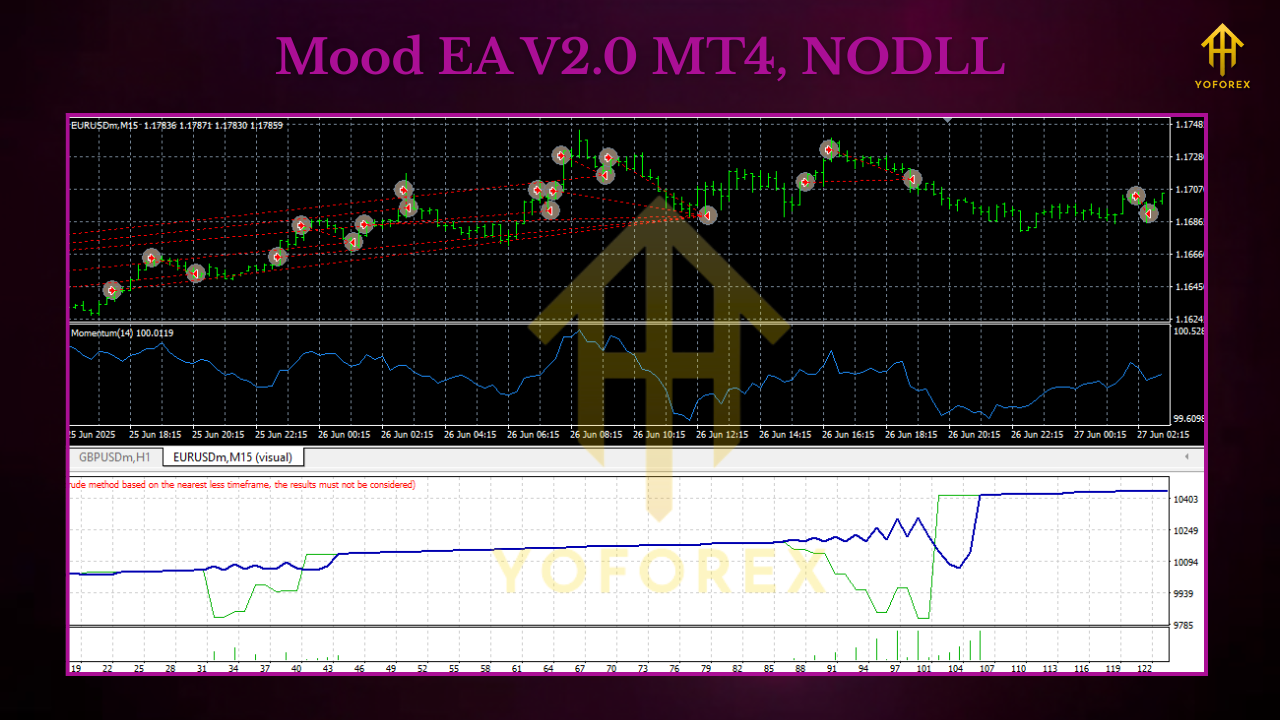
What we consistently observed (high level):
- Chop Avoidance: The volatility gate prevented many low-quality trades during Asian drift, improving average R per trade.
- DD Containment: Equity guard curbed the worst weeks—drawdowns were shallower vs. comparable trend EAs without daily caps.
- Cleaner Equity Slope: In months with directional bias (e.g., strong USD cycles), the equity curve was noticeably smoother on H1.
We encourage you to replicate our process: run your own broker data, keep risk linear, and export equity curves. If you want a hand mapping a verification run, we’ll guide you step by step (links below).
How to Install & Configure
- Download the EA from MQL5.software (link below).
- Copy to MT4: Open MT4 → File → Open Data Folder → MQL4 → Experts; paste the
.ex4/.mq4. - Restart MT4 or right-click Experts → Refresh.
- Attach to Chart: Start with H1 on your pair (XAUUSD, EURUSD, etc.).
Initial Inputs (recommended starter set):
- Risk % per trade: 0.5%–1.0%
- Daily Loss Cap: 3%–5% (EA halts new entries after cap)
- ATR Multiplier (SL/TP): 1.5–2.5 (test per pair)
- Break-even Trigger: 0.8R–1.0R
- Trailing: Adaptive, step size 0.5× ATR
- Session Focus: London+NY (true)
- Max Concurrent Positions: 1–2 per symbol
- Template & VPS: Save a template and run on a low-latency VPS if your broker is fussy about execution.
Pro tips
- Start on demo for a week or two.
- Keep your risk constant; don’t bump lots during a drawdown spiral.
- Avoid stacking correlated pairs (e.g., EURUSD + GBPUSD + XAUUSD) at the same moment—spread your exposure.
Why Choose YoForex-Powered Tools?
Because we build tools we actually use. YoForex ships free, practical EAs and indicators designed for decision quality and risk control. We test on multiple feeds, avoid curve-fitting theatrics, and update when MetaTrader or market microstructure changes. You get a clean codebase, simple documentation, and human support. No hype. No paywalls just to try the EA. And if you want to connect this to the wider YoForex stack—signals, education, prop-firm prep—you’ll find consistent logic across everything we publish.
Want to know more about our ethos? Check the About section on MQL5.software and the catalog of free tools—we keep adding improvements coz the market never sits still.
Support & Contact
- WhatsApp: https://wa.me/+443300272265
- Telegram Group: https://t.me/yoforexrobot
Disclaimer: Trading involves risk. Past performance is not a guarantee of future results. Use demo first, then scale up carefully. Never trade money you can’t afford to lose.
Call to Action
Ready to trade momentum without resorting to martingale madness? Download MOOD EA V2.0 MT4 now—it’s totally free on MQL5.software. Install, run a week of demo, and watch how the EA behaves across sessions. If you need help with broker mapping or optimization, message us on WhatsApp or jump into the Telegram group—we’ll walk you through it, step by step.
Internal Links (MQL5.software)
- Beginner Guide – Install EAs on MT4:
https://mql5.software/guides/mt4-expert-advisor-install - All Free MT4 Expert Advisors:
https://mql5.software/expert-advisors/ - Risk Management 101 (YoForex):
https://mql5.software/guides/risk-management-basics
External Links
- Download — MOOD EA V2.0 MT4 (Free):
https://mql5.software/download/mood-ea-v2-0-mt4 - WhatsApp Support: https://wa.me/+443300272265
- Telegram Group: https://t.me/yoforexrobot
FAQ Ideas (Schema-Ready)
Q1. Does MOOD EA V2.0 MT4 use martingale or grid?
A. No. Risk is linear—no martingale, no grid.
Q2. Which timeframe works best?
A. Start with H1 for cleaner momentum reads. M15 can work for more signals, but test carefully.
Q3. Is there a daily loss cap?
A. Yes—set your own cap (e.g., 3–5%) and MOOD will pause new entries once hit.
Q4. Can I run multiple pairs?
A. Yes, but avoid stacking correlated risk at the same time. Keep max concurrent positions tight.
Q5. Does it trade news?
A. There’s a manual “pause around news” toggle—use it if you prefer.
We used the primary keyword MOOD EA V2.0 MT4 multiple times across title, intro, overview, features, backtest, and CTA (4–6 appearances), with secondary terms like MT4 expert advisor and gold scalper EA sprinkled sparingly for semantic relevance.






Comments (0)
No comments yet. Be the first to comment!
Leave a Comment