Raff Channel Indicator V1.0 MT4 Best Forex Trading Strategy for EUR/USD (H1)
By: Swarnalata
Published on: Apr 04, 2025
Introduction
Are you looking for a reliable Forex trading indicator to enhance your trading strategy? The Raff Channel Indicator V1.0 MT4 is a powerful tool designed to help traders identify trends and potential entry/exit points on the EUR/USD currency pair.
In this comprehensive guide, we’ll explore:
✅ How the Raff Channel Indicator works
✅ Best settings for the 1-hour (H1) timeframe
✅ Minimum deposit requirements ($500 recommended)
✅ Step-by-step trading strategy
✅ How to download and install the indicator
Whether you're a beginner or an experienced trader, this guide will help you maximize profits using the Raff Channel Indicator V1.0 on MetaTrader 4 (MT4).
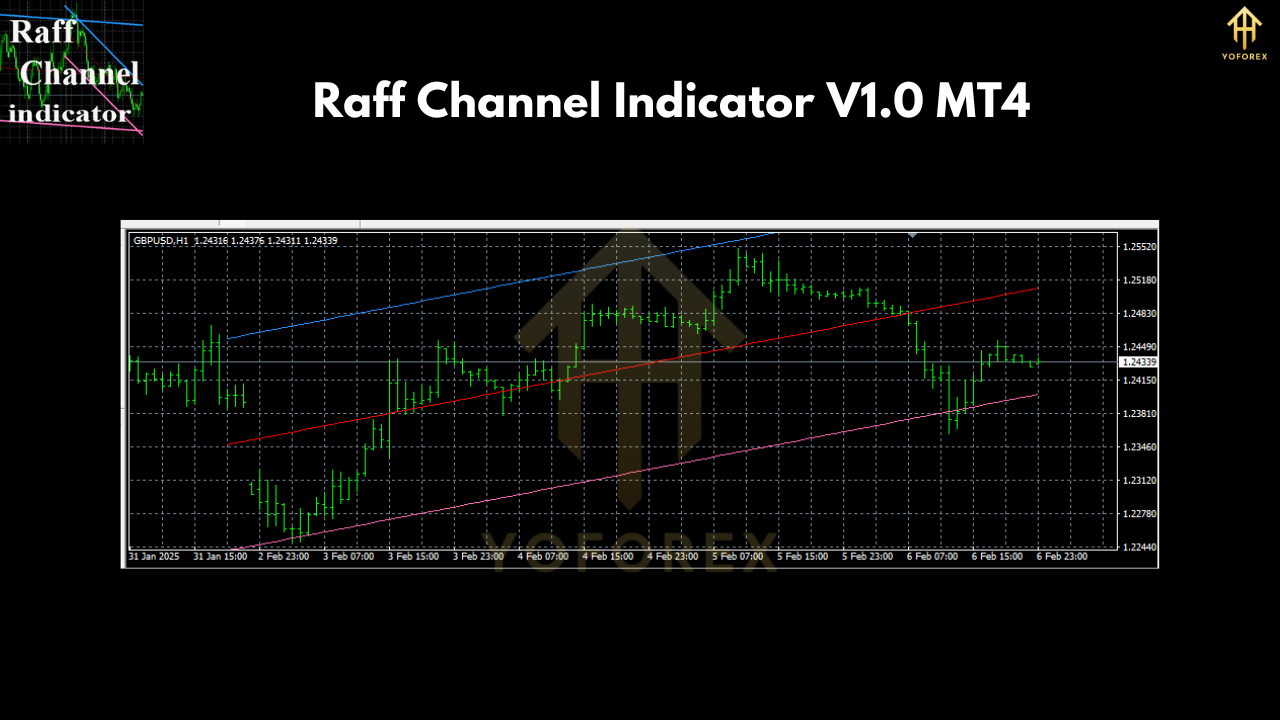 What is the Raff Channel Indicator V1.0 MT4?
The Raff Channel Indicator is a technical analysis tool that plots dynamic support and resistance levels based on price volatility. It helps traders:
✔ Identify trend direction (uptrend or downtrend)
✔ Spot potential breakout and reversal points
✔ Set stop-loss and take-profit levels effectively
Best Currency Pair & Timeframe
- Currency Pair: EUR/USD (Most liquid and stable pair)
- Timeframe: H1 (1-hour chart) – Ideal for swing and intraday trading
Minimum Deposit Requirement
To trade safely using this strategy, a minimum deposit of $500 is recommended to manage risk effectively.
How to Use the Raff Channel Indicator V1.0 MT4
Step 1: Download & Install the Indicator
- Download Link: Click Here to Download Raff Channel Indicator V1.0
- Installation Guide:
- Open MetaTrader 4 (MT4)
- Go to File > Open Data Folder > MQL4 > Indicators
- Paste the downloaded .ex4 file into the "Indicators" folder
- Restart MT4
- Drag and drop the indicator onto your EUR/USD H1 chart
Step 2: Setting Up the Indicator
The default settings work well, but you can adjust:
- Period: 20 (for smoother channels)
- Shift: 0 (no shift)
- Apply to: Close price
Step 3: Trading Strategy
Buy Signal (Uptrend)
✅ Price stays above the Raff Channel
✅ Wait for a pullback near the lower channel line
✅ Enter BUY with stop-loss below the channel
✅ Take-profit at the upper channel line
Sell Signal (Downtrend)
✅ Price stays below the Raff Channel
✅ Wait for a retest near the upper channel line
✅ Enter SELL with stop-loss above the channel
✅ Take-profit at the lower channel line
 Risk Management Tips
- Risk only 1-2% per trade
- Use stop-loss to protect your capital
- Avoid trading during high-impact news events
Pros & Cons of the Raff Channel Indicator
Pros
✅ Easy to use for beginners
✅ Works well in trending markets
✅ Helps identify key support/resistance levels
Cons
⚠️ May give false signals in sideways markets
⚠️ Requires confirmation with other indicators (e.g., RSI, MACD)
Alternative Indicators to Combine
For better accuracy, pair the Raff Channel with:
- RSI (Relative Strength Index) – To confirm overbought/oversold conditions
- MACD (Moving Average Convergence Divergence) – For trend confirmation
- Moving Averages (50 EMA & 200 EMA) – To identify long-term trends
Frequently Asked Questions (FAQs)
❓ Is the Raff Channel Indicator free?
Yes, you can download it for free from the link provided.
❓ Can I use this indicator on other currency pairs?
Yes, but it works best on EUR/USD (H1) due to its high liquidity.
❓ What’s the best trading session for this strategy?
The London & New York sessions provide the best volatility.
❓ Can I use this on a $100 account?
It’s possible, but a $500 minimum deposit is recommended for better risk management.
Conclusion
The Raff Channel Indicator V1.0 MT4 is a powerful tool for Forex traders, especially when trading EUR/USD on the H1 timeframe. By following the strategy outlined above, you can improve your trading accuracy and profitability.
Join our Telegram for the latest updates and support




Comments
No comments yet. Be the first to comment!
Leave a Comment