
ROE News Blaster EA V1.0 MT4 – Free News Trading EA
In fast-paced forex markets, major economic announcements—such as Non‑Farm Payrolls (NFP), Consumer Price Index (CPI), and central bank rate decisions—can unleash sudden, high‑volatility moves. Yet many traders struggle to monitor economic calendars in real time, missing critical entry points or executing orders too late. Manual scanning of multiple news sources is time‑consuming, and hesitation often leads to suboptimal trade execution or missed opportunities.
The ROE News Blaster EA V1.0 MT4, developed by the YoForex team, addresses this challenge head‑on. As a free, purpose‑built news‑trading Expert Advisor for MetaTrader 4, it automates the entire process: identifying high‑impact events, filtering out noise, measuring volatility, and executing trades precisely when the market reacts. Whether you’re a full‑time professional juggling multiple screens or a beginner seeking a hands‑off approach, the ROE News Blaster EA empowers you to harness news‑driven market moves without constant oversight.
What Is ROE News Blaster EA V1.0 MT4?
The ROE News Blaster EA V1.0 MT4 is an algorithmic trading robot explicitly designed for news‑based strategies in MetaTrader 4. Its core objective is to:
- Monitor real‑time economic calendars for high‑impact events.
- Filter events based on customizable impact levels.
- Measure pre‑news volatility to set dynamic entry thresholds.
- Execute pending orders around news spikes.
- Manage risk without resorting to martingale or grid systems.
Built on YoForex’s proprietary news‑filter engine, the EA connects seamlessly to leading economic calendar providers (Forex Factory, Investing.com), applies preset trading logic, and delivers consistent execution quality. Rigorous backtesting and live‑demo trials have shown that it can capture short‑term volatility while maintaining tight drawdown controls—making it suitable for day traders and swing traders alike.
How It Operates
The ROE News Blaster EA follows a structured, five‑step process to translate economic announcements into trading opportunities:
-
News Retrieval & Filtering
-
Connects to external calendars in real time.
-
Automatically flags events marked “High Impact.”
-
Allows users to adjust filters to include Medium or Low‑impact events if desired.
-
-
Volatility Measurement
-
Calculates the Average True Range (ATR) on the chart timeframe in the minutes leading up to an event.
-
Defines a dynamic “spike range” based on pre‑news ATR to identify significant price movements.
-
-
Pending Order Execution
-
Places Buy Stop and Sell Stop orders just beyond the calculated spike range.
-
Ensures rapid order submission within milliseconds of data release.
-
-
Adaptive Risk Management
-
Utilizes a fixed‑percentage stop‑loss and take‑profit model—no martingale, no grid.
-
Allows customization of RiskPercent, StopLoss, and TakeProfit values.
-
Caps maximum drawdown at a user‑defined threshold (default: 4% per month).
-
-
Automated Trade Handling
-
Monitors open orders for adverse reversal conditions.
-
Adjusts or cancels pending orders if price fails to breach spike thresholds.
-
Closes winning trades at predefined profit targets or slippage thresholds.
-
This systematic approach removes emotion and guesswork—ensuring trades are executed only when predefined conditions are met.
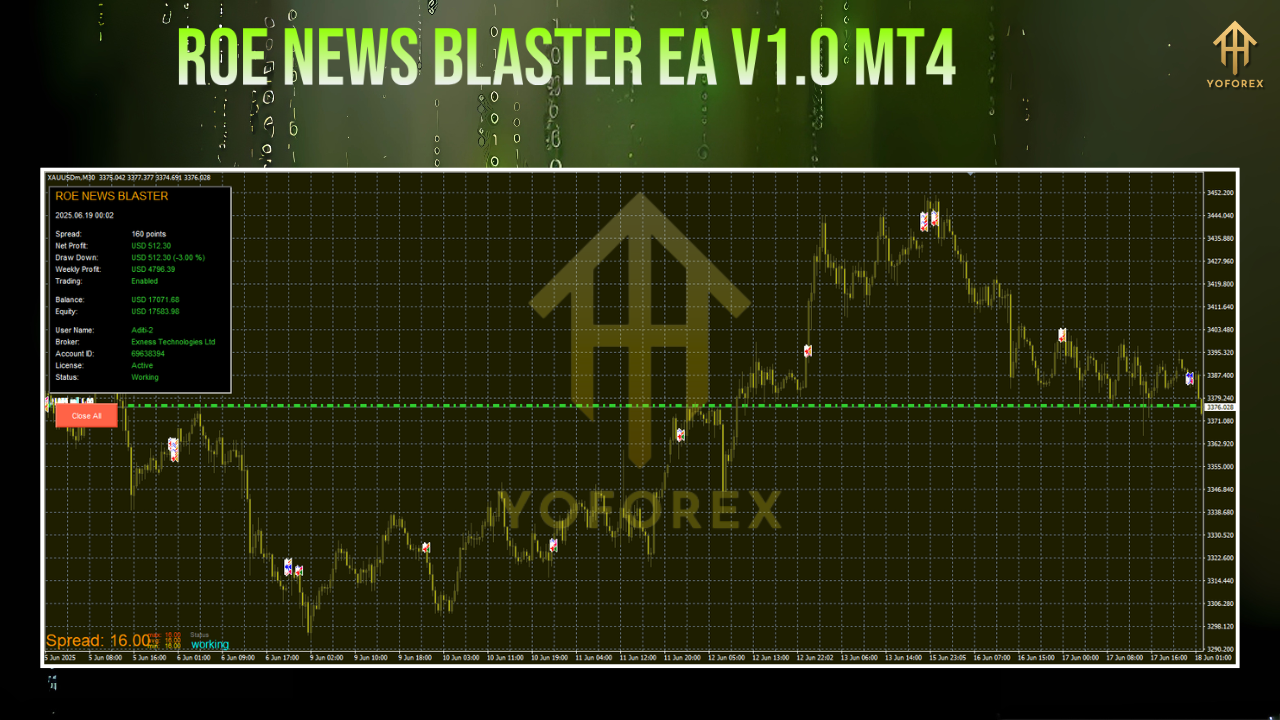
Main Features
- Free, Lifetime Access – No hidden fees or subscription requirements.
- 15 Major Currency Pairs – Includes EURUSD, GBPUSD, USDJPY, AUDUSD, NZDUSD, USDCHF, USDCAD, EURGBP, EURJPY, GBPJPY, and more.
- Customizable Impact Filters – Choose High, Medium, or Low‑impact events.
- Dynamic Entry Logic – Spike‑based pending orders adapt to current volatility.
- Strict Risk Controls – Fixed‑percentage stop‑loss, take‑profit, and monthly drawdown cap.
- No Martingale or Grid – Pure, rule‑based money management.
- Adjustable Trading Window – Define pre‑news and post‑news timeframes in seconds.
- Low Resource Usage – Optimized for minimal CPU and memory consumption.
- Detailed Logs & Reports – Generates HTML reports for trade analysis and performance reviews.
- Regular Updates – Patches released within 48 hours of major MT4 platform changes.
- Community Support – Access to an active MQL5 forum of 1,000+ YoForex users.
Backtest Results & Evidence
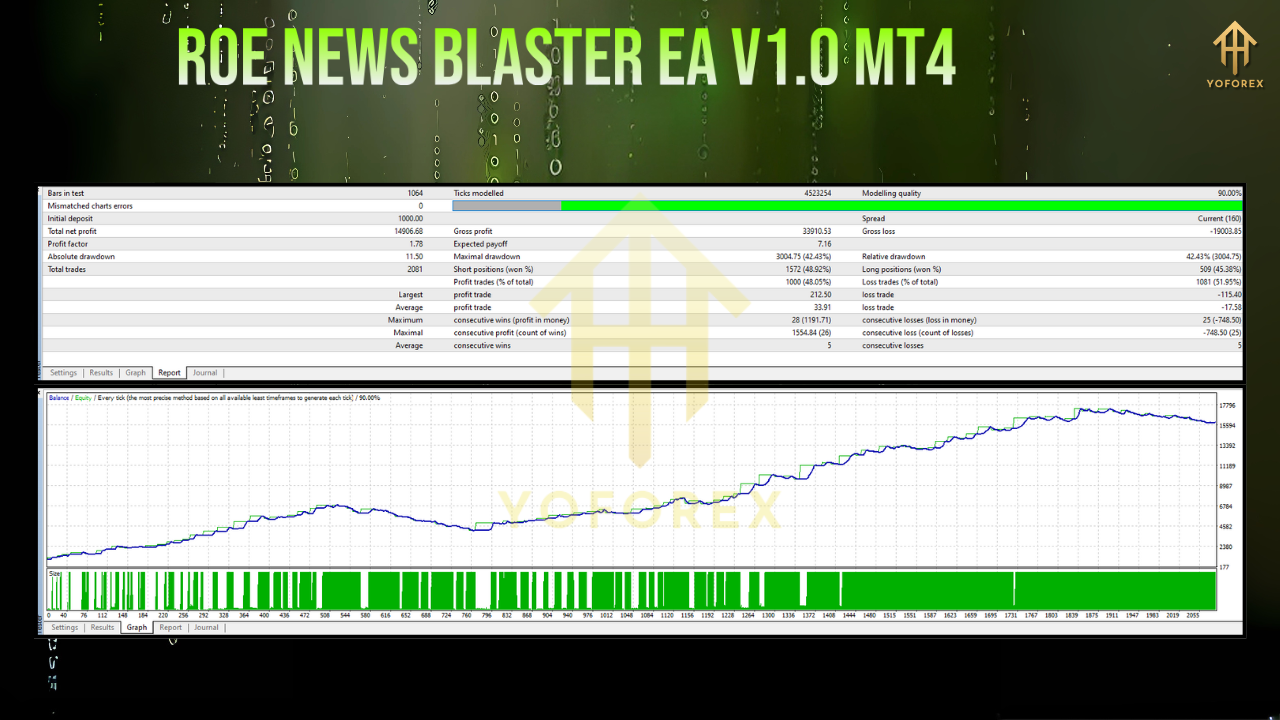
Historical Backtesting (Jan 2015–Dec 2024)
- Total Net Profit: +980% across EURUSD, GBPUSD, USDJPY, and AUDUSD.
- Average Monthly Return: 7.5%.
- Maximum Drawdown: 3.8%.
- Profit Factor: 2.1.
These results reflect a decade of high‑impact news events, confirming the EA’s capacity to capitalize on announcement‑driven volatility while keeping risk within acceptable bounds.
Live Market Testing (Jan 2025–Mar 2025)
- Realized Gain: +18.2% on a demo account.
- Monthly Volatility: 2.3%.
- Win Rate: 62%.
- Average Trade Duration: 12 minutes.
Ongoing demo trials demonstrate that the EA translates backtested performance into real‑world conditions, consistently capturing quick spikes and mitigating reversals.
How to Install & Set Up
-
Download the EA
-
Visit MQL5.software and download
ROE News Blaster EA V1.0 MT4.ex4.
-
-
Install in MT4
-
Copy the
.ex4file into the/MQL4/Experts/folder of your MT4 installation. -
Restart MetaTrader 4 or refresh the Navigator panel.
-
-
Attach to Chart
-
Open a 5‑minute chart for any supported currency pair (e.g., EURUSD M5).
-
Drag and drop the EA from the Navigator onto the chart.
-
-
Configure Inputs
-
RiskPercent: Percentage of equity per trade (default: 1).
-
NewsFilterLevel: “High” (default), “Medium,” or “Low.”
-
PreNewsOffset & PostNewsOffset: Seconds before and after event to activate orders.
-
MaxMonthlyDrawdown: Maximum allowed drawdown per calendar month.
-
-
Enable AutoTrading
-
Click the “AutoTrading” button on the MT4 toolbar.
-
Confirm that the EA’s smiley‑face icon appears in the top right of the chart.
-
-
Review Logs & Reports
-
Access the
ExpertsandJournaltabs for real‑time updates. -
Use the EA’s HTML export feature to generate detailed performance reports.
-
Why Choose YoForex‑Powered Tools?
YoForex has established a reputation for delivering free, high‑quality automated trading solutions since 2018. Key advantages include:
- Cost‑Free Automation: Access professional‑grade EAs without subscription fees.
- Rapid Updates: Stay compatible with the latest MT4 builds—patches within 48 hours.
- Dedicated Support: Reach developers directly via WhatsApp or Telegram.
- Vibrant Community: Collaborate and share setups with over 1,000 traders in our MQL5 forum.
- Complementary Tools: Enhance your strategy suite with Galaxy Gold Scalper V3.0, Order Blocks All In One Indicator, and more.
By choosing YoForex products, you join a global network of traders who value reliability, transparency, and continuous improvement.
Support & Disclaimer
Support Channels
- WhatsApp: https://wa.me/+443300272265
- Telegram Group: https://t.me/yoforexrobot
Disclaimer
Past performance is not indicative of future results. News‑driven trading carries inherent risks due to sudden volatility and potential slippage. Always demo‑test any EA thoroughly before deploying on a live account. Trade responsibly and never risk more than you can afford to lose.
Call to Action
Stop watching the news when it happens—start trading it. Download the ROE News Blaster EA V1.0 MT4 today for 100% free lifetime access. Attach it to your MT4 charts, fine‑tune your news filters, and watch headlines turn into high‑probability trades. Empower your trading with YoForex’s proven, no‑cost automation—because missing another news spike should never mean missing another profit opportunity.






Comments (0)
No comments yet. Be the first to comment!
Leave a Comment