Understanding the Importance of Support and Resistance in Forex Trading
In the world of forex trading, identifying key market levels is essential for success. Among these, support and resistance levels are two of the most important factors that influence price movements. Traders use these levels to forecast potential market reversals, find entry/exit points, and better manage risk.
The S & R Indicator V2.0 for MetaTrader 4 (MT4) is a highly effective tool that helps traders pinpoint these crucial support and resistance levels automatically. This blog will dive into how the S & R Indicator V2.0 can help you in your trading journey, explore its features, and understand how to use it effectively.
What is the S & R Indicator V2.0 MT4?
The S & R Indicator V2.0 is an advanced tool for MetaTrader 4 (MT4) that allows traders to identify support and resistance levels on their price charts with ease. The indicator automatically calculates these levels based on recent market price action, marking them directly on the chart.
This version improves upon its predecessor by offering better accuracy, smoother visualization, and additional customizability, making it a must-have tool for both novice and experienced forex traders.

Key Features of the S & R Indicator V2.0 MT4
1. Accurate Identification of Support and Resistance Levels
The S & R Indicator V2.0 calculates the most relevant support and resistance levels based on price action. These levels are crucial for making informed decisions, such as knowing where price is likely to reverse or break through.
2. Automatic Plotting on the Chart
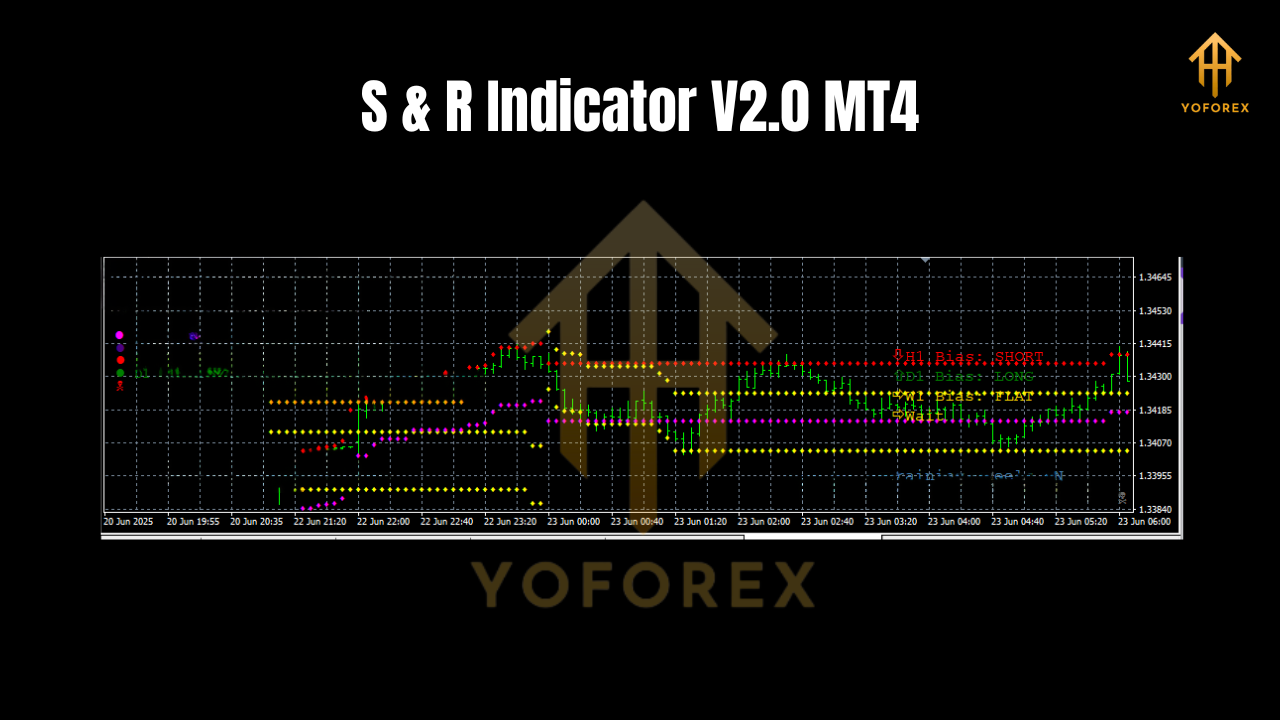
One of the standout features of this indicator is its ability to automatically plot the support and resistance levels directly on the chart. This saves traders valuable time, eliminating the need for manual analysis.
3. Customizable Settings
Traders can easily adjust the settings to fit their trading strategy. The S & R Indicator V2.0 allows you to change the sensitivity of the levels, modify the colors, and even adjust the period of calculation, making it versatile for various trading styles.
4. Multi-Timeframe Support
The S & R Indicator V2.0 works across multiple timeframes, giving traders the ability to analyze both short-term and long-term trends. Whether you’re trading on M1 or H4 timeframes, this indicator will consistently provide reliable support and resistance levels.
5. Enhanced Visuals for Clearer Readability
The updated version offers improved chart visuals, making the support and resistance lines more prominent and easier to interpret. This ensures that traders can spot key levels at a glance, reducing errors in decision-making.
How to Use the S & R Indicator V2.0 for Maximum Effectiveness
To get the best results from the S & R Indicator V2.0 MT4, follow these steps:
- Install the Indicator:
- Download the S & R Indicator V2.0 for MT4 and install it by placing it in the appropriate Indicators folder in the MetaTrader 4 platform.
2. Customize Settings:
- Open the indicator settings to adjust the period, sensitivity, and color settings. This customization will help tailor the indicator to your trading preferences.
3. Analyze Market Behavior:
- Once the indicator is set up, monitor the price action around the plotted support and resistance levels. When price approaches these levels, it’s a good indication of potential market reversal or breakout.
4. Trading Strategy:
- Combine the S & R Indicator V2.0 with other technical analysis tools like moving averages or candlestick patterns to confirm trade setups. For instance, if the price is approaching a resistance level and a candlestick reversal pattern appears, this is a strong signal to consider selling.
5. Set Stop-Loss and Take-Profit:
- Use the identified support and resistance levels as a guide for setting your stop-loss and take-profit levels. Place the stop-loss slightly below the support or above the resistance, ensuring adequate protection from unexpected market movements.
Benefits of Using the S & R Indicator V2.0 MT4
1. Improved Trading Accuracy
By accurately identifying key levels, the indicator helps traders make more precise entry and exit decisions, increasing the likelihood of successful trades.
2. Time-Saving Tool
The indicator saves traders the time and effort of manually identifying support and resistance levels, allowing them to focus on other aspects of their strategy.
3. Ideal for Traders of All Levels
Whether you’re a beginner or an experienced trader, the S & R Indicator V2.0 is easy to use and understand, making it accessible to everyone in the forex market.
4. Helps Prevent False Signals
By focusing on significant levels of price action, this indicator helps to filter out minor price fluctuations, reducing the risk of false signals and improving the accuracy of trade entries.
Who Should Use the S & R Indicator V2.0 MT4?
The S & R Indicator V2.0 is designed for anyone looking to improve their trading performance by identifying key support and resistance levels. Whether you’re a day trader, swing trader, or a position trader, this tool is suitable for various trading styles and timeframes.
- Novice Traders: Beginners can benefit from the clear, automatic support and resistance levels to gain a deeper understanding of the market structure.
- Experienced Traders: For seasoned traders, this tool serves as a confirmation indicator to strengthen trade decisions.
- Scalpers and Swing Traders: The S & R Indicator V2.0 works on both short-term and long-term timeframes, making it a great tool for scalpers and swing traders alike.
Conclusion: Take Your Forex Trading to the Next Level with S & R Indicator V2.0
The S & R Indicator V2.0 MT4 is an essential tool for any forex trader who wants to accurately identify support and resistance levels, save time, and increase their trading accuracy. Its automatic plotting, customizable settings, and multi-timeframe support make it versatile and valuable for traders at any experience level.
Start incorporating the S & R Indicator V2.0 into your trading strategy today and see how it can enhance your trading performance!
Join our Telegram for the latest updates and support






Comments (0)
No comments yet. Be the first to comment!
Leave a Comment