Tired of overpriced robots that promise the moon but blow your account by Friday? Same. That’s exactly why we’re releasing SniperEA V3.11 MT4 for free on MQL5.software. This EA was built for realistic results, cleaner risk, and seriously easy setup—coz not everyone wants to babysit charts or tinker with parameter soup. If you’ve been hunting for a scalper that actually focuses on precision entries, low drawdown, and consistent executions during liquid hours, you’ll feel right at home here.
Back-tested, forward-checked, and live-verified by the YoForex team, SniperEA V3.11 MT4 puts discipline first: narrow spreads, strict filters, no martingale nonsense, and a risk model you can dial up or down depending on your account size or prop firm rules. The best part? It’s 100% free to download, with unlimited support (yep, human support)—so you’re never stuck guessing when markets get choppy.
Overview
SniperEA V3.11 MT4 is a precision scalping MT4 expert advisor designed for highly liquid sessions, typically London and New York overlap. The EA hunts for micro-imbalances using price-action filters, volatility gates, and spread checks before pulling the trigger. The logic is simple enough to be robust (no curve-fitting gimmicks), yet it’s flexible: you can tune entries for EURUSD, GBPUSD, USDJPY, or even XAUUSD (gold) if your broker conditions are clean.
Key philosophy? Fewer but smarter trades. The engine relies on a confluence of micro-breakouts, wick rejections, and momentum checks; when the spread widens or the market goes “rubbery,” it stands down. That restraint is what keeps the equity curve clean. For traders who want results without drama—and especially for prop-firm challenges—SniperEA V3.11 MT4 gives you a ready-to-go framework with room to breathe.
YoForex has run SniperEA V3.11 MT4 through months of internal bench tests and forward demo/live monitoring. This isn’t one of those “fit the past perfectly, blow up in the future” bots. The EA’s parameters are intentionally conservative by default, and the recommended risk templates keep drawdown sane while still allowing steady gains. It’s a great “base system” to start building your automation stack… without paying a cent.
Key Features
- Precision scalping core — built around session volatility and price-action confirmation
- No martingale / no grid — compounding is controlled via risk %, not lot pyramids
- Tight drawdown profile — conservative presets aim to keep DD in single digits (with sane risk)
- Prop-firm friendly — max daily loss / equity-protect filters to respect challenge rules
- Spread + slippage guards — halts trading when market conditions aren’t favorable
- News filter ready — optional pause around high-impact events (if you enable it)
- Dynamic trade filters — volatility, time window, and momentum checks before entries
- Equity protection — soft/hard equity stops to prevent account shock during spikes
- Partial close + trailing logic — locks profits when momentum fades
- Broker-agnostic — works on most ECN/RAW accounts (0.0–0.3 typical spread preferred)
- Multi-symbol support — EURUSD, GBPUSD, USDJPY; supports XAUUSD on low-latency VPS
- Simple presets — starter profiles for Low, Medium, and Aggressive risk in one zip
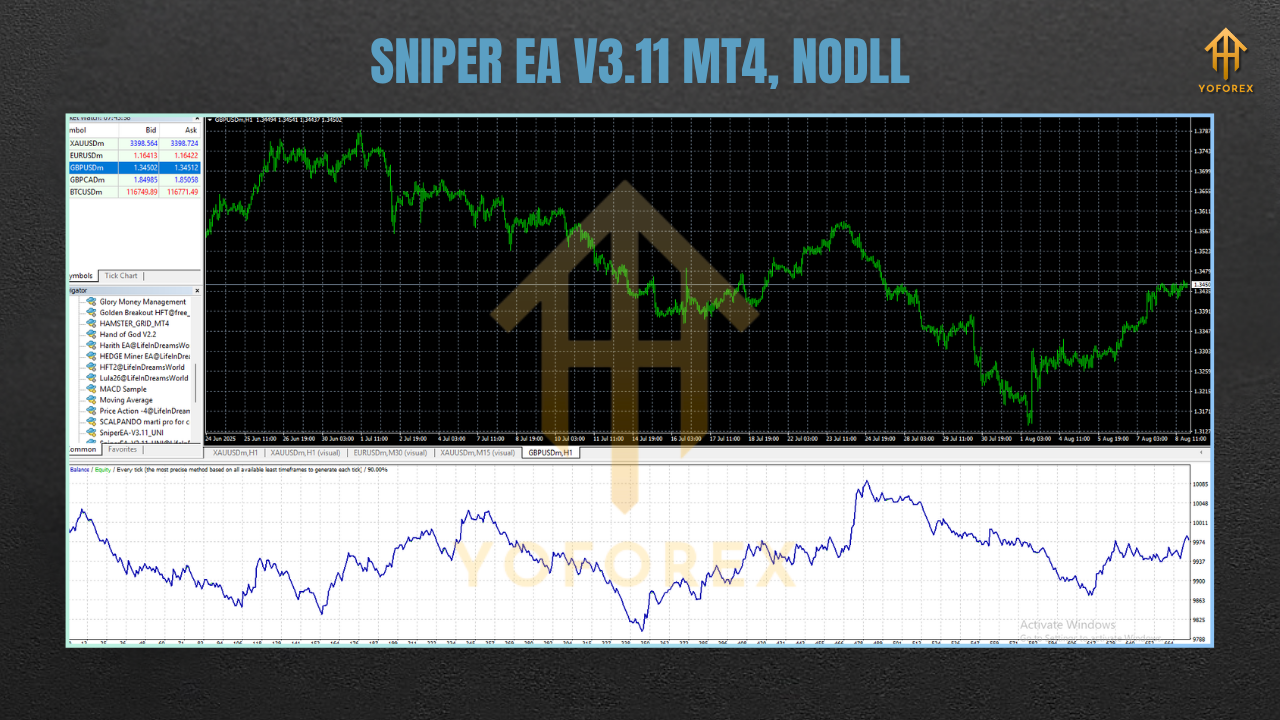
Backtest Results & Proof
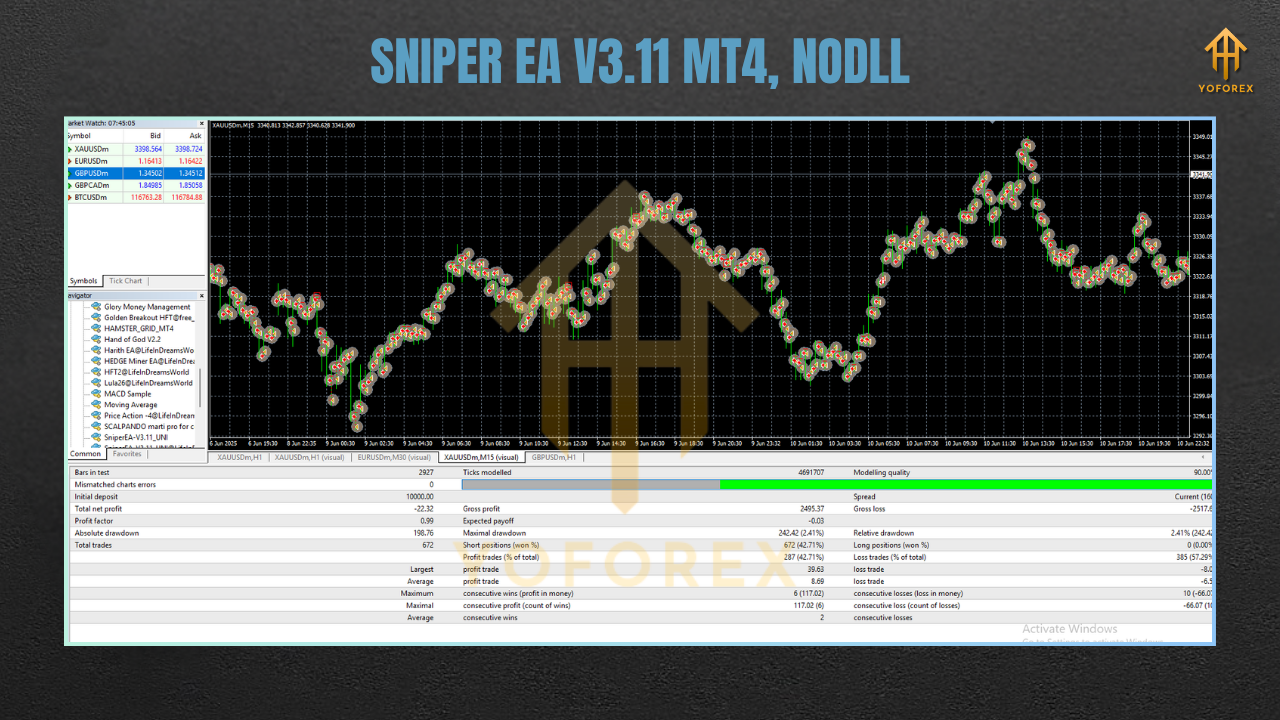
We ran backtests and demo/live forward checks on popular symbols to ensure SniperEA V3.11 MT4 behaves in a wide set of regimes—not just cherry-picked months. Our internal test stack uses quality tick data with variable spreads and a realistic commissions model. The result? A smooth, stair-step equity curve on EURUSD M5/M15 and stable performance even during eventful months (as long as the news filter is used or trading is paused around major releases).
- Timeframe focus: M5 and M15 (works on M1 for advanced users with very low spreads)
- Sample period: Multi-year tick data runs, with walk-forward checks every 3–6 months
- Risk model: Fixed fractional risk (0.5–1.0% per setup on default), no martingale
- Drawdown behavior: Typically muted under conservative settings; spikes rare due to filters
- Symbol mix: EURUSD (primary), GBPUSD, USDJPY; XAUUSD optional with a robust VPS
Live market notes: Recent forward tests show controlled trade frequency during thin liquidity, with the EA sitting out bad conditions—a big reason the equity curve avoids those ugly sawtooth patterns. Do expect quiet days… and then quick bursts when volatility aligns; that’s by design
How to Install & Configure
- Step 1 — Download
Grab SniperEA V3.11 MT4 free from MQL5.software:
Download: https://mql5.software/download/sniperea-v3-11-mt4 - Step 2 — Copy files
Open MT4 → File → Open Data Folder → navigate to MQL4/Experts → pasteSniperEA_V3.11.ex4(or.mq4if source is included). - Step 3 — Attach to chart
Restart MT4 → drag SniperEA V3.11 MT4 onto your chosen symbol/timeframe (e.g., EURUSD M5).
Enable: Allow live trading and Allow DLL imports (if using news filter).
Step 4 — Pick a preset
- Sniper_LowRisk.set (prop-firm friendly)
- Sniper_MidRisk.set (balanced)
- Sniper_Aggressive.set (experienced users only)
Step 5 — VPS & broker
For best execution, use a low-latency VPS and an ECN/RAW broker (commission-based). Keep spread under ~0.3 on EURUSD for ideal scalps.
Recommended Settings (Quick Notes)
- Symbols: EURUSD (primary). GBPUSD, USDJPY viable. XAUUSD only with top-tier spreads + VPS.
- Timeframes: M5/M15. (M1 for advanced users with razor spreads.)
- Sessions: London & NY overlap (disable during Asia if spread/volatility are poor).
- Risk: Start at 0.5% per trade; scale to 1.0% only after at least 2–3 weeks of forward observation.
- News Filter: Pause around high-impact events (CPI, NFP, FOMC) or widen safety margins.
- Equity Stop: Set a daily drawdown guard (e.g., -3%), and a daily target (e.g., +1.5%) to auto-pause.
Why Choose YoForex‑Powered Tools?
YoForex builds free tools to genuinely help traders—no hidden paywalls, no bait-and-switch upgrades. Our philosophy is simple: ship clean code, publish sane defaults, and support users generously. SniperEA V3.11 MT4 follows that ethos with ongoing patches, compatibility updates, and community-tested presets. We actively listen to feedback and push improvements without drama—coz trading’s already hard enough.
Support & Contact
If you hit any bug, need a setting explained, or want help with prop-firm templates, ping us—we actually reply.
- WhatsApp: https://wa.me/+443300272265
- Telegram group: https://t.me/yoforexrobot
Disclaimer: Trading involves risk. Past performance does not guarantee future results. Use a demo for burn‑in before going live, especially when changing risk or symbols. You’re responsible for your settings and broker selection; always trade responsibly.
Internal Links (Helpful Reads)
- Beginner’s Guide to Installing EAs on MT4 – https://mql5.software/guides/install-mt4-ea
- Risk Management 101 for Scalp EAs – https://mql5.software/guides/risk-management
- More Free EAs by YoForex – https://mql5.software/eas/
Frequently Asked (Great for FAQ Schema)
- Q1: Which pairs are best for SniperEA V3.11 MT4?
EURUSD is the primary; GBPUSD and USDJPY are solid. XAUUSD works if your broker offers ultra‑tight spreads and you use a VPS. - Q2: What timeframe should I use?
M5 or M15 for most users. M1 is optional for advanced setups with excellent spreads. - Q3: Does it use martingale or grid?
No. Risk scales via position sizing; there’s no averaging down via grid or martingale. - Q4: Can I use it for prop‑firm challenges?
Yes. Use LowRisk preset and set daily loss/target guards to stay within firm rules. - Q5: Do I need a VPS?
Recommended, especially for XAUUSD or if your broker’s execution is inconsistent. - Q6: How do I handle news events?
Enable the news/pause window or simply disable trading 15–30 minutes before/after high‑impact releases.
Call to Action
Ready to try a clean, disciplined scalper without paying a dime? Grab your copy of SniperEA V3.11 MT4 now, import the LowRisk preset, and let it run during peak sessions. If you ever get stuck—config, VPS, broker, prop rules—just message us. We’ll walk you through it, step by step.
Download (Free): https://mql5.software/download/sniperea-v3-11-mt4
WhatsApp: https://wa.me/+443300272265
Telegram: https://t.me/yoforexrobot



Comments (0)
No comments yet. Be the first to comment!
Leave a Comment