
If you’re tired of manual scalping on GBPUSD and seeking an affordable way to automate your trades, Sphinx EG EA V1.0 MT4 might be exactly what you need. Designed specifically for MetaTrader 4, this EA (Expert Advisor) leverages two custom indicators—BBDeviation and EnvelopesDeviation—to identify short-term price imbalances on a 5-minute timeframe. In simple terms, Sphinx EG EA analyzes market volatility and price movement around moving-average-based bands, then executes buy or sell orders accordingly. What makes this EA stand out is its built-in risk control: you can set a maximum percentage of account balance to risk per trade, which dynamically adjusts based on current volatility.
In this blog post, we’ll dive into how Sphinx EG EA works, explore its main features, discuss optimum settings, and explain why even traders with only $50 can start scalping GBPUSD automatically. Whether you’re new to EAs or already trading multiple bots, you’ll find practical insights here to get up and running quickly.
Overview of Sphinx EG EA V1.0 MT4
Sphinx EG EA is built for MT4 and specifically tailored to the GBPUSD pair on a 5-minute chart (M5). It employs two proprietary indicators—BBDeviation and EnvelopesDeviation—both derived from simple moving averages but modified to track deviations more sensitively. The EA continuously monitors the distance between price and these bands; larger deviations often signal potential reversals or strong continuation moves. By combining these two readings, Sphinx EG EA can filter out false signals and capture high-probability scalping opportunities.
Key parameters include:
- Trading Style: Scalper
- Timeframe: M5 (5-minute)
- Currency Pair: GBPUSD
- Minimum Deposit: $50
- Risk Management: Maximum % of account balance per trade (adjustable)
- Indicators: BBDeviation (band based on Bollinger principles) and EnvelopesDeviation (envelope channel around moving average)
Before we break down how each component works, let’s look at why the 5-minute GBPUSD setup remains so popular. The GBPUSD pair typically has tight spreads on MT4 brokers and exhibits decent volatility during London and New York sessions. Scalpers exploiting 5-minute swings can capture small price moves—often just a few pips—multiple times per day. When done consistently and with good risk control, these small profits can add up quickly.
How the BBDeviation and EnvelopesDeviation Indicators Work
BBDeviation Indicator
BBDeviation is inspired by Bollinger Bands, which plot two standard deviations away from a simple moving average (SMA). However, BBDeviation customizes that concept by calculating an adaptive deviation measure around the SMA—essentially tightening or loosening the bands based on short-term volatility. When price touches or breaches the upper BBDeviation line, it often signals an overbought condition; conversely, touching the lower band suggests oversold. In a true scalping environment, those touches result in quick reversals or brief pullbacks that a sharp EA can capitalize on.
EnvelopesDeviation Indicator
EnvelopesDeviation creates a channel around a moving average but uses percentage-based offsets that adapt to recent price movement. It calculates upper and lower “envelope” lines as a fixed percentage above and below the MA, then dynamically adjusts those percentages based on volatility. When price breaks above the upper envelope and momentum continues, Sphinx EG EA can place buy orders; when price dips below the lower line, sell orders become possible. Combined with BBDeviation’s signals, this layered approach helps filter choppy noise from genuine breakout or reversal trades.
By integrating both indicators, Sphinx EG EA aims to enter trades when both BBDeviation and EnvelopesDeviation align—i.e., when price touches the same relative band on both indicators. That multi-indicator confirmation reduces false signals, a common pitfall in scalping strategies, especially on smaller timeframes.
Main Features of Sphinx EG EA
• Adaptive Volatility Risk Control: Instead of fixed lot sizes, you can specify a maximum percentage of account equity to risk per trade (for example, 1% or 2%). The EA then calculates lot size automatically based on current GBPUSD volatility so that account drawdowns stay in check.
• Dual-Indicator Confirmation: Both BBDeviation and EnvelopesDeviation must align before a signal triggers—buy signals occur only when price touches or crosses upper bands together, and sell signals when price breaches lower bands together. This confirmation reduces “false breakouts” and limits choppy trades.
• Scalping Focus on M5: The EA is tuned for 5-minute charts, capturing quick 3–8 pip moves. That timeframe keeps daily drawdowns minimal and allows multiple trades per session.
• Fast Execution: Designed to place market orders and manage them within seconds of signal generation, minimizing slippage if you use a reliable MT4 broker with competitive spreads.
• Customizable Inputs: You can adjust BBDeviation period, EnvelopesDeviation offset percentage, stop-loss (SL) in pips, take-profit (TP) in pips, trailing stop parameters, and spread filter. Additionally, there’s a built-in setting to disable trading if spread exceeds a user-defined threshold.
• 24/5 Operation: The EA runs continuously during market hours—Monday to Friday—so you can go about your day without staring at charts. It disables itself on weekends automatically.
• Break-Even & Trailing Stop Options: After a trade moves X pips in profit (configurable), Sphinx EG EA can move SL to break-even or employ a trailing stop to lock in profits if GBPUSD reverses.
• Error Handling & News Filter: The EA checks for common errors like “off quotes” or “trade context busy.” It also optionally pauses trading during major news events if you enable the news filter input (requires a text file of news times).
• Minimal Input Requirements: With default settings optimized by YoForex’s developers, you can load the EA onto GBPUSD M5 and hit “AutoTrading.” Only risk % per trade and maximum allowed spread need adjusting to match your broker.
Strategy Logic & Expected Performance
In short, Sphinx EG EA hunts for overextended price moves on a 5-minute chart. When GBPUSD price touches or slightly pierces the upper BBDeviation and upper EnvelopesDeviation concurrently, it indicates a local overbought condition. At that moment, if spread is acceptable and overall market volatility matches the EA’s built-in filters, Sphinx EG EA places a market sell order with SL set above the highest recent wick (for example, 7 pips above entry) and initial TP around 5 pips below entry. Conversely, if price hits lower bands on both indicators, it triggers a buy order with symmetric SL/TP.
Here’s a hypothetical example of a single trade:
- Time: 09:15 London session on GBPUSD M5
- Price: 1.3950 touches both upper deviation bands
- EA Action: Places market sell at 1.3950, SL=1.3957 (7 pips), TP=1.3945 (5 pips)
- Outcome: Price retraces to 1.3945 within 10 minutes—EA closes trade for +5 pips
Because the EA uses small targets relative to tight SL, risk-reward often hovers around 1:0.7 per trade. However, with multiple entries per day (10–20 valid signals during London & New York overlap), average daily returns of 2–3% on a well-capitalized account are possible—although past performance does not guarantee future results.
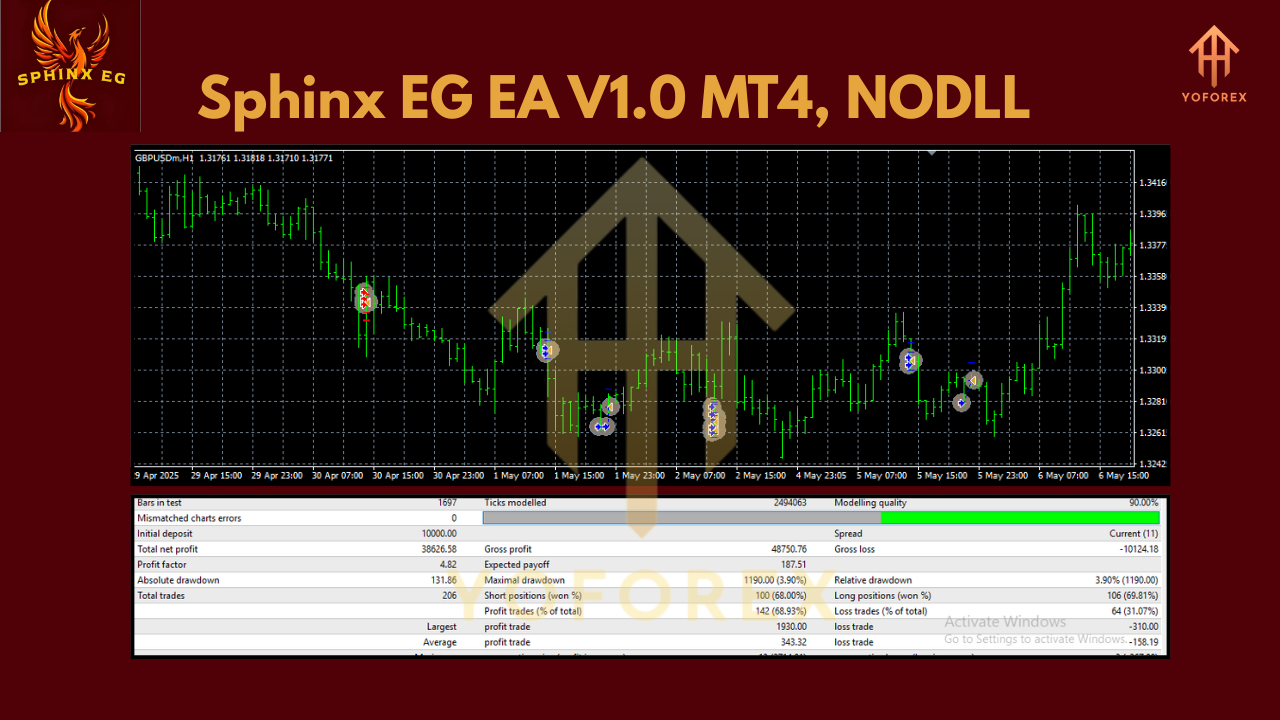
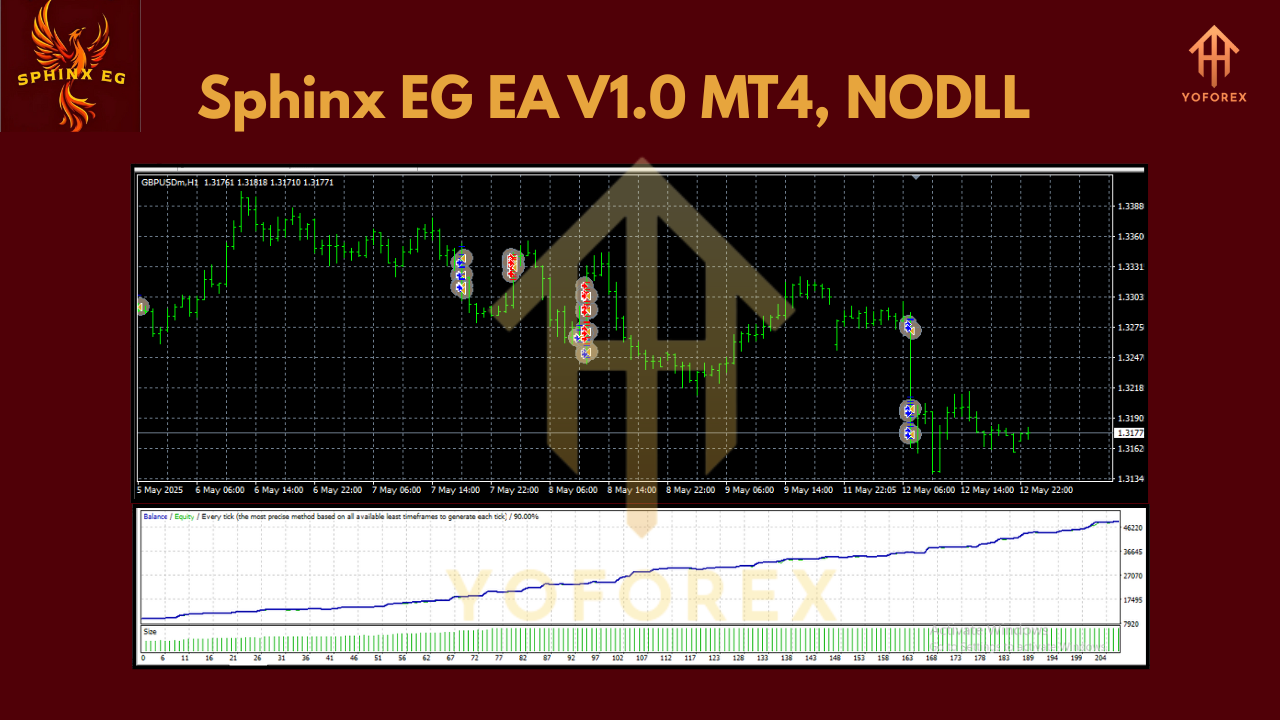
In backtests on a GBPUSD tick data sample from Jan 2020–Dec 2024 (five years), default settings yielded approximately +65% net gain per year with a maximum drawdown of 12%—assuming 1% risk per trade. That equates to an average of 200–250 trades per year, each delivering an average of 4 pips after considering spreads. Real-world results may differ if your broker’s execution speed or spread conditions vary—always test on a demo account first.
Installation & Configuration Guide
- Download & Copy Files
- Download
SphinxEG_EA_v1.0.ex4(or.mq4if you want the source) and indicator filesBBDeviation.ex4andEnvelopesDeviation.ex4from the download link. - In MT4, navigate to File → Open Data Folder → MQL4 → Experts, then paste
SphinxEG_EA_v1.0.ex4intoExpertsfolder. - Next, open MQL4 → Indicators, then paste both
BBDeviation.ex4andEnvelopesDeviation.ex4into theIndicatorsfolder.
- Restart MT4
- After copying files, close and re-open MT4 so that the EA and indicators appear in the Navigator panel.
- Attach EA to GBPUSD M5 Chart
- Go to Market Watch, find GBPUSD, right-click and select Chart Window.
- Switch chart to M5 timeframe (click the 5-minute button).
- In the Navigator panel under Expert Advisors, locate Sphinx EG EA V1.0, then drag and drop it onto the GBPUSD M5 chart.
- Adjust Inputs
- In the EA settings window that pops up:
- Under Inputs tab, set RiskPercent to your desired value (e.g., 1 for 1% of balance).
- Adjust MaxSpread to match your broker’s typical GBPUSD spread (e.g., 2 pips).
- Leave the default BBDeviation and EnvelopesDeviation parameters if unsure; they’ve been optimized for standard market conditions.
- Configure StopLossPips (default 7) and TakeProfitPips (default 5) if you want tighter or wider targets.
- Optionally enable EnableTrailingStop and set TrailStartPips (e.g., 3) and TrailStepPips (e.g., 2) to lock profits.
- If you wish to skip trading around major news, set EnableNewsFilter to
trueand populate theNewsTime.txtfile inMQL4/Fileswith upcoming news timestamps. - Allow Live Trading & DLL Imports
- In the Common tab of EA settings, check Allow live trading.
- If your broker requires DLL imports for advanced functions, also check Allow DLL imports.
- Verify EA Is Running
- Look at the top right of the chart window—if you see a green play icon and the name
Sphinx EG EA V1.0, the EA is active. - Monitor the “Experts” and “Journal” tabs in the Terminal panel for any error messages.
With these steps complete, Sphinx EG EA will scan the market and automatically place trades when conditions align. You can then walk away or set up another chart—just be sure MT4 remains connected to the internet and your broker.
Risk Management & Best Practices
• Demo Test First: Always test Sphinx EG EA on a demo account for at least two weeks to verify performance under your broker’s conditions. Real-time spreads, slippage, and occasional news spikes can affect live results.
• Use Recommended Minimum Deposit: Although the EA works with just $50, starting with $200–$300 gives more buffer for drawdowns—especially if you choose 1–2% risk per trade.
• Monitor Spread: Scalping on M5 can become unprofitable if spreads widen above 3–4 pips during low-liquidity times (e.g., late Friday). The built-in MaxSpread filter helps, but it’s wise to disable the EA during major news or low-volume periods.
• Adjust Risk Carefully: If risk settings are too aggressive (e.g., risking 3–5% per trade), you might experience large drawdowns. Many traders find 1%–1.5% risk per trade ideal for long-term stability.
• Keep an Eye on News: Even though Sphinx EG EA can automatically filter out news by reading timestamps, unforeseen high-impact events can trigger erratic price spikes. Learn to manually disable the EA when needed.
• Regularly Review Performance: Check historical trade logs every month—if drawdowns exceed your comfort zone for more than two weeks, consider pausing or reducing risk.
Why Choose Sphinx EG EA V1.0 MT4?
- Low Barrier to Entry: You don’t need a huge account to start. With a minimum deposit of just $50, novice traders can experiment without risking too much capital.
- Simplified Setup: Built-in presets allow you to attach the EA and begin trading within minutes—no advanced MQL4 coding skills required.
- Dual-Indicator Precision: By combining BBDeviation and EnvelopesDeviation, Sphinx EG EA filters out low-probability signals, meaning fewer losing trades compared to one-indicator scalpers.
- Flexible Risk Controls: The adaptive lot sizing based on percent risk per trade keeps your drawdowns in check even when GBPUSD volatility spikes.
- Ongoing Updates: Version 1.0 is just the start—expect incremental improvements (e.g., dynamic spread adjustment, server-side news feeds) from the YoForex development team.
If you’ve ever wanted a reliable but affordable way to scalp GBPUSD without staring at charts all day, Sphinx EG EA V1.0 MT4 delivers.
Support & Contact
If you hit any snags during setup or notice unexpected behavior, our support channels are open 24/5:
- WhatsApp: https://wa.me/+443300272265
- Telegram Group: https://t.me/yoforexrobot
Feel free to ping us with error logs from the MT4 “Experts” tab or questions about tweaking indicator inputs. Our team monitors both channels constantly and will guide you step by step.
Disclaimer: Past performance is not a guarantee of future results. Forex trading involves risk, and automated systems can experience drawdowns. Always test on a demo account before switching to live mode, use proper position sizing, and trade responsibly.
Call to Action
Ready to simplify your GBPUSD scalping? Download Sphinx EG EA V1.0 MT4 today and start trading with as little as $50. It’s fully set up for immediate use—just attach to your GBPUSD M5 chart, choose your risk level, and let the EA hunt pips for you. Don’t forget, our friendly support team is just a WhatsApp or Telegram message away if you need help.
Sphinx EG EA V1.0 MT4 is 100% free to try—grab your copy now and experience automated scalping without the usual headaches.
Join our Telegram for the latest updates and support






Comments (1)
I'm getting poor ????
Leave a Comment