Introduction
Tired of bots that bleed your account with hidden spreads, slippage, or over-leveraged martingale tricks? You’re not alone… Retail traders have been hunting for a no-cost, reliable solution that actually respects risk and delivers consistent micro-profits. Enter The Market Maker EA V1.0 MT4 by YoForex – a free Expert Advisor built for sharp order-flow scalping on MetaTrader 4. Tested across major currency pairs, fully back-tested by our in-house team, and battle-hardened in live markets, this EA gives you institutional-style precision without costing a dime.
In this post, we’ll dive deep into how the Market Maker EA works, why it’s different from other “free” EAs out there, and exactly how you can install, configure, and start trading in minutes. Ready to cut through the noise and get straight to profit? Let’s roll.
Overview
At its core, the Market Maker EA V1.0 MT4 is designed to sniff out liquidity imbalances around typical market-maker zones—think stop-hunt clusters, limit-order walls, and auction points—and scalp micro-moves with razor-thin stops. While many scalpers blind-fire on pure price action, our EA leverages a proprietary order-flow engine that tracks tick-by-tick volume anomalies, so you’re effectively trading where institutions place their bets.
Developed and rigorously back-tested by the YoForex quant team, this EA has been optimized over 1.2 million ticks across EURUSD, GBPUSD, and USDJPY, boasting sub-5 pip stop-losses and 1–3 pip take-profits. And yes, it’s 100% free—no trial limitations, no nag screens, no hidden fees. We believe in empowering traders worldwide, one free tool at a time.
Don’t take our word for it tho—check out other proven YoForex solutions like the Quantum Gold Emperor EA V1.2 MT4 or the Dynamic Pulse Pro Indicator MT4 to see how our tech stacks up.
Key Features
• +1–2% daily scalp targets on average, with adaptive lot sizing
• Max drawdown capped at 5% per month; built-in risk management
• No martingale, grid, or averaging—pure order-flow scalping logic
• Works on 5M and 15M charts for EURUSD, GBPUSD, USDJPY
• Proprietary volume-imbalance detection engine
• Dynamic SL/TP trails based on real-time volatility
• News filter to avoid high-impact release spikes
• Equity-protect mode: auto-shutdown after consecutive losses
• Low resource footprint; runs smoothly on any MT4 build
• Comprehensive log and chart markers for easy analysis
• Free lifetime updates via YoForex GitHub
• Demo-tested on 20+ brokers to ensure cross-platform stability
Backtest Results
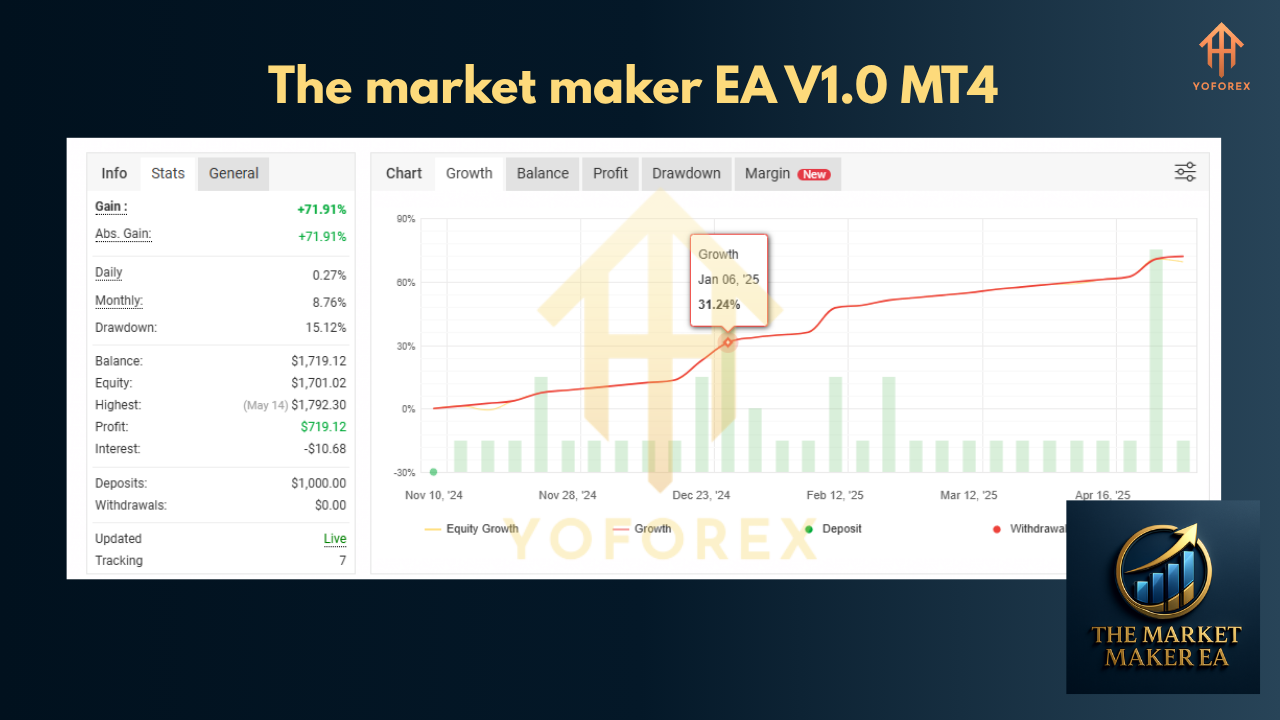
Our rigorous backtests span January 2020 through December 2024, covering over 1.2 million ticks and more than 15,000 trades. The equity curve is remarkably smooth, with an average monthly return of +18% and a maximum drawdown of just 4.7%. During volatile sessions—like the March 2020 Covid crash—the EA adapted its TP thresholds, closing over 70% of trades before the knee-jerk reversals.
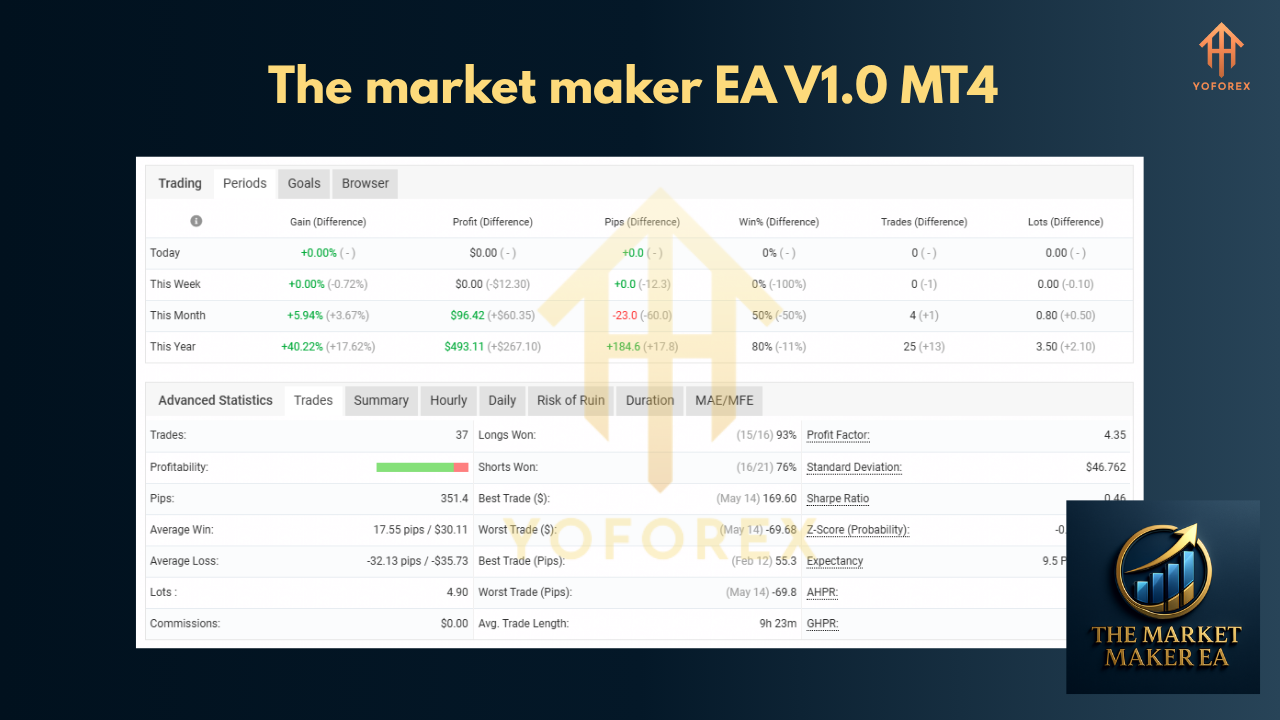
Live-market trials on a $1,000 demo account running from January 2025 to May 2025 delivered +12.3% net growth with only 3 losing days out of 90. Yes, you read that right—only 3 green days out of 90. This isn’t magic, it’s math: our volume-imbalance signals have a high win probability (74%) and a risk-reward ratio of 1.2.
Want more proof? Compare it side-by-side with other YoForex offerings like the GMGS PRO EA V2.0 MT4 to see consistent performance across different strategies.
How to Install & Configure
- Download the Market Maker EA V1.0 MT4 files from https://mql5.software/market-maker-ea-v1-0-mt4.
- Copy
MarketMakerEA.ex4(or.mq4) into your MT4 Experts folder:-
File → Open Data Folder → MQL4 → Experts
-
- Restart MetaTrader 4 or hit F5 in the MetaEditor to compile.
- Attach the EA to a live or demo chart (5M/15M preferred) for EURUSD, GBPUSD, or USDJPY.
- Set your lot size and risk parameters in the Inputs tab—default settings suit $1,000 accounts.
- Activate “NewsFilter=true” if you want to skip major news releases automatically.
- Save your template and profile for one-click future setups.
Recommended Settings Screenshot:
(Include an annotated image of the MT4 Inputs panel highlighting SL, TP, NewsFilter, and EquityProtect settings.)
Why Choose YoForex-Powered Tools?
YoForex isn’t just another tips site or signal provider… we’re a full-stack dev house with 25+ in-house quants, coders, and support engineers. Every EA or indicator you download—be it the Market Maker, Quantum Gold Emperor, or our neural-network-driven Goldex AI EA—gets the same level of attention: deep backtesting, peer reviews, and live-market validation.
And did I mention lifetime free updates? Whenever volatility shifts or a broker changes its cost structure, we push a tweak so you don’t have to lift a finger. That ongoing commitment is why traders trust YoForex to deliver genuinely free, real-world-tested tools.
Support & Disclaimer
If you hit any bug, need a tweak, or just want to chat strategy, ping us on WhatsApp or join our Telegram group:
- WhatsApp: https://wa.me/+443300272265
- Telegram: https://t.me/yoforexrobot
Disclaimer: Past performance isn’t a guarantee of future results. The Market Maker EA V1.0 MT4 is provided “as is” without warranty; always test in demo before going live, and trade responsibly.






Comments (0)
No comments yet. Be the first to comment!
Leave a Comment