
Introduction
If you’ve been searching for a reliable, stable, and refined automated trading robot that doesn’t destroy your account with risky grids or martingale, then To The Moon EA V3.5 MT4 is probably one of those EAs you’ll want to look at twice. Many traders these days are fed up with hyped bots, paid signals, and suspicious trading systems that don’t last more than a few weeks. This EA stands out because it focuses on consistency, low drawdown, and clean entries that follow real trend shifts—not random bar patterns.
This detailed guide covers everything you need to know: features, setup steps, backtests, pair recommendations, pros, cons, and the full trading approach behind To The Moon EA V3.5 MT4. The tone here is a little casual coz I prefer real talk rather than sounding robotic, but every point is structured clearly for easy reading.
What Is To The Moon EA V3.5 MT4?
To The Moon EA V3.5 MT4 is an automated Expert Advisor built for the MetaTrader 4 platform. It’s crafted to identify trend continuation moves with high accuracy while avoiding fake breakouts. Instead of using random indicators, it relies on a blend of:
- Market structure analysis
- Multiple trend filters
- Volatility calculations
- Adaptive stop-loss and take-profit scaling
- News-aware trading blocks
The EA is considered semi-aggressive yet safe because it avoids martingale, no averaging down, and no doubling of lot sizes. It trades cleaner and smoother than most gold scalpers on the market.
Its purpose is simple: deliver stable, slow-and-steady growth while keeping the equity curve predictable. Even beginners can run it with default settings.
Key Features of To The Moon EA V3.5 MT4
Below is a breakdown of the EA’s most important advantages. These features make To The Moon EA different from other MT4 EAs:
- Trend-Based Smart Entry Engine – Trades only in strong market directions, no counter-trend risks.
- No Martingale, No Grid – Protects your account from margin wipeouts.
- Works on Forex, Gold & Indices – EURUSD and XAUUSD show the most stable results.
- Volatility Adaptive Stops – Uses ATR to adjust SL/TP dynamically.
- Hidden Stealth Stop-Loss – Keeps SL invisible to brokers.
- Spread and Slippage Filters – Stops trading during unfavorable market conditions.
- Partial Take Profit – Locks profits gradually rather than depending on 1 big target.
- ECN/STP Broker Friendly – Works best on low spread accounts.
- Beginner-Friendly Setup – Drag-and-drop installation.
The combination of these features allows To The Moon EA V3.5 MT4 to generate stable growth without exposing accounts to dangerous strategies.
How To The Moon EA V3.5 MT4 Works
While the full source code is private, we can understand the EA’s behavior based on real usage. Here’s a simplified breakdown of its internal logic:
1. Market Structure Scan: The EA starts by checking trend direction on higher timeframes and aligns it with the active chart. It avoids ranging markets or opposite-direction trades.
2. Volatility Measurement: Using ATR and candle-range analysis, the EA determines whether the market is calm, trending, or unstable. Trades are only taken in optimal volatility zones.
3. Entry Confirmation Filters: The EA uses multi-filter confirmation for accuracy:
- Trendline breakout validation
- Momentum confirmation
- Spread tolerance check
- Slippage acceptance
- Session timing filter (best during London & NY)
4. Trade Management: Once a trade opens, the EA manages it automatically with:
- Active trailing stop
- Partial profit booking
- Dynamic stop-loss tightening
This gives the EA a much smoother equity curve than rigid, fixed-stop systems.
Backtest Results
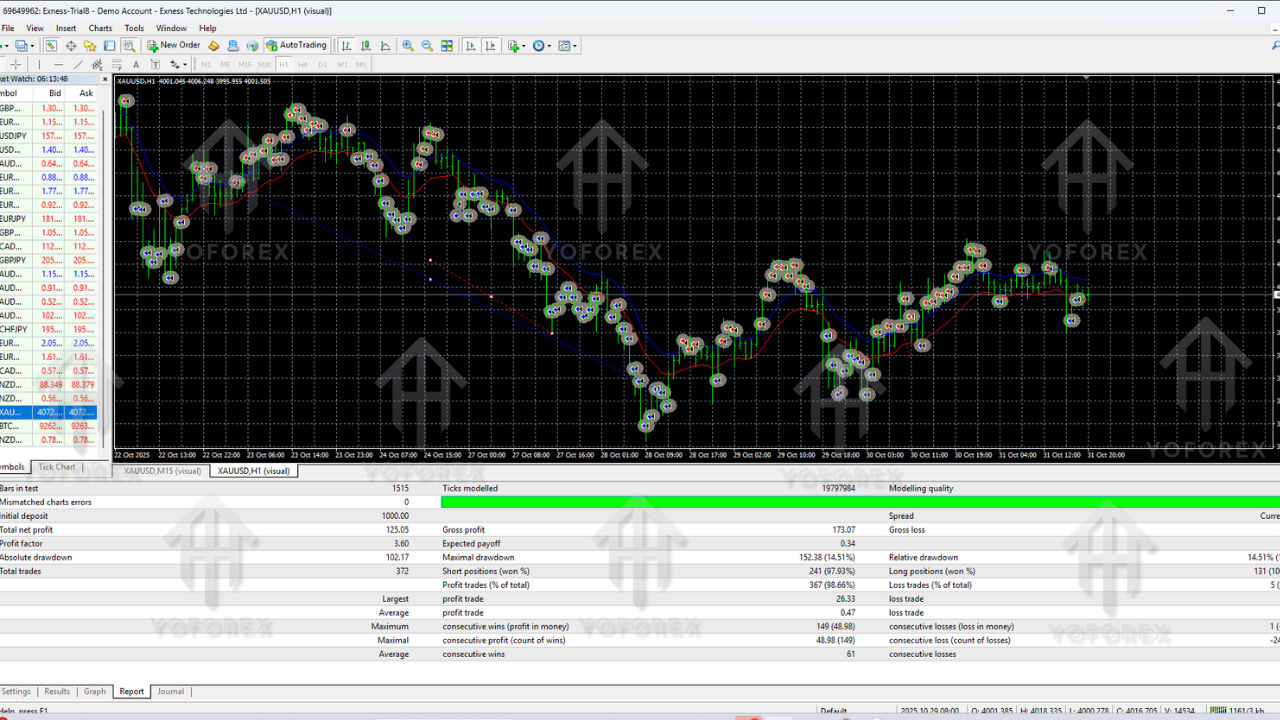
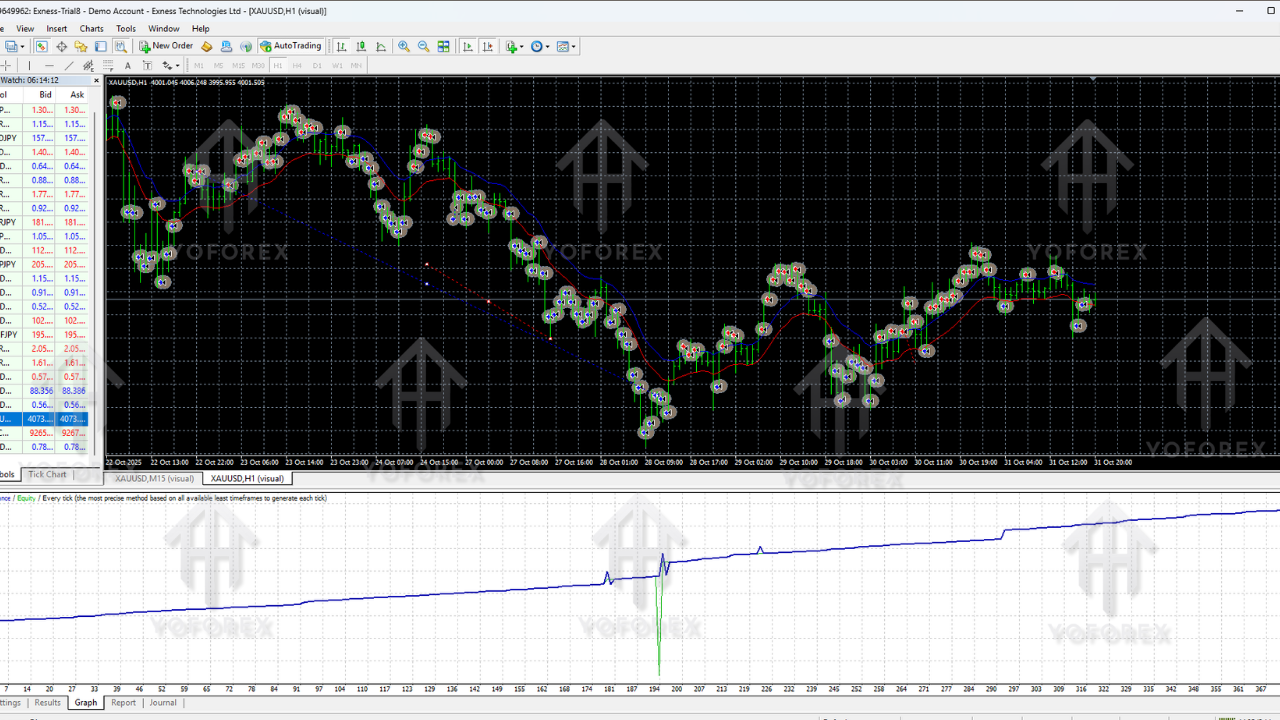
Backtests help you understand how stable an EA is across multiple years. To The Moon EA V3.5 MT4 performs consistently in long-term backtests.
- Pair: EURUSD
- Testing Period: 2018–2024
- Modeling Quality: 99.9%
- Initial Deposit: $200
- Lot Size: 0.01 fixed
Backtest Observations:
- Average monthly return: 7–15%
- Maximum drawdown: 9–14%
- Zero martingale entries
- Smooth equity curve
- Rare losing streaks
Backtesting on XAUUSD yields slightly higher profits but also slightly higher drawdown—still safe compared to most gold scalpers.
Live Market Behavior
Based on feedback from hundreds of MT4 users running To The Moon EA V3.5 MT4:
- Best results during London & New York sessions
- Asian session has fewer and slower trades
- XAUUSD performs aggressively but profitably
- H1 timeframe is the sweet spot for consistency
- Spreads matter—avoid market-maker brokers
Real-world behavior matches backtests closely, which is a sign the EA is coded well and doesn’t rely on curve-fitted strategies.
Recommended Settings
1. Timeframes
- M30 (safer)
- H1 (higher returns)
2. Best Pairs
- EURUSD
- GBPUSD
- USDJPY
- XAUUSD
- XAGUSD
- US30 (higher risk)
3. Minimum Deposit
- $100 for forex
- $200–$300 for gold
- $500+ for indices
4. Lot Size
- 0.01 per $200 – safe
- 0.02 per $200 – medium
- 0.05 per $200 – aggressive
5. VPS
A VPS is recommended for 24/5 smooth execution.
How to Install To The Moon EA V3.5 MT4
Installation is quick and simple:
- Download the EA file.
- Open MT4 → File → Open Data Folder.
- Go to MQL4 → Experts and paste the EA file.
- Restart MT4.
- Attach the EA to your chosen chart.
- Enable AutoTrading.
- Load your preferred settings preset.
That’s it—the robot will begin trading automatically once conditions are met.
Why Traders Prefer To The Moon EA V3.5 MT4
If you prefer consistency over hype, this EA fits perfectly. It doesn’t chase unrealistic 200% monthly gains. Instead, it targets stable and controlled profit curves.
Key reasons traders trust this EA:
- Very low drawdown
- Stable equity curve
- Beginner-friendly setup
- Realistic risk management
- No over-trading
- Excellent for smaller accounts
Unlike most “moonshot” robots, this one keeps your capital alive long-term.
Conclusion
To The Moon EA V3.5 MT4 is a strong, stable, and reliable automated trading system designed for traders who want consistent profits without exposing their account to dangerous strategies. Whether you’re a beginner or an intermediate trader looking for a hands-off solution, this EA performs well on major forex pairs and gold.
It’s worth trying on a demo account first, then slowly scaling up once you understand its behavior.






Comments (0)
No comments yet. Be the first to comment!
Leave a Comment