Trend Marti EA V1.0 MT4 — Hybrid Trend + Smart Martingale For EURUSD, GBPUSD & XAUUSD
Tired of EAs that either trend-follow and miss pullbacks, or grid into infinity with sweaty palms? Trend Marti EA V1.0 tries to strike the sweet spot. It blends clean trend entries (so you’re aligned with momentum) with a smart, capped martingale recovery that’s designed to exit bad sequences sooner rather than later. No wild, runaway multipliers; no “hope & pray” hold-forever baskets. Just structured logic, adaptable risk, and multi-timeframe support—M5, M15, H1, H4—across EURUSD, GBPUSD, and XAUUSD.
If you like the idea of a disciplined marti—yeah, that’s the plan here—then keep reading. We’ll break down how it works, ideal setups, recommended risk, and some practical notes so you can get moving without guesswork.
What Is Trend Marti EA (In Plain English)
At its core, Trend Marti EA V1.0 is a hybrid system:
- Primary entries: Trend-following logic kicks in only when the market meets directional criteria (e.g., moving-average alignment, momentum confirmation, and a volatility filter).
- Recovery module: If price pulls against the position, the EA deploys a capped martingale with dynamic step spacing and maximum basket size. The aim isn’t to super-size risk; it’s to average intelligently within limits, then close the basket on a mean-revert pulse or at a pre-defined target.
Because not all symbols behave the same, Trend Marti EA includes symbol-aware presets tuned for EURUSD, GBPUSD, and XAUUSD. You can run it on M5, M15, H1, or H4 depending on your style: lower timeframes for more frequent trades, higher timeframes for calmer exposure.
Who it’s for: traders who want a rules-based martingale approach that respects risk, rather than open-ended grids. If you’re anti-marti on principle, fair; but if you’ve wished for a controlled version that prioritizes trend alignment first, this one’s worth a spin on demo.
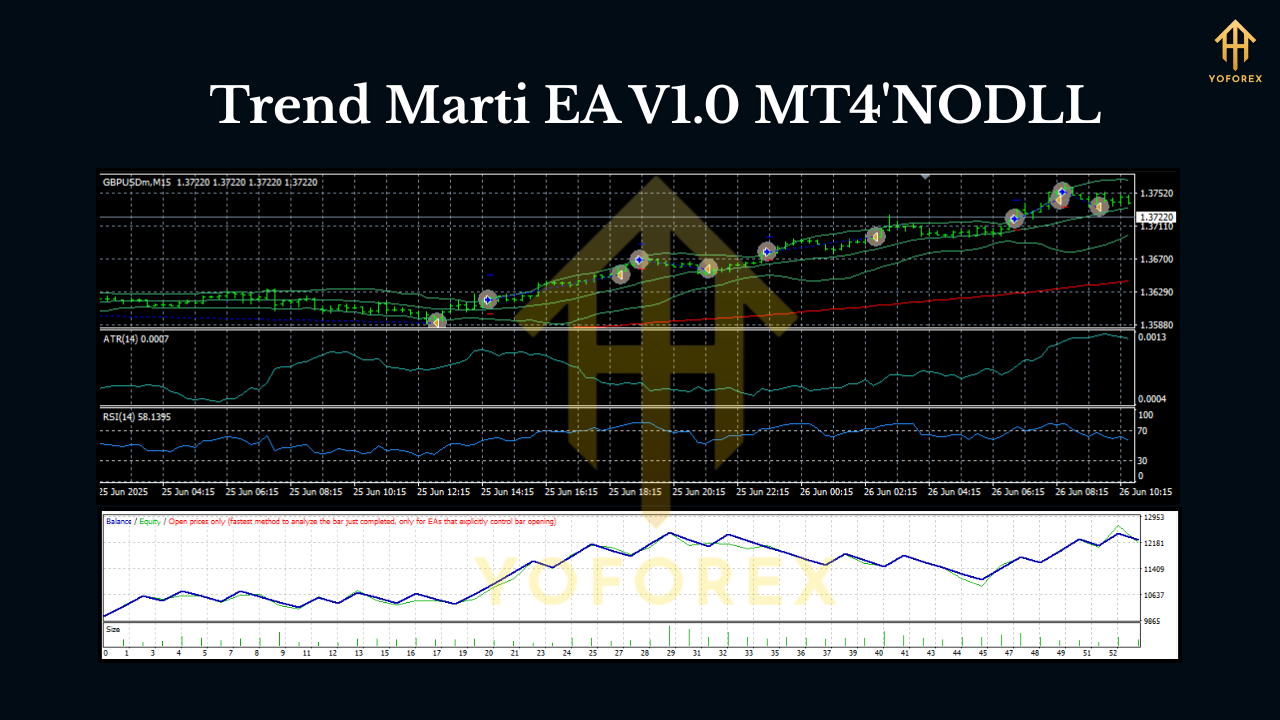
Key Features (Quick Hit List)
- Hybrid engine: trend entries first, recovery only if needed.
- Capped martingale: fixed max basket size and lot multiplier cap.
- Dynamic step spacing: adapts distance between entries using volatility (ATR).
- Equity guard: hard daily drawdown stop and equity-based shutdown.
- Session filter: avoid low-liquidity chop or news spikes if you want.
- Symbol presets: tuned defaults for EURUSD, GBPUSD, XAUUSD.
- Timeframe flexibility: M5, M15, H1, H4 (choose frequency vs. noise).
- Spread/Slippage filters: trade only in acceptable conditions.
- One-click risk profiles: Conservative / Balanced / Aggressive templates.
- Clean chart HUD: see basket progress, risk in use, and next grid step.
- Magic number isolation: safe multi-chart, multi-pair operation.
- News pause (optional manual): toggle off around high-impact events.
How It Works (Without the fluff)
- Trend Gatekeeper
The EA checks for directional bias (think MA slope + momentum) and volatility quality (ATR not too low, not too crazy). If conditions pass, it opens a small seed position with a modest TP. - Smart Recovery (When Needed)
If price moves against the seed, the EA adds at dynamic step levels, widening steps as volatility expands. Multiplier is capped (e.g., 1.3–1.5, depending on your profile), and max positions are hard-limited (e.g., 5–7). This avoids the classic blow-up curve. - Exit Priority
The basket attempts to close on:
- Mean-reversion pop into a dynamic TP zone, or
- Time-based exit if the trend clearly shifts and the EA judges recovery to be lower probability.
The aim is to spend less time in recovery and more time taking clean trend profits.
4. Risk Governor
Daily drawdown % and equity guards make sure the bot stands down if things get heated. You set them; the EA obeys—no arguments.
Recommended Setup
Pairs: EURUSD, GBPUSD, XAUUSD
Timeframes: M5, M15, H1, H4
Minimum Deposits (guidelines, not gospel):
- EURUSD: from $300–$500 (0.01 starting lot per $300; conservative profile).
- GBPUSD: from $400–$600 (slightly punchier volatility).
- XAUUSD: from $700–$1,000 (gold swings harder, give it room).
Leverage: 1:200–1:500 recommended for flexibility (mind your jurisdiction).
Broker conditions: ECN-style feeds with tight spreads and stable execution help a lot.
VPS: If you’re running lower timeframes (M5/M15), a low-latency VPS is a plus.
Suggested Settings (Start Here)
- Risk Profile: Balanced (switch to Conservative for small accounts).
- Start Lot: 0.01 per $300–$500 on FX; for XAUUSD, consider 0.01 per $700–$1,000.
- Max Positions: 5–7 (XAUUSD safer at 5, EURUSD can handle 6–7).
- Multiplier Cap: 1.3–1.5 (don’t go ballistic; small edges scale over time).
- Step Mode: Dynamic ATR (auto-widens in high vol; narrows in low vol).
- Daily DD Guard: 5–8% (pick a number you can sleep with).
- Session Filter: London + early NY; avoid late-Friday drift.
- News Pause: Enable around Tier-1 events if you don’t like drama.
Tip: Start demo first for a full week across your chosen pairs/timeframes. Then move to small live risk only when you’re happy with behavior.
Strategy Notes Per Pair
EURUSD (M15/H1):
This is the smoothest ride. The trend logic behaves well here; low spreads mean cheaper recovery if needed. On M15, you’ll see more signals; on H1, fewer trades but cleaner baskets.
GBPUSD (M15/H1):
Cable can fake-out—nice when you catch the run, spicy when you don’t. Use a slightly wider ATR step and keep Max Positions one notch lower than EURUSD if you’re cautious.
XAUUSD (M5/M15/H1):
Gold bangs. The EA’s dynamic steps matter most here. Favor Balanced or Conservative risk profiles, keep multipliers capped near 1.3, and consider H1 if you want calmer exposure.
Backtesting & Forward Testing (What to Expect)
When you backtest Trend Marti EA, don’t just stare at the equity curve—look at max basket depth, average recovery time, and worst floating drawdown. A nice-looking line can hide some gnarly underwater periods if you don’t peek beneath the surface.
How to test properly:
- Period: at least 12–24 months per pair.
- Modeling: tick data if you can (or “Every tick based on real ticks” if available).
- Spread: add a point or two above your typical live spread to keep it realistic.
- News windows: if you plan to pause around news in live trading, reflect that in your test logic where possible (or at least review those segments).
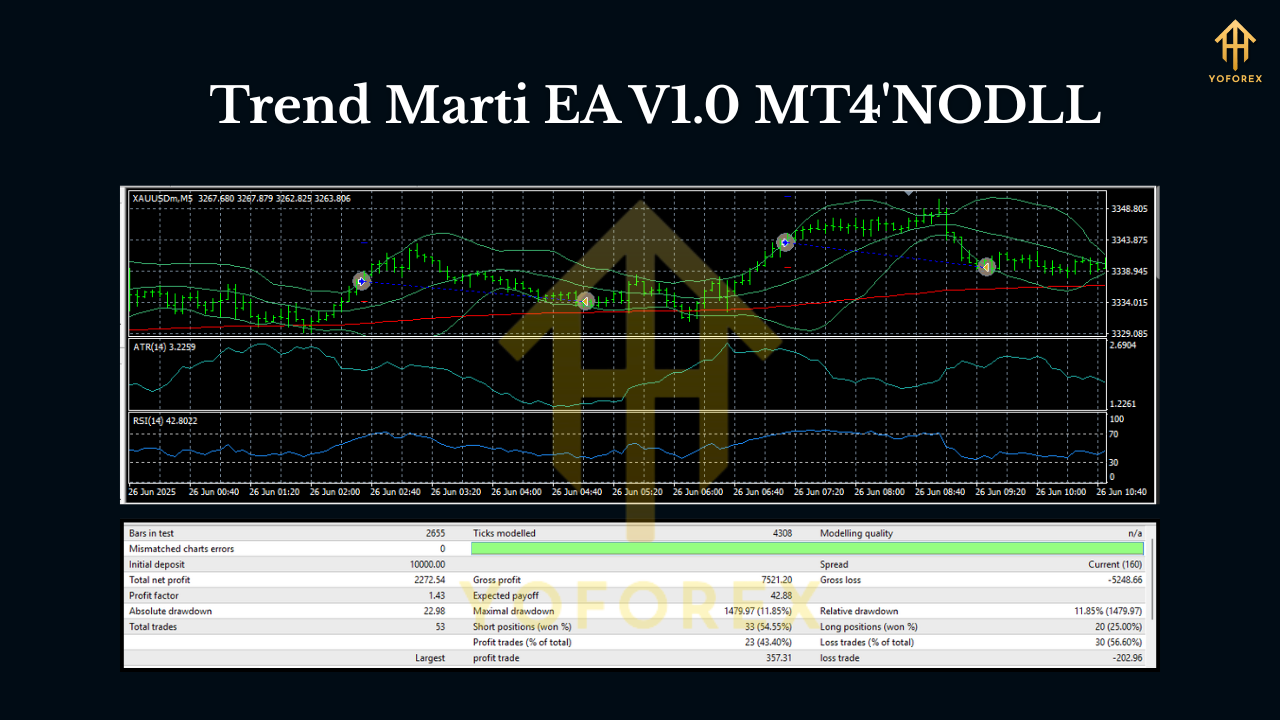
What you want to see:
- Baskets that close within a reasonable time window.
- Rare hits of max positions; if it’s frequent, lower your start lot or tighten the risk profile.
- Floating DD that’s in line with your Daily DD guard; if not, tweak Max Positions down.
Remember, the goal isn’t to “win every trade.” It’s to make good decisions repeatedly with a plan for the inevitable rough patches.
Live Use Tips (From real-world habit)
- One symbol per chart with unique Magic Numbers.
- Keep notes: if you see frequent late-NY baskets, consider a session filter.
- Adjust start lots upward only after several stable weeks.
- Don’t stack exposure (e.g., EURUSD+GBPUSD both short USD) without being cool with the correlated risk.
- Review Fridays: sometimes the best trade is no trade into the weekend.
Risk Disclosure (read this, seriously)
Trend Marti EA uses a restricted martingale. It does average into positions, but with caps and equity protection. That still means risk. Markets change; slippage or gaps can happen; baskets can extend longer than you like. Always demo first, and when you go live, start tiny. If you’re ever unsure, drop risk—not ego.
Quick Start (Step-By-Step)
- Install the EA into
MQL4/Expertsand restart MT4. - Attach to your chosen chart (EURUSD/GBPUSD/XAUUSD) on M5, M15, H1, or H4.
- Load preset (Conservative/Balanced/Aggressive) appropriate to your capital.
- Enable algo trading, verify your spread filter & Magic Number.
- Set your Daily DD guard, confirm session times, and you’re off.
Final Thoughts
Trend Marti EA V1.0 MT4 isn’t pretending martingale is “safe”—nothing is in trading—but it treats risk like a first-class citizen. Trend-aligned entries, capped recovery, dynamic steps, and equity guards add up to a far more responsible take on a classic idea. If you’re after hands-off automation that still respects the red lines you set, give it a try on demo… then scale on your terms.
Join our Telegram for the latest updates and support






Comments (0)
No comments yet. Be the first to comment!
Leave a Comment