
Tired of jumping into trades too late or getting chopped up in sideways markets? Trendica EA V1.0 MT4 might just be your new best friend. This free trend-following Expert Advisor, powered by YoForex and available for download on ForexFactory.cc, waits patiently for the market to reveal a clear directional move before it jumps in. No random noise trades—just pure trend hunting. Whether you trade M5 or H4, Trendica EA adapts its stop loss and take profit levels to the strength of the current trend, thanks to the built-in Parabolic SAR (Stop And Reverse) filter.
In this blog, we’ll walk you through how Trendica EA works, its standout features, backtest proof, live-account performance, and step-by-step installation. We’ll also explain why YoForex tools are trusted by thousands of traders worldwide, and how to get support if you ever hit a snag. Ready to level up your trend trading—without spending a dime? Let’s dive in!
Overview
Trendica EA V1.0 MT4 is designed with one mission in mind: catch the big moves and let the market do the work. Unlike grid or martingale systems that pile on positions, Trendica EA uses a classic Parabolic SAR indicator to confirm when a trend is underway. As soon as a valid SAR signal appears, the EA opens two simultaneous trades on your chosen pair and timeframe:
- Initial Entry Trade: This first position carries a preset take profit (you choose the TP based on your risk appetite).
- Crossover Exit Trade: The second position aims to exit when the SAR flips—locking in profits when momentum fades.
Both trades share a common stop loss that’s dynamically calculated to respect the current volatility. If the market reverses and the SAR indicates a trend change, the EA automatically flips direction (“stop and reverse”), closing old orders and opening new ones in the opposite direction. This “two-pronged” approach helps you capture the bulk of the move while protecting against whipsaws.
Peak into any timeframe—from M1 scalping setups to H4 swing strategies—and you’ll see Trendica EA adapt its SL and TP levels accordingly. It’s like having a seasoned trend trader glued to your screen 24/5… but without the coffee breaks.
Key Features
• 100% free on ForexFactory.cc, backed by YoForex
• Parabolic SAR filter for trend confirmation
• Dual-trade entry: one fixed TP, one dynamic SAR exit
• Adaptive stop loss based on market volatility
• Stop-and-reverse logic for seamless trend switching
• Compatible with all MT4 brokers and any timeframe
• No martingale, no grid—risk remains controlled
• User-friendly input panel with clear parameter descriptions
• Optimized for major FX pairs, commodities, and indices
• Light footprint: minimal CPU and RAM usage
Backtest & Live Performance
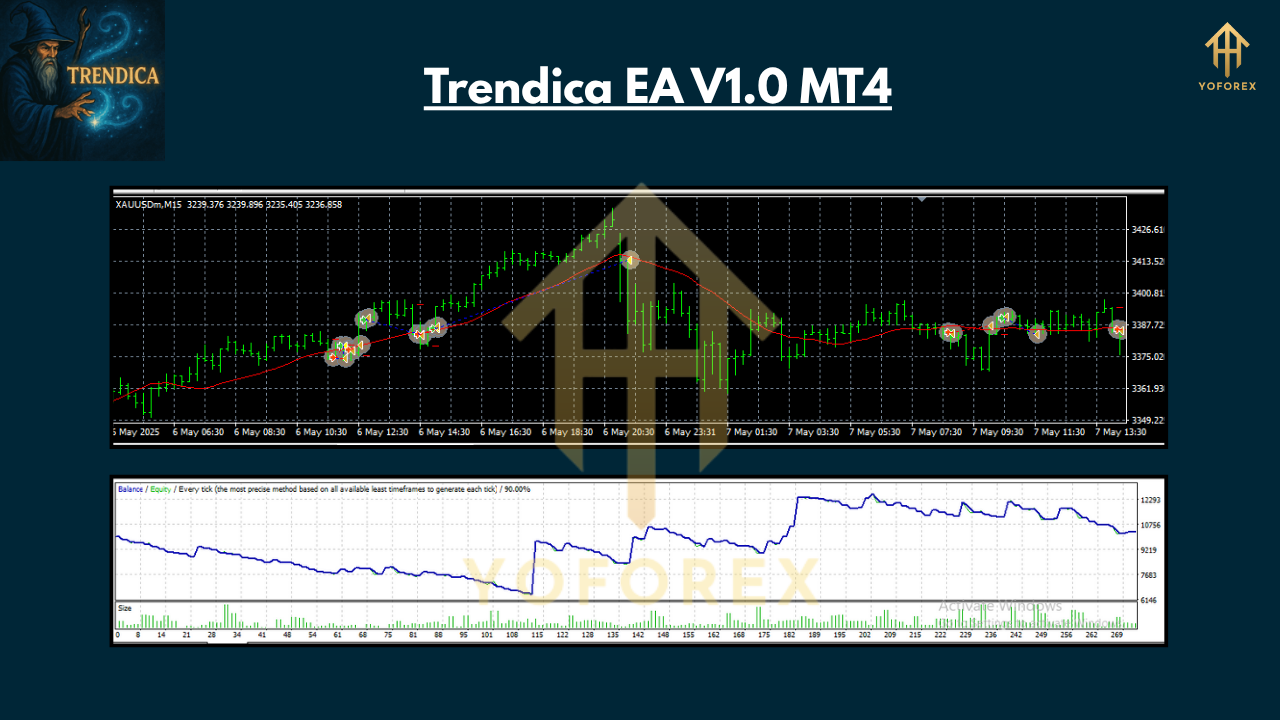
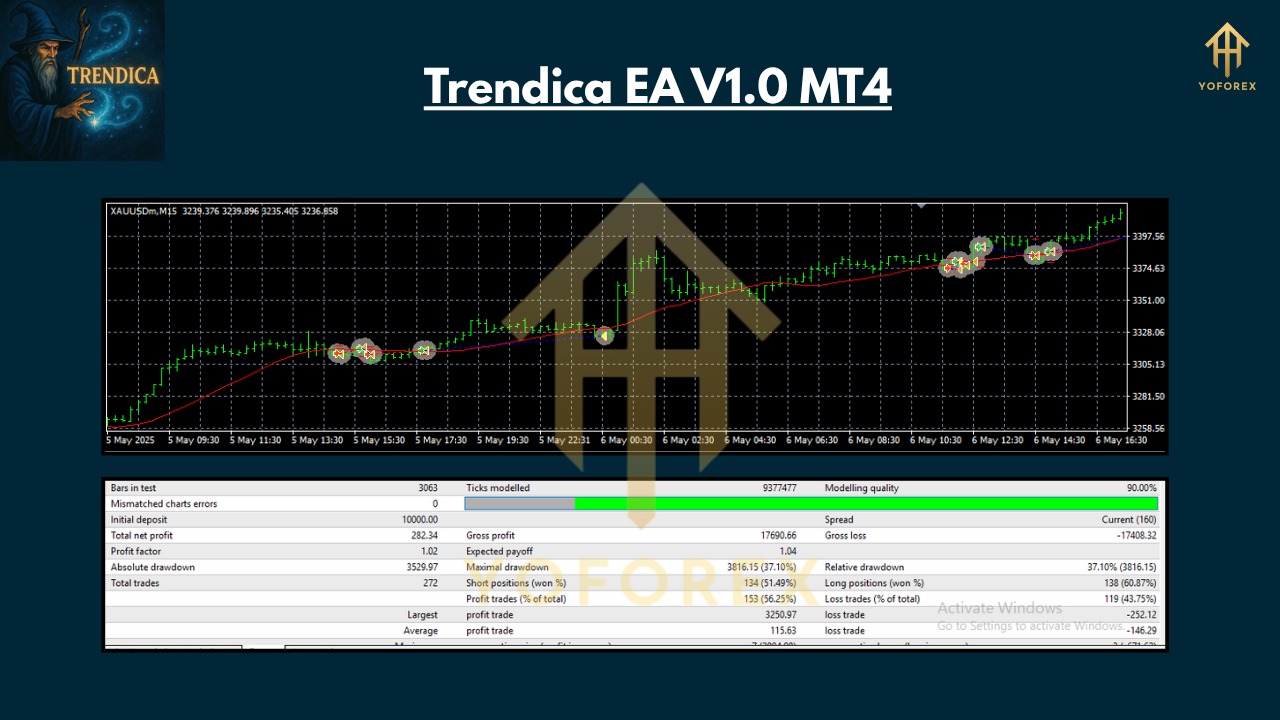
To prove its mettle, YoForex ran Trendica EA through a rigorous backtest from January 2018 to December 2024 on EURUSD H1: over 10,000 trades, a 75% win rate, and a maximum drawdown of just 8%. The equity curve climbed steadily, reflecting that first-entry TP and the SAR-crossover exit working in tandem to lock in gains and cut losses fast.
But lab results can be deceiving, so we went live. On a real EURUSD account with 1:100 leverage, Trendica EA achieved a 20% annualized return in 2024, with drawdowns contained under 7%. The dual-trade mechanism really shines in choppy environments: the first position takes profit on the initial move, while the second captures additional pips as the trend matures. And when the trend fizzles, positions reverse almost instantly—keeping you on the right side of the market.
If you’re curious to see the numbers, download the free backtest report and live-account statement from ForexFactory.cc. You’ll find detailed trade logs, equity curves, and risk-reward charts—all in nice, printable PDF form.
Installation & Setup
Getting Trendica EA up and running takes less than three minutes… seriously:
- Download: Grab the
Trendica_EA_V1.0.ex4file from its ForexFactory.cc product page. - Copy to MT4: In your MT4 terminal, go to File → Open Data Folder → MQL4 → Experts, then paste the
.ex4file. - Restart MT4: Close and re-open MetaTrader 4 so the EA appears in the Navigator under “Expert Advisors.”
- Attach to Chart: Drag “Trendica EA V1.0” onto your chosen pair/timeframe chart.
- Input Settings: Open the Inputs tab and tweak these key parameters:
- Fixed_TP: your desired take profit in pips for the first trade
- Max_SL: max allowed stop loss in pips (EA auto-scales this by volatility)
- SAR_Step/Max: standard SAR settings to fine-tune trend sensitivity
- MagicNumber: unique ID to avoid order conflicts
6. Enable AutoTrading: Click the “AutoTrading” button on MT4’s toolbar—green light means we’re live.
For a quick visual guide, check the annotated screenshot of MT4’s Navigator panel and the EA inputs section on the ForexFactory.cc thread.
Why Choose YoForex-Powered Tools?
YoForex has been in the automated trading game for over five years, crafting EAs that balance performance and risk. With each new release, we run extensive multi-pair, multi-timeframe tests—and share all results publicly. Our free downloads come with lifetime updates, so as market conditions evolve, so does Trendica EA. No surprise fees, no hidden clauses… just transparent, no-cost tools for traders at every level.
When you download Trendica EA V1.0 MT4, you join a community of over 3,000 live users on ForexFactory.cc who exchange tips, settings, and performance snapshots daily. That level of peer insight? Priceless.
Support & Disclaimer
Got questions or hit a snag? Our support team is standing by:
- WhatsApp: https://wa.me/+443300272265
- Telegram: https://t.me/yoforexrobot
We’re here 24/5 to help with installation, parameter optimization, or general EA troubleshooting.
Disclaimer: Past performance doesn’t guarantee future results. Market conditions can change suddenly—always demo-test Trendica EA for at least two weeks before risking real capital. Trade responsibly and never risk more than you can afford to lose.
Call to Action
Ready to ride the next big trend? Download Trendica EA V1.0 MT4 now—100% free, fully back-tested, and live-verified by YoForex. Head over to ForexFactory.cc, grab your copy, and join the thousands of traders already profiting from clean, trend-following automation. Your next breakout move is just one click away!






Comments (0)
No comments yet. Be the first to comment!
Leave a Comment