
Introduction
In the current forex landscape, most traders are caught between two extremes: ultra-aggressive grid bots that can blow accounts overnight… and overly “safe” robots that barely trade at all. Somewhere in the middle, there’s a sweet spot – a system that can ride strong trends, manage pullbacks intelligently, and still keep risk under control.
That’s exactly where Ultimate Pulse EA V3.0 MT5 fits in.
Designed for MetaTrader 5, Ultimate Pulse EA V3.0 MT5 focuses primarily on XAUUSD (gold), combining trend-following logic with a controlled, rule-based grid-style position adding. Instead of spamming random orders, it waits for a dominant direction, enters with the trend, and only layers additional positions when the market offers better prices – all while aiming to take profit on each order individually.
If you’re looking for a structured, semi-aggressive EA that can work for personal accounts or prop-style conditions (with proper risk control), this detailed guide will walk you through what Ultimate Pulse EA V3.0 MT5 does, how it trades, and how you can set it up properly.
What Is Ultimate Pulse EA V3.0 MT5?
Ultimate Pulse EA V3.0 MT5 is an automated trading robot built for MetaTrader 5, engineered around the idea of capturing profit from the “natural pulse” of the market.
Instead of relying on hyper-complicated indicators, it typically uses:
- A longer-term trend filter to determine whether the market is in a bullish or bearish phase.
- A dynamic entry mechanism that opens an initial trade with the prevailing trend.
- A controlled grid / DCA style logic that adds new positions only when price pulls back to predefined zones.
- Individual take-profit levels per position, so it can scale out of the market gracefully rather than waiting for a single big basket target.
Most setups of Ultimate Pulse EA V3.0 MT5 are optimized for gold (XAUUSD) on the M30 timeframe, which offers a good balance between signal quality and trade frequency. Traders may experiment with H1 or other volatile pairs, but XAUUSD M30 tends to be the core configuration because of gold’s strong intraday swings and liquidity.
Core Idea Behind the EA
The underlying philosophy of Ultimate Pulse EA V3.0 MT5 is simple:
Follow the main trend, buy (or sell) dips in that direction, and secure profit on each position as the market breathes.
This design tries to:
- Avoid fighting the dominant direction.
- Take advantage of pullbacks instead of fearing them.
- Smooth the average entry price with additional positions (when allowed by risk rules).
- Gradually secure profits as the market oscillates.
How Ultimate Pulse EA V3.0 MT5 Trades
To understand if this EA fits your style, it’s important to know how it behaves behind the scenes.
1. Trend & Direction Filter
The EA first evaluates market direction using one or more of the following concepts (implementation varies by set file):
- Moving averages over a long lookback.
- Swing structure / higher highs & higher lows.
- Volatility and price channel breaks.
Only when a clear direction is detected (for example, bullish gold on M30) will Ultimate Pulse EA V3.0 MT5 start looking for entries in that direction.
2. Initial Entry
Once the trend is confirmed:
- A first position is opened with the trend.
- Stop loss and take profit are placed based on volatility and configured risk.
- No immediate “grid” is placed; the EA waits for price to move.
This keeps things clean and avoids unnecessary over-trading when the trend continues smoothly.
3. Smart Grid / Averaging-In
If price pulls back against the initial entry:
- The EA may open additional positions at predefined step distances.
- Each new position is placed at a better price, improving the overall average entry.
- It never opens infinite positions; there is a maximum allowed number of trades to control exposure.
This is not a blind martingale; lot sizing can be fixed, stepped, or slightly scaled, depending on parameters. The idea is to average in intelligently rather than chase losses uncontrolled.
4. Individual Take Profits
Each trade has its own independent take-profit target, often aligned around:
- Recent structure zones.
- Short-term volatility.
- Partial mean-reversion.
This means:
- Some trades close earlier with small, quick profits.
- Others may ride a bit longer if price continues strongly in the trend direction.
The result is a smoother equity curve and less dependence on one big basket closure.
Recommended Trading Conditions
While every trader has a different account and broker setup, here is a generally reasonable starting point for Ultimate Pulse EA V3.0 MT5:
Recommended Pair & Timeframe
- Pair: XAUUSD (Gold)
- Timeframe: M30 (you can test H1 if you prefer fewer trades)
Minimum Deposit & Leverage
- Minimum Deposit: From $200–$300 on a cent or low-lot account (for very conservative risk).
- More Comfortable Deposit: $500+ for standard accounts, especially if you allow multiple grid levels.
- Leverage: At least 1:200 or higher (1:500 preferred) to give enough margin room.
Broker & Account Type
- Low-spread ECN or Raw account.
- Fast execution (ideally with a VPS close to the broker).
- 5-digit pricing with stable liquidity during London and New York sessions.
Key Features of Ultimate Pulse EA V3.0 MT5
Here are the standout features that make Ultimate Pulse EA V3.0 MT5 attractive for many traders:
- ✔ Trend-Following Core Logic
Trades primarily in the direction of the dominant market trend instead of guessing tops and bottoms. - ✔ Controlled Grid / Averaging-In System
Adds positions only when price makes meaningful pullbacks, with a strict cap on the maximum number of trades. - ✔ Individual Take-Profit per Position
Each order closes independently, allowing faster profit-locking and smoother equity behavior. - ✔ Volatility-Aware Entries & Exits
Parameters take into account ATR or recent price ranges, making the EA adaptive to gold’s changing volatility. - ✔ Built for XAUUSD M30
Optimized for gold on the 30-minute chart, balancing the number of trades with signal quality. - ✔ News & Session Filters (Depending on Set Files)
Ability to avoid trading during high-impact news or illiquid off-session hours. - ✔ Equity / Drawdown Protection
Optional equity stop, max drawdown percentage, or “panic-close” features to protect accounts in extreme conditions. - ✔ Prop-Firm Friendly Settings (If Tuned Correctly)
With conservative lot sizes and lower max trades, Ultimate Pulse EA V3.0 MT5 can be adapted to meet common prop firm rules. - ✔ Fully Automated Trading
Once installed and configured, it monitors the chart 24/5, placing and managing trades without manual intervention. - ✔ Customizable Risk Profiles
Users can select between fixed lot, balance-based dynamic lot, or semi-aggressive scaling for more advanced setups.
Backtest & Performance Overview
Every broker, spread, and historical data feed will show slightly different results, so the figures below are for illustration only. You should always run your own backtests and forward demos.
Imagine you test Ultimate Pulse EA V3.0 MT5 on XAUUSD M30 over a 3–5 year period with:
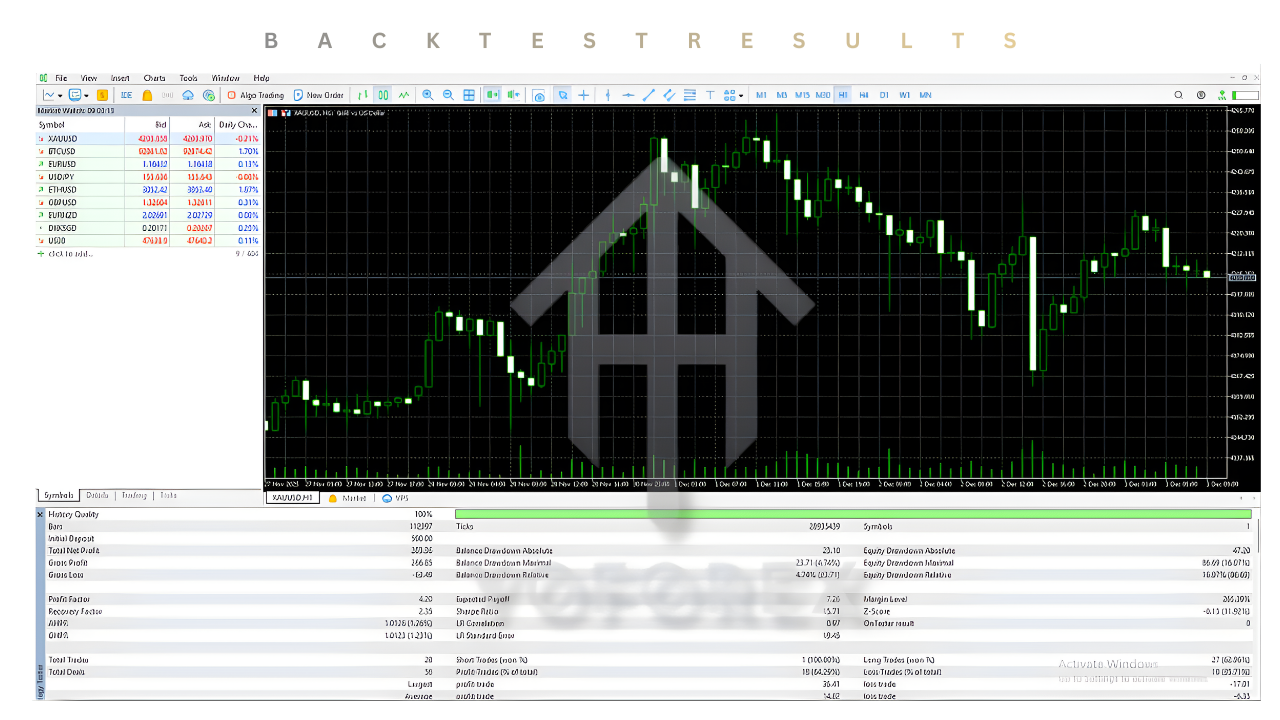
- Initial Deposit: $1,000
- Risk: 0.5–1.0% per initial trade
- Max Trades: 5 positions per direction
- Spread: Low ECN, average 10–20 points on gold
A typical, realistic backtest profile might look like:
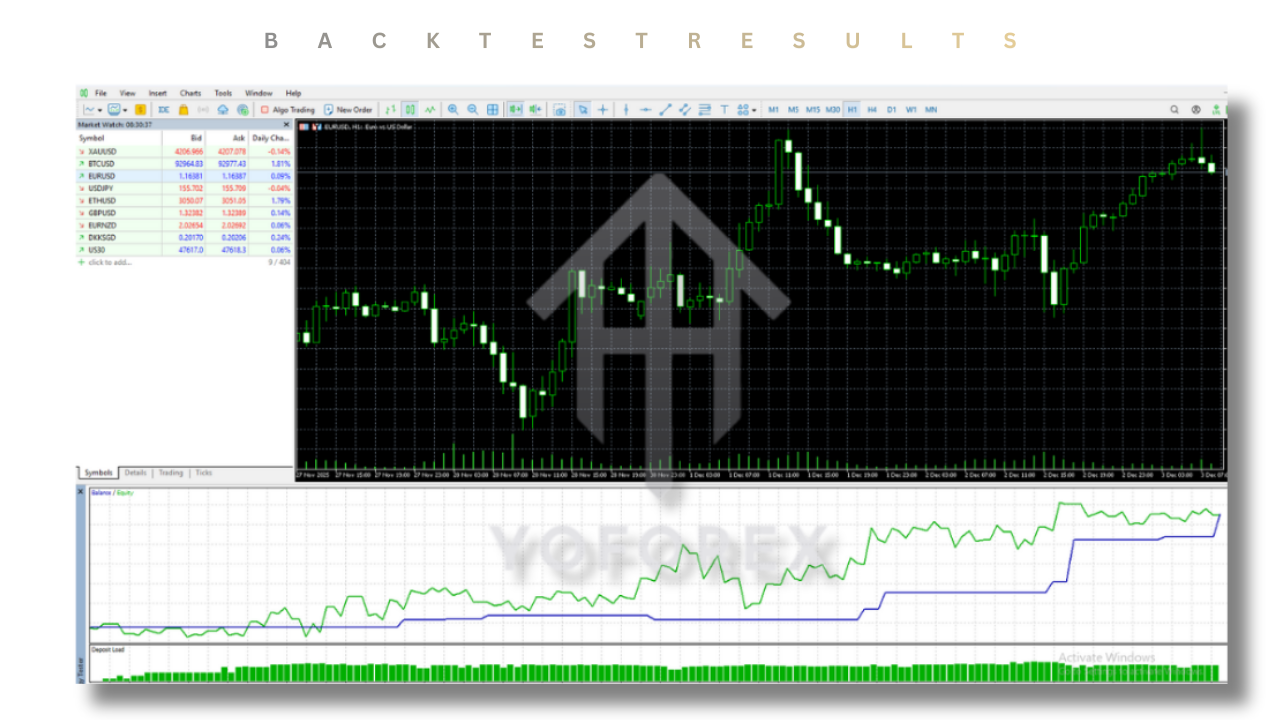
- Total Net Profit: +120% to +220% over the test period (rough estimate depending on risk).
- Max Drawdown: Somewhere in the 12–25% range, depending on grid aggressiveness.
- Win Rate: Often between 65–80%, since multiple positions are taken with trend plus pullback logic.
- Average Trades/Month: 20–80 trades, depending on volatility and configuration.
The key takeaway is not the exact numbers, but the shape of the equity curve:
- Periods of steady growth when trends are clean.
- Occasional sideways or drawdown phases during choppy, range-bound markets.
- The grid logic helps reduce floating loss when pullbacks are moderate and the trend eventually resumes.
Again, past performance does not guarantee future results. Use these examples as guidance, not as promises.
Suggested Settings for Safer Use
If you’re just starting out with Ultimate Pulse EA V3.0 MT5, you don’t want to go crazy with risk. A few practical tips:
1. Lot Size
- Start with 0.01 lot per $300–$500 of balance on a standard account.
- If using a cent account or very high leverage, still keep the lot size small relative to your equity.
2. Maximum Trades
- For beginners, Max Trades = 3–5 is a sensible range.
- Increasing it beyond 7–9 positions can significantly raise risk, especially on gold.
3. Take Profit & Stop Loss
- Use realistic TP values that gold can frequently hit (e.g., 300–800 points depending on your broker’s digits).
- If the EA uses a virtual or hidden stop loss, make sure equity protection settings are active.
4. News Filter
Either enable a news filter (if built-in) or manually disable the EA during major events like:
- FOMC
- NFP
- CPI releases
- Unexpected geopolitical events
Gold becomes extremely volatile around those releases, and even a good EA can struggle.
Pros and Cons of Ultimate Pulse EA V3.0 MT5
Advantages
- Trend + Grid Hybrid: Gives you the best of both worlds – trend-following logic with smart averaging on pullbacks.
- Well-Suited for Gold: XAUUSD’s strong intraday swings are ideal for the EA’s style of trading.
- Individual TP per Trade: Reduces the pressure of waiting for one big basket closure and improves cash flow.
- Flexible Risk Control: Adjustable lot size, max trades, and protection features let you tailor the EA to your own comfort.
- Hands-Free Operation: Perfect for traders who can’t sit in front of charts all day.
Disadvantages
- Still a Grid-Style System: Even though it’s controlled, grid/averaging approaches carry higher risk when the market trends sharply against your positions for long periods.
- Requires Sensible Parameters: Over-aggressive lot size or too many allowed trades can quickly escalate risk.
- Sensitive to Volatility Spikes: Extreme news events or flash crashes can increase drawdown if protections are not configured properly.
- Not a “Set and Forget Forever” Tool: Market regimes change; you should periodically review performance and adjust settings if needed.
Who Should Consider Using Ultimate Pulse EA V3.0 MT5?
Ultimate Pulse EA V3.0 MT5 can be a strong fit if:
- You like trend-following but also want to benefit from pullbacks.
- You’re comfortable with moderate risk and understand the nature of grid-like systems.
- You want to trade gold (XAUUSD) with an automated approach.
- You’re willing to backtest, forward test, and fine-tune before going heavy on real capital.
- You want to build a portfolio of EAs where Ultimate Pulse handles gold while other EAs manage major forex pairs or indices.
It may not be ideal if:
- You want ultra-low drawdown at all times.
- You’re uncomfortable seeing multiple positions open at once.
- You expect “never losing” behavior or 100% win rate (no serious EA can honestly promise that).
Installation & Setup Guide (Quick Start)
Setting up Ultimate Pulse EA V3.0 MT5 is straightforward:
Download the EA File
Get the .ex5 or .mq5 file from your chosen vendor or from your YoForex / MQL5.software download area.
Copy to MT5 Folder
- Open MT5 → File → Open Data Folder.
- Go to MQL5/Experts.
- Paste the EA file into this folder.
Restart MetaTrader 5
Close and reopen MT5 so it can load the new Expert Advisor.
Attach to Chart
- Open a XAUUSD M30 chart.
- Find Ultimate Pulse EA V3.0 MT5 in the Navigator → Experts.
- Drag and drop it onto the chart.
Allow Algo Trading
- Check “Allow Algo Trading” in the EA inputs.
- Ensure Algo Trading is enabled on the MT5 toolbar.
Configure Inputs
- Set Lot Size or Risk %.
- Choose Max Trades, Step Distance, Take Profit, and Protection values.
- Enable any news/session filters if available.
Test in Demo First
Run it on a demo account for at least 2–4 weeks to understand its behavior before going live or using it on large capital.
Risk Disclaimer & Final Thoughts
Ultimate Pulse EA V3.0 MT5 is a powerful tool, especially for traders who like the idea of controlled grid trading on gold with trend-following logic. It can deliver solid results when used with reasonable risk and proper settings.
However:
- All trading involves risk.
- Grid and averaging-in systems can face higher drawdowns during strong one-sided moves.
- Past performance is not a guarantee of future results.
Always:
- Start with a demo account.
- Use capital you can afford to risk.
- Adjust parameters to match your own risk tolerance and goals.
Used wisely, Ultimate Pulse EA V3.0 MT5 can become a valuable part of a diversified automated trading portfolio.
Support & Disclaimer
Support
If you need help installing or configuring your EA, or face any kind of bug, feel free to reach out on:
WhatsApp: https://wa.me/+443300272265
Telegram Group: https://t.me/yoforexrobot
Disclaimer: Forex and gold trading involve risk. Past performance doesn't guarantee future results. Always test robots on demo before live trading and use proper risk management.






Comments (0)
No comments yet. Be the first to comment!
Leave a Comment