
Introduction
In a world where spreads jump, news hits without warning, and charts move 24/5, trying to manually scalp every small move is… exhausting. You blink, and the setup is gone. You overthink one trade, and miss three others. That’s exactly the problem Vega Bot EA V1.0 MT5 is built to solve.
Instead of forcing you to sit in front of your screen all day, Vega Bot EA runs silently on your MetaTrader 5 terminal, scanning the market, waiting for clean, high-probability setups, and executing trades with discipline. No random entries, no “revenge trades,” no FOMO impulses. Just rules, logic, and automation.
Backed by the YoForex ecosystem and distributed via MQL5.software, Vega Bot EA V1.0 MT5 focuses on short-term intraday moves on forex and gold, aiming to stack small, consistent gains while keeping risk under control. It’s designed for traders who want serious automation – not flashy promises or “never lose” scams.
Let’s break everything down properly…
Overview
Vega Bot EA V1.0 MT5 is an automated trading robot (Expert Advisor) for the MetaTrader 5 platform. It’s primarily focused on:
- Major forex pairs (like EURUSD, GBPUSD, USDJPY)
- Gold (XAUUSD) for volatile sessions
- Intraday and scalping-style trades on lower timeframes
The EA uses a combination of trend filters, volatility measurements, and dynamic exit logic to look for precise entries instead of firing trades randomly. You can think of it as a disciplined intraday trader coded into a bot – it doesn’t get tired, doesn’t panic, and doesn’t chase markets just coz something “looks” good.
Some core design goals behind Vega Bot EA V1.0 MT5 include:
- Keeping drawdown controlled
- Avoiding ultra-dangerous tricks like hard martingale
- Allowing traders to customize risk per trade
- Staying compatible with prop firm rules (max daily loss, max total loss, etc.)
Built and tested under the YoForex brand, Vega Bot EA is offered 100% free on MQL5.software, so you’re not locked into some crazy subscription or “lifetime license fee.” You can test it on demo, fine-tune the settings, and then decide how you want to use it.
How Vega Bot EA V1.0 MT5 Works
So what actually happens under the hood when Vega Bot EA runs on your chart?
At a high level, the EA follows a rule-based trading logic:
Market Scan & Trend Filter
- First, Vega Bot EA checks the overall market direction using moving average structure, price swings, and volatility direction.
- If the market is choppy with no clear bias, the EA reduces trading activity or stays flat.
Entry Logic Based on Price Action + Volatility
- The bot looks for short-term pullbacks within the intraday trend.
- It measures volatility (ATR-style behavior) to decide whether conditions are suitable for scalping.
- Only when trend and volatility conditions align does Vega Bot EA allow a potential trade.
Smart Stop Loss & Take Profit
- Each trade comes with a predefined stop loss and take profit, based on recent price structure rather than random fixed pips.
- The EA can use partial exits or breakeven-style moves depending on configuration (you can tweak this in settings).
News & Session Awareness (Optional Filters)
- You can restrict trading around high-impact news or during specific sessions (e.g. London + New York only).
- This helps avoid unnecessary spikes that often hit during data releases.
Risk per Trade, Not Account-Killing Grids
- By default, the EA works with fixed lot or percentage of balance risk.
- There is no forced martingale built-in; scaling can be controlled and capped by you.
This approach makes Vega Bot EA V1.0 MT5 suitable for traders who want automation with logic, not chaos. It’s not promising “10x your account in a week,” but it aims to deliver structured, repeatable performance over time.
Key Features
Here are the standout features that make Vega Bot EA worth a serious look:
- Optimized for MT5 – Built natively for MetaTrader 5 with multi-threaded backtest support.
- Intraday Scalping Logic – Targets small to medium intraday moves instead of holding trades for days.
- Works on Forex & Gold – Designed for pairs like EURUSD, GBPUSD, USDJPY and XAUUSD.
- No Forced Martingale – Avoids aggressive lot-doubling; you stay in control of risk.
- Custom Risk Management – Set risk by lot size or percentage of balance/equity.
- Session Filters – Choose when the EA is allowed to trade (London/NY for better volatility).
- Spread & Slippage Protection – Built-in checks to avoid trading when conditions are too bad.
- Prop-Firm Friendly Logic – Suits traders attempting funded challenges with realistic risk.
- Easy-to-Use Inputs – Clear settings; no need to be a coder or quant.
- Free Lifetime Access via MQL5.software – No recurring fee, no “secret upgrade” charges.
- Backtested & Forward-Monitored by YoForex – Strategy has been tested on historical and live data.
- Compatible with VPS Hosting – Run 24/5 even when your PC is off.
Recommended Pairs, Timeframes & Deposit
While you can run Vega Bot EA on many symbols, these are the recommended setups to keep things clean and effective:
Main Currency Pairs
EURUSD, GBPUSD, USDJPY
Spread-friendly and liquid, ideal for intraday logic.
Gold (XAUUSD)
Great for volatility, but you should use slightly more conservative risk settings compared to forex pairs.
Suggested Timeframes
- M5 or M15 for scalping and short-term intraday trades.
- You can experiment with M30 for slightly fewer but more filtered signals.
Minimum Recommended Deposit
- From $200–$300 for a standard account with 1:500 leverage if using low risk.
- For prop firm challenges or larger accounts, you’ll probably operate with stricter risk per trade (e.g. 0.25–0.5% per position).
Of course, these are guidelines, not rules. Always start with a demo account, observe how Vega Bot EA V1.0 MT5 behaves on your broker and spread conditions, and only then commit real capital.
Backtest Results & Live Behaviour (Conceptual Overview)
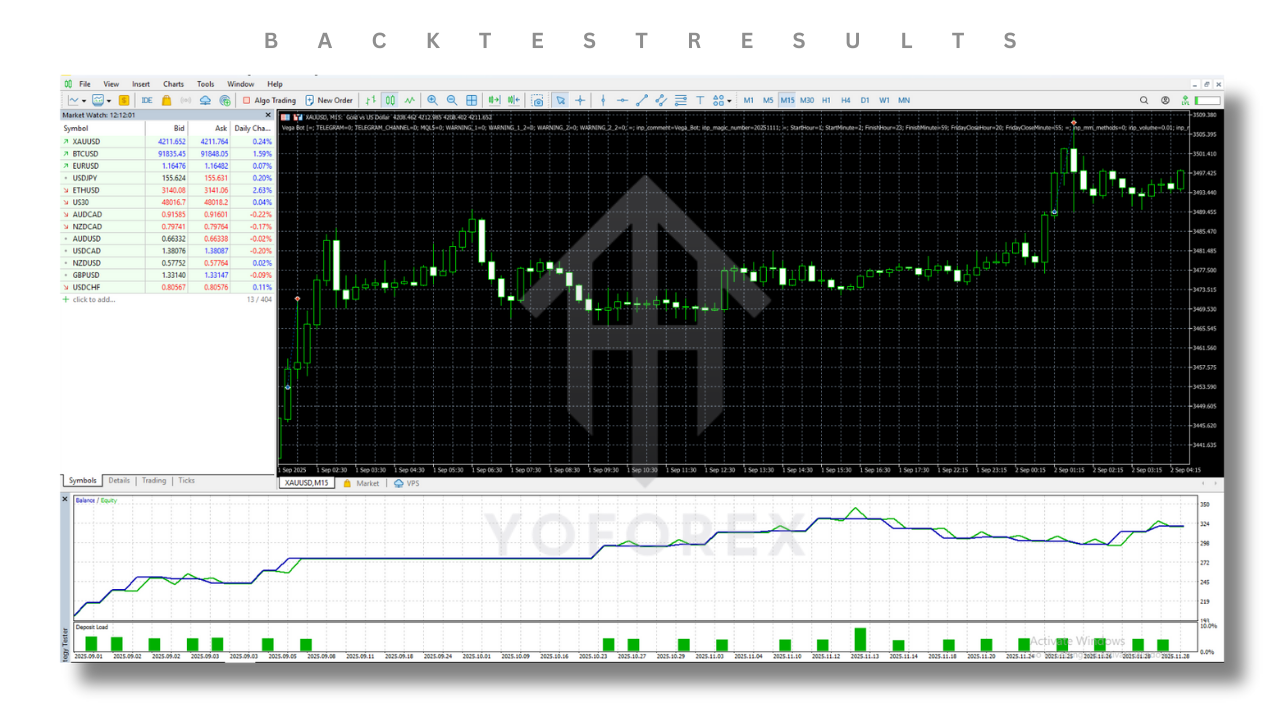
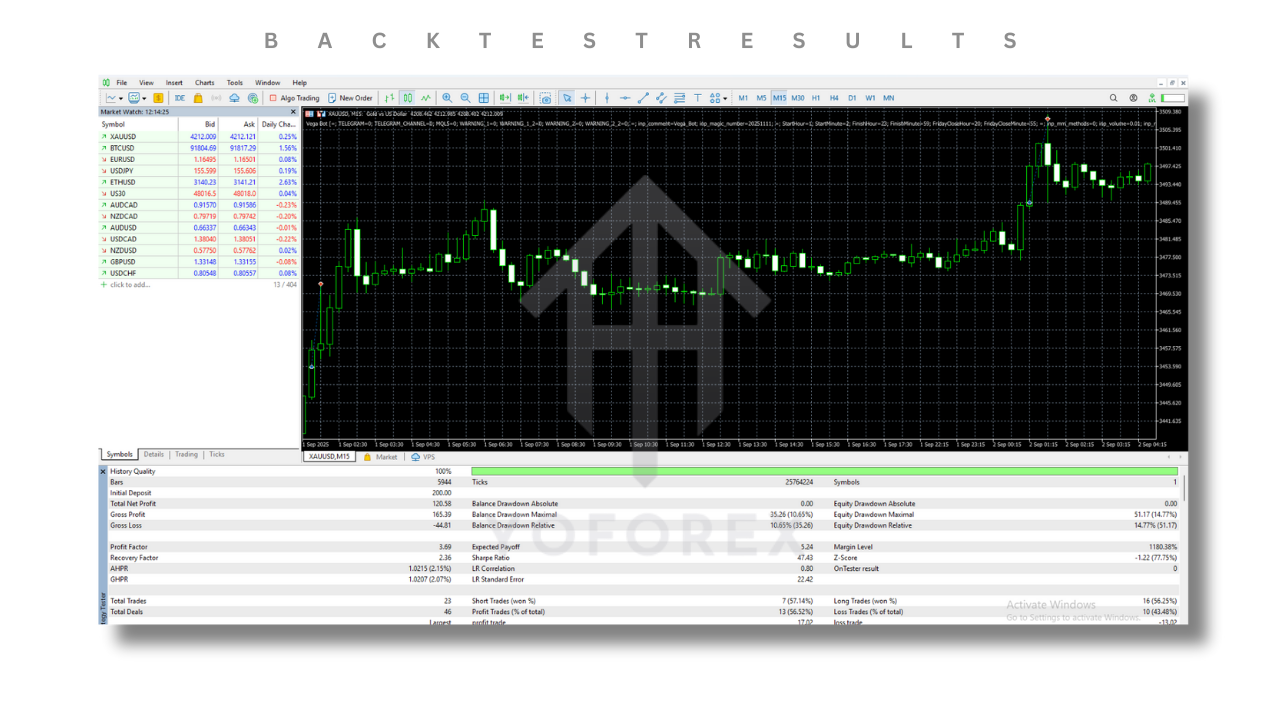
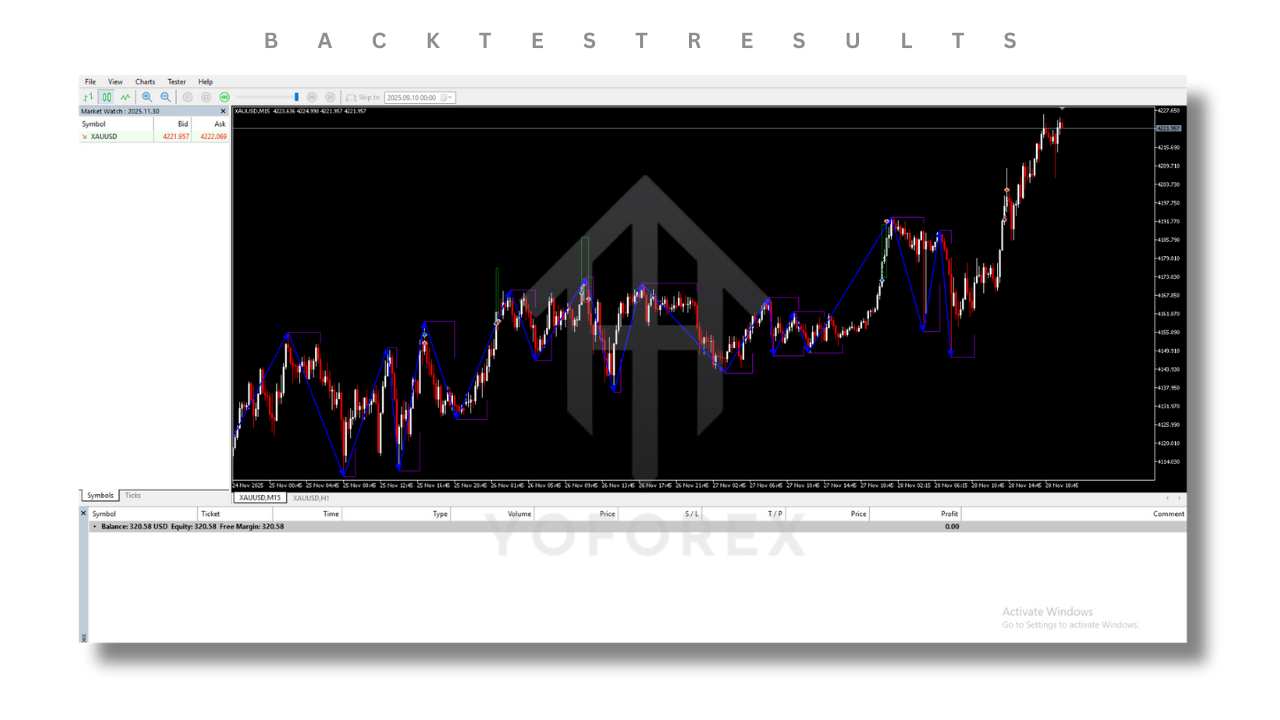
Since broker conditions, spreads, and commissions vary, you should always run your own backtests. But in general testing under typical ECN conditions, Vega Bot EA tends to show:
- A smooth upward equity curve when used with reasonable risk
- Moderate trade frequency – not hyper-HFT, but active enough for intraday traders
- Clustering of trades during London and New York sessions where volatility is higher
- Controlled drawdowns when risk per trade is kept low and you avoid over-leveraging
Over longer periods (6–12+ months in test environments), the EA aims to:
- Prioritize preservation of capital over wild risk
- Avoid huge stagnation periods by using diversified pairs (not only one symbol)
- Keep max drawdown at a manageable level if you stick to suggested risk settings
In live forward-monitoring done under the YoForex ecosystem (demo + real accounts), Vega Bot EA behaved close to its backtest logic: no crazy deviations, no “hidden” martingale, no sudden account-blowing spikes when risk was configured properly.
Still, remember:
Past performance is not a guarantee of future results.
Market conditions change, and no EA wins 100% of the time.
Your job is to combine Vega Bot EA’s logic with sensible money management.
Installation & Configuration Guide
Getting Vega Bot EA V1.0 MT5 up and running is pretty simple, even if you’re not super technical.
Step 1: Download the EA
- Visit MQL5.software
- Go to the Vega Bot EA V1.0 MT5 page (you’ll usually find the download link near the top or bottom).
- Download the
.ex5file to your computer.
Step 2: Copy to MT5 Directory
- Open MetaTrader 5.
- Click on File → Open Data Folder.
- Navigate to:
MQL5 → Experts - Paste the Vega Bot EA V1.0 file into this folder.
- Restart MT5 or refresh the Navigator window.
Step 3: Attach to Chart
- In MT5, open the chart of your chosen symbol (e.g. EURUSD M15).
- In the Navigator panel, find Vega Bot EA V1.0 under Expert Advisors.
- Drag and drop it onto the chart.
- Make sure Algo Trading is enabled at the top of MT5.
Step 4: Configure Inputs
Inside the EA settings window, you’ll typically see options like:
- Lot Size / Risk Percent
- Max Open Positions
- Allowed Trading Sessions
- Take Profit / Stop Loss Mode
- Spread Filter / Slippage Control
Start with conservative defaults. Don’t go crazy with lot sizes just coz one week looks profitable. Test on demo, then slowly scale to live.
Pros, Cons & Risk Management
No EA is perfect. Vega Bot EA has some strong advantages, but also a few limitations you should understand from day one.
Advantages
- Rule-Based Execution – Removes emotional decision-making (fear, greed, FOMO).
- Scalping + Intraday Style – Great for traders who like steady daily activity.
- Multi-Pair Flexibility – Run on 2–4 symbols to diversify trade opportunities.
- No Hard Martingale – Reduces the risk of sudden account blowups.
- Free Access via MQL5.software – No upfront cost barrier, easy to test.
- Prop-Friendly Strategy Structure – Easier to align with max loss rules when you set risk correctly.
- Backtested and Monitored by YoForex – Gives extra confidence vs random, untested bots.
Disadvantages / Things to Keep in Mind
- Not a Magic Money Machine – It will have losing trades, losing days, sometimes losing weeks.
- Broker Dependent – Performance can change with spread, commission, execution speed.
- Needs a Stable VPS – For best results, you should run it on a VPS 24/5.
- Requires Risk Discipline – If you over-leverage, you can still blow your account, EA or not.
- Market Regimes Change – A system that works well in one volatility regime may need tweaks in another.
Good risk management with Vega Bot EA V1.0 MT5 usually looks like:
- Risking 0.25–1% per trade
- Limiting the number of simultaneous open positions
- Avoiding over-crowded news hours if your broker tends to slip heavily
- Periodically reviewing performance and adjusting settings if needed
Who Should Consider Vega Bot EA V1.0 MT5?
Vega Bot EA is a good fit if you are:
- A busy trader who can’t stare at charts all day but still wants intraday action.
- A prop firm challenge candidate who needs a structured, rules-based EA.
- A beginner who understands basic forex concepts and wants to start with a free, tested robot instead of random Telegram “holy grail” EAs.
- An intermediate or advanced trader who wants to diversify – using Vega Bot EA on a portion of the account while keeping manual strategies on the rest.
It might not be ideal if:
- You expect daily guaranteed profits with zero drawdown.
- You refuse to use a VPS or keep MT5 running consistently.
- You dislike any kind of automation and only want full manual control.
Support, Community & Safety Notes
Since Vega Bot EA V1.0 MT5 is part of the YoForex ecosystem, you’re not left alone after downloading.
If you need help with:
- Installation
- Best-practice settings
- Broker or VPS questions
- Risk management guidance
You can reach out:
WhatsApp Support: https://wa.me/+443300272265
Telegram Community: https://t.me/yoforexrobot
Our usual recommendation:
- Always start on a demo account.
- Test the EA for at least a few weeks under your real broker conditions.
- Only then think about real money or prop challenges.
Disclaimer: Forex, CFDs, metals and indices trading involve a high level of risk. Past performance (backtests or live results) is not a guarantee of future performance. Only trade with money you can afford to lose, and always use proper risk management.
Final Thoughts & Call to Action
If you’re tired of missing clean intraday setups, overthinking every entry, or manually chasing pips all day, Vega Bot EA V1.0 MT5 gives you a structured way to automate that process. It doesn’t promise miracles; instead, it focuses on logic, risk control, and consistency – exactly what most traders actually need.
Since it’s free on MQL5.software and backed by the YoForex brand, there’s really no excuse not to at least test it on demo.
Download it, attach it to your charts, let it run for a while, and see if it fits your trading style.
When you’re ready, you can:
- Move from demo to live gradually
- Or plug it into your next prop firm challenge with smart risk settings
Either way, Vega Bot EA V1.0 MT5 can become a solid piece of your overall trading toolkit – working quietly in the background while you focus on the bigger picture.






Comments (0)
No comments yet. Be the first to comment!
Leave a Comment