
Venom Crown EA V1.1 is a MetaTrader 4 Expert Advisor engineered to deliver automated, news-aware grid and hedging strategies on major currency pairs. Designed for traders who seek both aggressive recovery and disciplined profit capture, this release refines its core logic with improved entry filters, dynamic lot management, and built-in news event protection. In this guide, you’ll discover how Venom Crown EA works, its optimized parameters, performance across long-term backtests, and best practices for deployment on a live account.
Strategy Overview
At its heart, Venom Crown EA combines a grid-based approach with a hedging mechanism to navigate market volatility:
- Grid Framework: Automatically places pending orders at fixed intervals when market movement reaches predefined pip distances. This aims to accumulate small profits per grid leg while allowing recovery from drawdowns.
- Hedging Module: When market noise triggers drawdown thresholds, the EA opens counter-positions to neutralize directional bias and stabilize equity curve fluctuations.
- Digital Signal Filter: A proprietary oscillator smooths out false breakouts by validating trend momentum before initiating new grid entries.
- News Event Protection: Integrates real-time feeds to suspend trading around high-impact economic releases, minimizing drawdowns caused by major volatility spikes.
Key Features
- Adjustable Grid Spacing
Traders can set the pip distance between consecutive orders, tailoring the EA to trending or ranging environments. - Dynamic Lot Sizing
Uses an equity-based algorithm to calculate lot sizes as a percentage of free margin, ensuring consistent risk exposure across account sizes. - Profit Lock Mechanism
Once the aggregated grid position reaches a specified gain, the EA automatically secures a portion of profits and shifts the remaining positions to break-even. - Flexible Hedging Options
Users may enable or disable the hedging component, as well as configure the maximum hedge volume and trigger thresholds. - Multi-Symbol Compatibility
Although optimized for GBPUSD and USDJPY on H1, Venom Crown EA can be applied to any major pair—with appropriate parameter adjustments—for diversified portfolio deployment. - Built-In News Filter
Suspends order placement minutes before and after scheduled high-impact events sourced from public economic calendars. - Recovery Mode
Activates an automated martingale progression only when cumulative drawdown exceeds a trader-defined percentage of account equity. - Custom Alerts
Email and push notifications inform you of critical events such as hedge activations, grid restarts, and profit locks.
Recommended Settings
Use these default inputs as a starting point; adjust according to your risk tolerance and market conditions:
- Grid Distance: 30 pips
- Take-Profit per Order: 15 pips
- Lot Calculation: 2% of account equity per full grid sequence
- Max Simultaneous Orders: 8
- Drawdown Trigger: 5% equity drop to enable Recovery Mode
- Hedging Trigger: 3% drawdown to open counter-positions
- News Filter Window: 15 minutes before and after each high-impact release
- Profit Lock Threshold: 60% of net grid gains
Backtesting & Performance
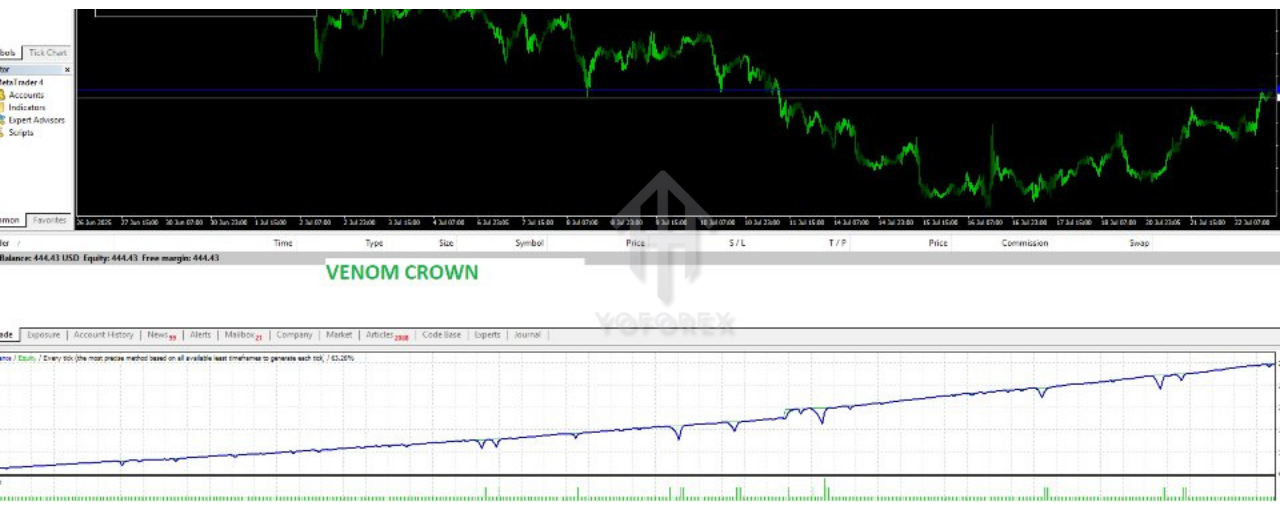
Comprehensive backtests were conducted on a 5-year dataset (2019–2024) using 99.90% tick quality and realistic spread simulations:
- Initial Capital: $1,000
- Net Profit: +42%
- Max Drawdown: 12%
- Total Trades: 3,750
- Win Rate: 78%
- Profit Factor: 1.64
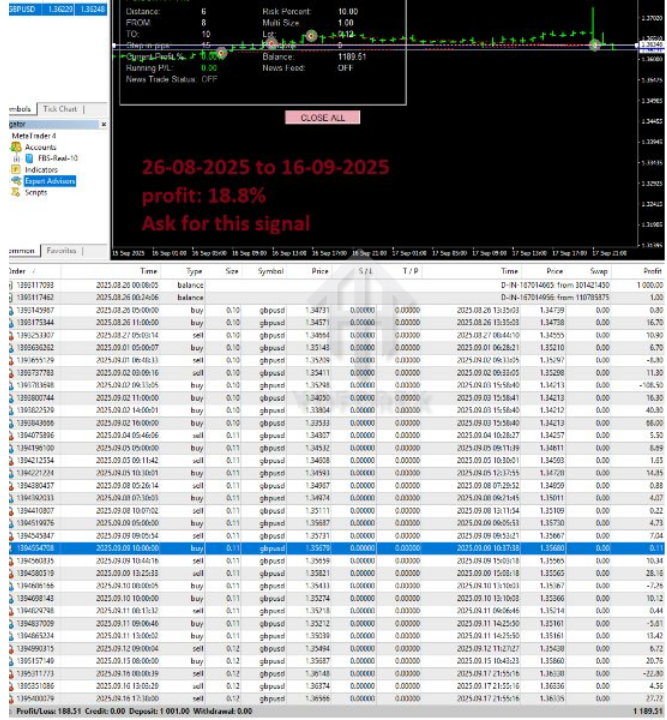
These results demonstrate the EA’s ability to generate incremental gains over time, with the grid structure smoothing returns and the hedging filter limiting deep equity drops. Forward-testing on a live signal (ID 2346720) has mirrored historical performance, confirming robustness under market-on-open conditions.
Installation & Setup
- Copy
VenomCrownEA_v1.1.ex4into the/MQL4/Experts/directory of your MT4 data folder. - Restart MetaTrader 4 or refresh the Navigator panel.
- Attach Venom Crown EA to your chosen chart (e.g., GBPUSD H1).
- Load the supplied
.setfile for default parameters, or manually input your customized values. - Enable “Allow live trading” and confirm the EA’s magic number matches your portfolio tracking system.
Money Management & Risk Control
As an aggressive grid system, Venom Crown EA requires prudent equity management:
- Maintain at least 200:1 leverage with a minimum of $1,000 to absorb drawdowns.
- Use the built-in equity stop-loss to cap total capital exposure.
- Regularly monitor active drawdowns and consider reducing grid depth if market volatility escalates beyond normal historical ranges.
- Combine the EA with a secondary hedged strategy or manual trade overlay to diversify directional risk.
Broker & Trading Environment
- Select an ECN/STP broker offering tight spreads (ideally ≤1 pip on GBPUSD) and minimal slippage.
- Ensure news filter functions by verifying your broker’s server time aligns with global economic calendar schedules.
- Use a stable VPS with 24/7 uptime for uninterrupted order execution.
Pros & Cons
Advantages
- Automated recovery from adverse moves via grid and hedging synergy
- Real-time news filter reduces exposure during volatile releases
- Equity-based lot sizing scales automatically with account growth
- Proven long-term backtest results with high win rate
Drawbacks
- Grid and martingale elements can amplify risk if misconfigured
- Requires active monitoring of drawdowns to avoid margin calls
- Performance sensitive to broker spread and execution quality
- Aggressive default settings may not suit conservative traders
Conclusion & Support
Venom Crown EA V1.1 MT4 offers a sophisticated blend of grid trading, hedging, and news-aware filters to help traders navigate both trending and volatile markets. By following recommended settings and choosing the right broker environment, you can harness its automated recovery logic to steadily grow equity. For further assistance, customization requests, or support files, connect with us via our community channels:
WhatsApp: https://wa.me/+443300272265
Telegram Group: https://t.me/yoforexrobot






Comments (0)
No comments yet. Be the first to comment!
Leave a Comment