
Nexorion EA V1.2 MT5: Clear Liquidity Logic for Automated Gold Trading
Many gold traders face the same daily friction. XAUUSD moves fast, liquidity shifts create sharp spikes, and staying glued to the H1 chart for clean entries becomes exhausting. Manual reading of buy-side and sell-side liquidity often leads to late entries, emotional exits, or missed opportunities when life intervenes.
Nexorion EA V1.2 MT5 was built to address exactly that problem: turning structured liquidity analysis into consistent, rules-based automation on MetaTrader 5.
What Is Nexorion EA V1.2 MT5?
Nexorion Initium Novum EA (version 1.2) is a fully automated Expert Advisor designed exclusively for XAUUSD on the H1 timeframe. It applies institutional-style liquidity analysis and deterministic logic to identify trading opportunities and manage positions without discretionary input.
Available through the MQL5 marketplace and promoted by brands such as Yoforex EA, it focuses on computational transparency: the system maps its decision zones directly onto the chart so traders can see the logic rather than treating the EA as a pure black box.
How Does Nexorion EA V1.2 MT5 Work?
The core process is straightforward once the marketing language is set aside.
The EA continuously scans the H1 chart for Buy-Side Liquidity (BSL) and Sell-Side Liquidity (SSL) zones. It then calculates Equilibrium (EQ) levels that mathematically separate premium and discount areas of the current structure. Entries are taken only when price interacts with these defined zones according to the programmed deterministic rules.
Every open position carries a fixed stop-loss. The code explicitly excludes martingale, grid, and averaging methods. Visual geometric mapping on the chart shows the zones and decision points in real time, giving the trader an immediate view of why a trade was taken or avoided.
The system is self-contained (no external DLL required) and runs fully automated once attached to the correct chart and settings.
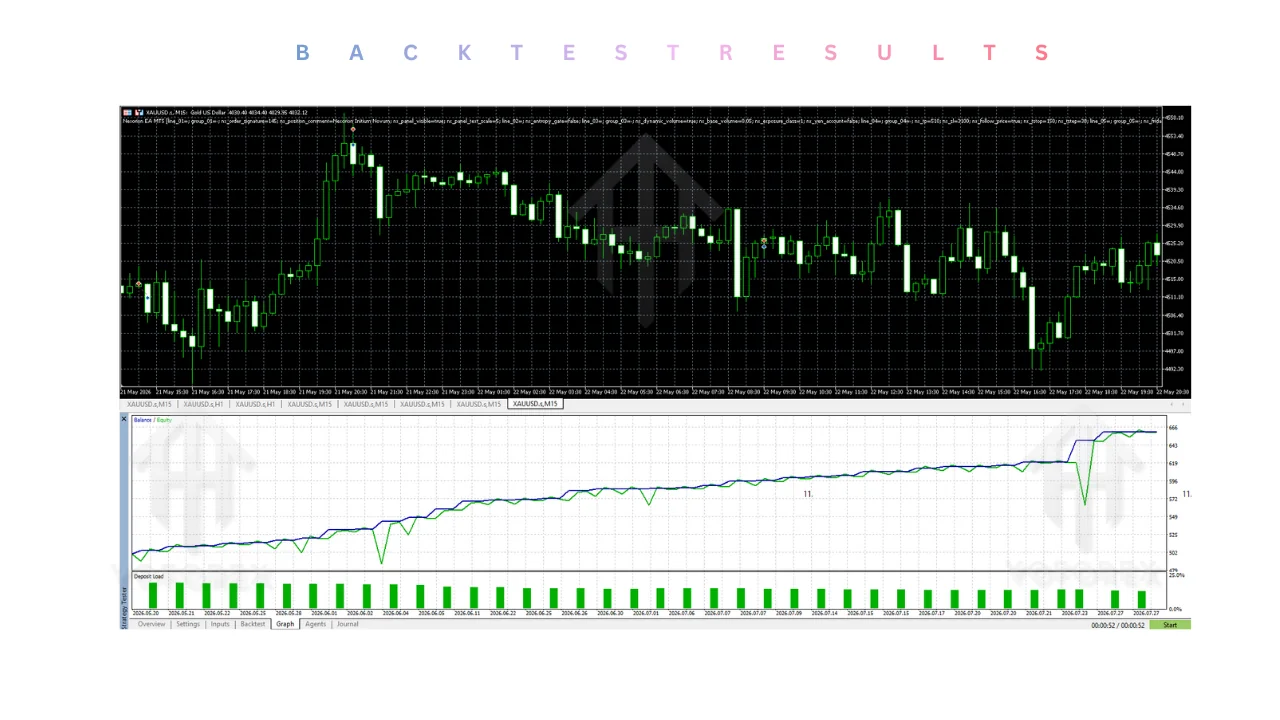
Key Features
- Institutional liquidity analysis focused on BSL/SSL pools
- Automated equilibrium (EQ) level calculation for premium/discount zones
- Dynamic Computation Mapping – on-chart geometric visualization of decision logic
- Deterministic stop-loss on every trade
- Strict exclusion of martingale, grid, and averaging
- NEXORION CORE interface for real-time operational monitoring
- Fully automated execution on MT5
- Designed for high-volatility gold conditions while enforcing capital safety rules
Quick Features Table
Feature Details Platform MetaTrader 5 (MT5) Strategy Institutional Liquidity Analysis & Deterministic Logic Trading Style Structured liquidity-based entries Pairs XAUUSD (Gold) only Timeframe M15 Risk Management Deterministic SL; no martingale/grid/averaging Automation Fully automated Best For Traders seeking rule-based gold automation with visible logic
Main Benefits
| Feature | Details |
|---|---|
| Platform | MetaTrader 5 (MT5) |
| Strategy | Institutional Liquidity Analysis & Deterministic Logic |
| Trading Style | Structured liquidity-based entries |
| Pairs | XAUUSD (Gold) only |
| Timeframe | M15 |
| Risk Management | Deterministic SL; no martingale/grid/averaging |
| Automation | Fully automated |
| Best For | Traders seeking rule-based gold automation with visible logic |
Traders gain time freedom. The EA monitors H1 gold structure continuously so you do not have to sit in front of the screen waiting for liquidity sweeps or equilibrium tests.
It reduces emotional decision-making. Entries and exits follow fixed mathematical criteria rather than gut feel during volatile gold sessions.
The on-chart visualization builds understanding. You can study the zones the EA reacts to and gradually improve your own discretionary reading of liquidity.
Capital protection is built into the design through the mandatory stop-loss and the absence of recovery methods that often accelerate drawdowns.
Who Is Nexorion EA V1.2 MT5 For?
- MT5 traders who focus primarily on XAUUSD
- Busy professionals who want rule-based automation rather than constant chart watching
- Traders comfortable with H1 timeframe holding periods
- Algorithmic traders who value visible decision logic over pure black-box systems
- Intermediate and experienced users who already understand liquidity concepts and can evaluate live performance critically
- Traders willing to run the EA on a quality ECN/RAW broker with realistic spreads and to test thoroughly before scaling
Who Should Avoid It?
- MT4-only traders (this is MT5 exclusive)
- Traders who want multi-pair or multi-timeframe diversification in one EA
- Users seeking high-frequency scalping or very short holding periods
- Anyone requiring multi-year verified live track records before considering a product
- Traders who prefer grid or martingale recovery styles
- Absolute beginners who have never studied market structure or liquidity concepts and are not prepared to monitor and test an EA properly
Nexorion EA V1.2 MT5 vs Manual Trading
Aspect Manual Trading Nexorion EA V1.2 MT5 Time commitment High – constant monitoring Low – automated after setup Emotional influence High Minimal (rules-based) Liquidity analysis Subjective and variable Systematic mathematical calculation Consistency Depends on trader state Same logic every session Visualization Trader draws levels EA projects zones automatically Risk per trade Variable Fixed deterministic stop
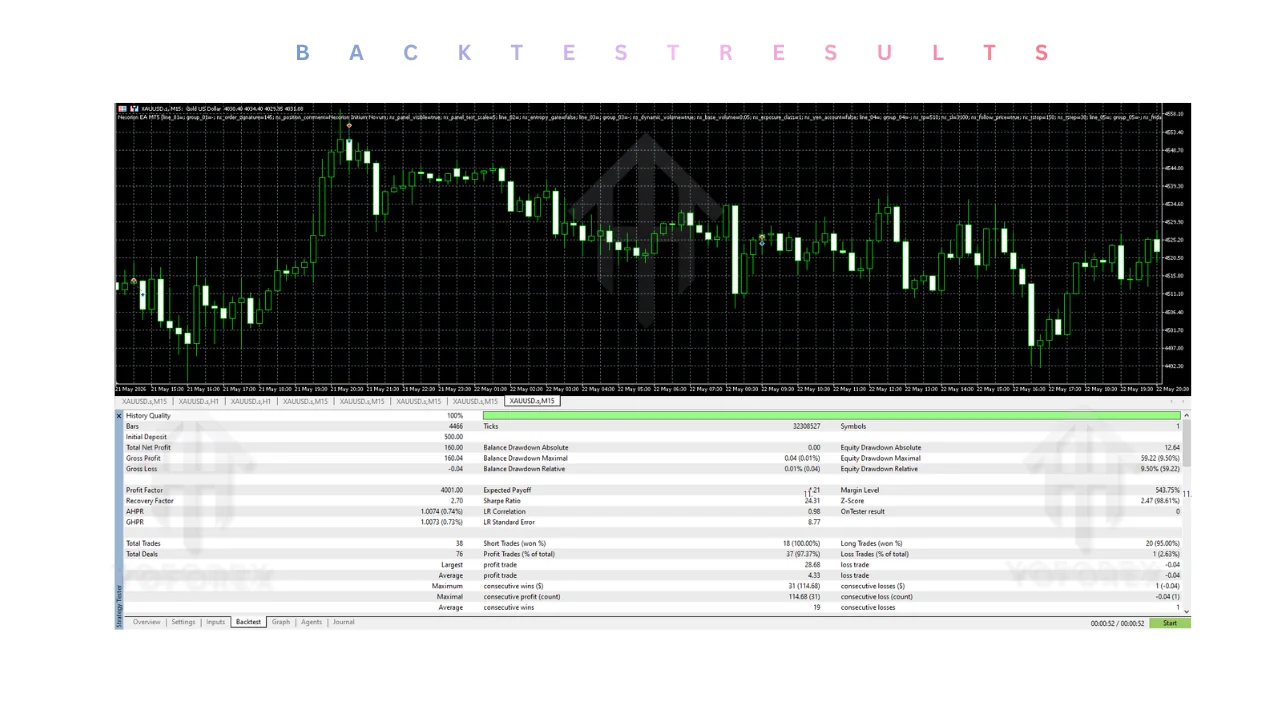
What To Check Before Buying
| Aspect | Manual Trading | Nexorion EA V1.2 MT5 |
|---|---|---|
| Time commitment | High – constant monitoring | Low – automated after setup |
| Emotional influence | High | Minimal (rules-based) |
| Liquidity analysis | Subjective and variable | Systematic mathematical calculation |
| Consistency | Depends on trader state | Same logic every session |
| Visualization | Trader draws levels | EA projects zones automatically |
| Risk per trade | Variable | Fixed deterministic stop |
- Confirm the strategy matches your understanding of liquidity and equilibrium concepts
- Review the maximum acceptable drawdown you can tolerate and ensure the EA’s risk settings align
- Verify MT5 compatibility and that your broker offers tight XAUUSD spreads (ECN/RAW preferred)
- Plan for a reliable VPS for 24/5 uptime
- Test the default and any recommended settings thoroughly on a demo account first
- Check developer support channels and response quality
- Examine the official live signal with realistic expectations about sample size and broker differences
- Understand that past results (live or backtest) do not guarantee future performance
How To Get Started
- Purchase the EA from a legitimate source such as the official MQL5 market page.
- Download the .ex5 file and place it in your MT5 Experts folder.
- Restart MetaTrader 5.
- Open an XAUUSD H1 chart.
- Attach Nexorion EA V1.2 and load the recommended settings.
- Enable AutoTrading and run on a demo account for several weeks across different market conditions.
- Only move to a small live account after you are satisfied with the behaviour on your specific broker.
- Use a VPS for continuous operation.
Yoforex EA users can access the product through established MQL5 channels and follow the same disciplined testing process.
FAQs
Is Nexorion EA V1.2 only for gold?
Yes. It is built exclusively for XAUUSD on the M15 timeframe.
Does it use martingale or grid?
No. The official description states these methods are strictly excluded. Every trade uses a deterministic stop-loss.
Can I see why the EA takes a trade?
Yes. The Dynamic Computation Mapping projects the liquidity zones and decision geometry onto the chart.
Do I need a VPS?
Strongly recommended for uninterrupted 24/5 operation, especially with gold’s volatility.
Is it suitable for beginners?
Only if the beginner is prepared to study the underlying liquidity concepts and test carefully. Experience with structure helps.
What account type works best? Hedging accounts on ECN or RAW spread brokers with competitive XAUUSD conditions are preferred by most users of similar systems.
How long should I test it? At least several weeks on demo across quiet and volatile gold periods before risking real capital.
Where can I monitor live performance?
The developer publishes a public MQL5 signal linked from the product page. Always compare it against your own broker conditions.
CONCLUSION
If structured liquidity analysis on gold H1 charts matches your trading style and you are ready to test thoroughly, review the current version of Nexorion EA V1.2 MT5 on the MQL5 market. Download the demo, attach it to an XAUUSD H1 chart, and evaluate the logic yourself before deciding whether it belongs in your toolkit.
REFERRAL
Join the VIP Signals Telegram Channel for real-time expert trading signals and stay ahead in the forex market. Get personalized strategies by becoming a part of our Real Account Management Telegram Channel and optimize your trading experience. If you’re aiming to Pass PropFirm Challenges , join our dedicated channel for tips and proven methods. Start managing your capital effectively with expert advice from our Funded Account Management Telegram Channel. For advanced traders, our HFT EA / Passing Telegram Channel offers high-frequency trading insights and strategies to boost your performance.
Free Trading Tools
Download Expert Advisors & Indicators
Write for Us
Share your expertise with our community
Download Available
Get this trading tool for free